<?xml version="1.0" encoding="utf-8"?><feed xmlns="http://www.w3.org/2005/Atom" xml:lang="en"><generator uri="https://jekyllrb.com/" version="4.3.2">Jekyll</generator><link href="https://ioswitch.dev/feed.xml" rel="self" type="application/atom+xml" /><link href="https://ioswitch.dev/" rel="alternate" type="text/html" hreflang="en" /><updated>2024-01-31T04:00:05+00:00</updated><id>https://ioswitch.dev/feed.xml</id><title type="html">Straying from the Google-able</title><subtitle>Write an awesome description for your new site here. You can edit this line in _config.yml. It will appear in your document head meta (for Google search results) and in your feed.xml site description.</subtitle><entry><title type="html">Porting a Blog</title><link href="https://ioswitch.dev/posts/Porting-a-Blog/" rel="alternate" type="text/html" title="Porting a Blog" /><published>2023-12-21T00:00:00+00:00</published><updated>2024-01-31T03:50:07+00:00</updated><id>https://ioswitch.dev/posts/Porting-a-Blog</id><content type="html" xml:base="https://ioswitch.dev/posts/Porting-a-Blog/"><![CDATA[<h2 id="preface">Preface</h2>

<p>This is not going to be a very technical blog. If you are looking for normal Linux systems reading, this isn’t it. What I want to cover is why I moved off of a hosted blog platform. So I’ve kept the technical details to a minimum.</p>

<p>There are pros and definite cons to this move. Namely, I wrote this as a non-technical blog post because I thought I could outline steps that a non-technical person could follow to get here. While it doesn’t take much knowledge to write markdown, managing a git repo (especially with changes to GitHub Actions that stop updates from deploying), isn’t as trivial as washing dishes. That said, If you are technical, hopefully this blog site may give you inspiration to create your own Jekyll blog.</p>

<h2 id="thoughts">Thoughts</h2>

<p>I’ve been on Blogger (the company Google bought to make blogspot.com) for 10 years now. I liked it because I don’t write that much and it’s got an Android app and Google’s SSO/auth that makes it really easy to use. But it’s also a simple WYSIWYG platform (at least when using the mobile app). Blogger has built-in Google Analytics, which is nice, too (I don’t intend to sell any of my posts but it’s nice to know that taking the time to write well is seen by others).</p>

<p>But Blogger has some short comings for me. Primarily: I want to write in markdown. I don’t have to think much about how things are going to be displayed if I’m writing markdown and can just write with the simple syntax every so often and things look ok. Some of the other things I wanted included:</p>

<ul>
  <li>More control over or being able to improve the theme</li>
  <li>More selection of themes to choose from</li>
  <li>Adding a menu</li>
  <li>Tracking changes</li>
  <li>A nicer look on mobile devices</li>
  <li>Creating <code class="language-plaintext highlighter-rouge">quoted</code> text</li>
</ul>

<p>I think not being able quote text especially made the quality of the content suffer quite a bit as there was no differenciation between what I was writing and the examples I was showing. Lastly, I wanted to be able to expand the platform - add a tab for pictures or automatically include a screenshot of a site I’m linking to or… I don’t really know. But being able to alter the workflow is often fun.</p>

<h2 id="where-to">Where to?</h2>

<p>I’ve used Hugo <a href="https://gohugo.io">0</a> for other Github Pages sites I’ve created. It works really well. However, it has some issues for me: I don’t know golang <a href="https://go.dev">1</a> - the language Hugo is written in - and I don’t want to learn it in order to hack on a framework that’s building a site. I also enjoy working on mobile operating systems - namely Android - and Go apps need to be compiled for those ARM processors. Hugo is, however, a great platform - it works as advertised.</p>

<p>Instead, I went with Jekyll for this project. It’s written in Ruby, which I know/have used before, and has a runtime compiled for linux running on Android. Ruby also has a fairly large community who use it for web sites (mainly due to Ruby on Rails), which I figure should have some bleed in for Jekyll. Jekyll is also written by Github, which has free web hosting via Github Pages. The template system for Jekyll is Liquid <a href="https://shopify.github.io/liquid/">2</a>, which has some differences from Jinja2 or Erubis or Go templates that I’ve used before. I’m not thrilled about needing to know the differences with a template system I’m unlikely to use elsewhere, but the differences seem minor, and most of the time I’m in VIM writing markdown for Jekyll or not worrying about the template engine anyway. Last, I also wanted an excuse to use Jekyll instead of Hugo.</p>

<p>Using either Jekyll or Hugo SPA (single page application) site builder in my blog pipeline while using git and vim, makes me feel at home. This pipeline comes with some features Blogger can’t provide. Vim is my editor of choice and has a great undo system that can show me what I was doing at any point in time. But I generally don’t rely on that too much - what I do rely on is git’s history. Knowing that I have a log that says “this blog is done being written” or “this blog has been proofread and is about to get published” and then being able to see what changed and move backward and forward in time is great. And lastly, git gives me about the best non-repudiation system I know about: gpg signed commits. If you ever question whether I wrote something, you can look at the signature in the Github repo for this site and verify I made the change (or at least used my hardware token to sign the change) <a href="https://github.com/ag4ve/ag4ve.github.io/commits/master/">3</a>.</p>

<h2 id="shortcomings">Shortcomings</h2>

<p>A while ago, I bought a domain from Google - ioswitch.dev - it’s one of many, but named well enough to put a Google Workspace on and use for professional email. I wanted to use the same domain I use for email for this blog. I definitely did not want to deal with Google/Postini domainkey migration if I didn’t have to - if you’ve run an email server, you know you want to be as far away from them as possible. Changing Google Workspace settings was my absolute last choice.</p>

<p>The Google Domains web portal didn’t let me add a CNAME record for the bare ioswitch.dev domain, but they do allow A records on the bare domain. I’m not sure if this has to do with how Google Workspace is setup - it seems odd, but again, I didn’t want to change anything to do with how Workspace was setup, so I moved on. Well almost….</p>

<p>When I started this, I was hoping to use Amazon S3 and Cloudfront to host this blog. I could write a git subcommand <a href="/posts/Getting-Git/#subcommands">4</a> to push my work and then run jekyll to build the site and then run terraform to create and manage the infrastructure and upload the blog site. However, after a day of going down this path - with basically no one actually using the services I was setting up - I was already being charged $1. Does that mean my blog site was going to cost me $30 per month (or more)? I don’t know. And there was still the issue of not being able to use a CNAME for my bare domain and AWS charging for public IP use (as does everyone else). I was looking at using Route53 to handle the domain and point that to an S3 bucket, which would’ve solved the external IP cost. But then I’d still need to move Google’s domainkey to Route53 and deal with any issues that arise from that. As noted earlier, I did not want to deal with email issues.</p>

<h2 id="chirpy">Chirpy</h2>

<p>When you start configuring Jekyll (or Hugo), one of the first decisions you’ll have to make is what theme to use. There are lists of themes - a list for Hugo <a href="https://themes.gohugo.io">5</a> and one for Jekyll <a href="http://jekyllthemes.org">6</a> - most seem based on themes for Wordpress. You’ll look through them, click through the example sites they’ve setup, choose one, and then walk through the setup guide for whichever theme you decide to use. Pretty simple, but quite time consuming.</p>

<p>The Chirpy <a href="https://github.com/cotes2020/jekyll-theme-chirpy">7</a> project is a well done Jekyll theme that makes a clean blog site. It also comes with a Github Action that builds and tests the site <a href="https://github.com/cotes2020/chirpy-starter/blob/main/.github/workflows/pages-deploy.yml">8</a>. This means that I don’t need to write a function to run jekyll and terraform and deploy my blog. I would’ve preferred to handle deployment myself, but since the other way was going to cost money (this setup is completely free), I’ll take the path of least resistance. Using the Chirpy Github Action also means that anyone can see when I update the site and what issues it has <a href="https://github.com/ag4ve/ag4ve.github.io/actions">9</a>.</p>

<p>This means that the steps to make this all work are pretty simple:</p>

<ul>
  <li>I renamed the repo to <code class="language-plaintext highlighter-rouge">&lt;username&gt;.github.io</code>,</li>
  <li>Created the A records with the IPs that Github provides,</li>
  <li>Created a <code class="language-plaintext highlighter-rouge">www</code> subdomain with a CNAME pointing to <code class="language-plaintext highlighter-rouge">ag4ve.github.io</code>,</li>
  <li>Added the Github Action to my repo, and</li>
  <li>Told github about the custom domain.</li>
</ul>

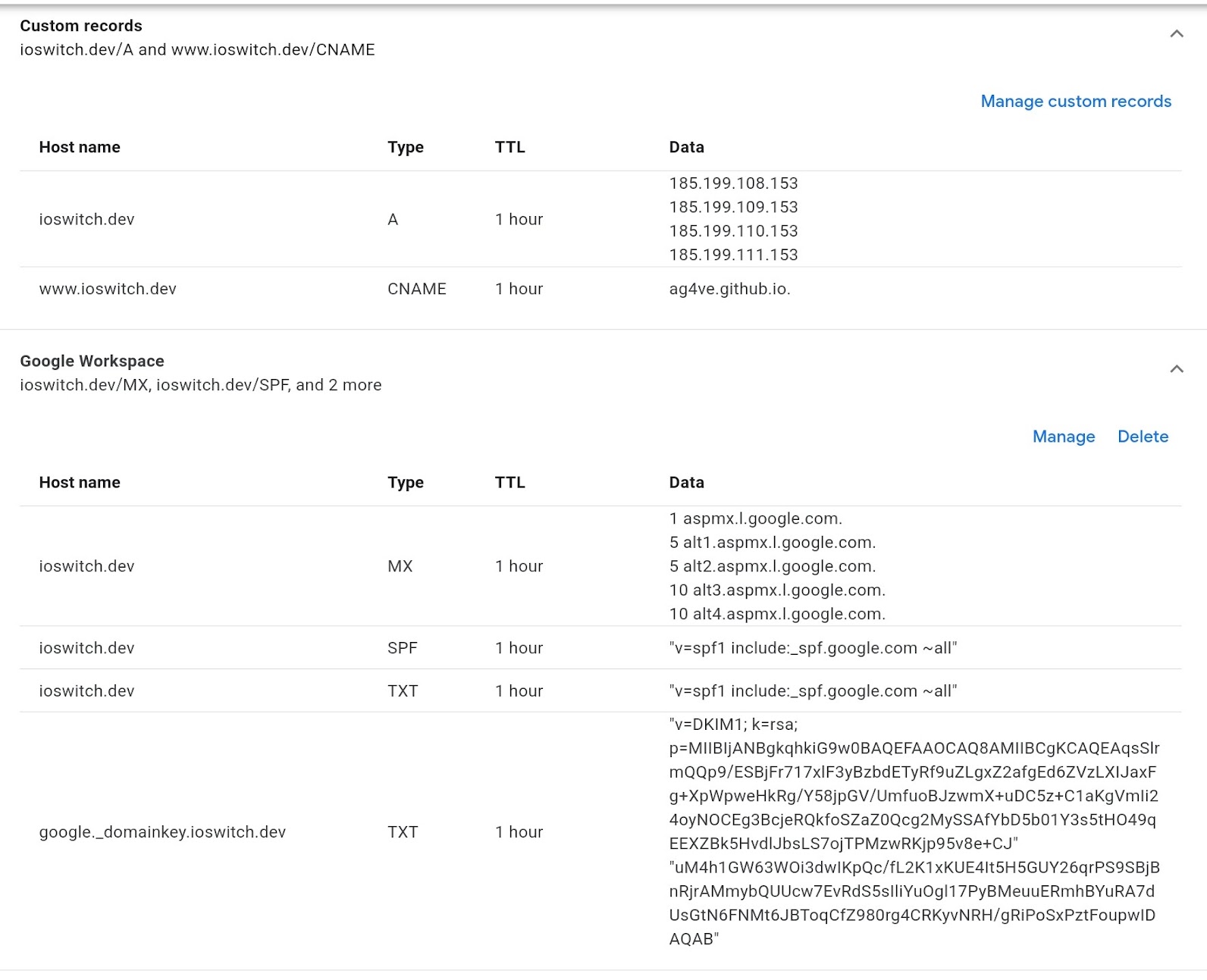
<p>And it just worked. The rest of these steps are well documented, but here’s what my Google Domains dashboard looks like:</p>

<p><img src="/static/img/google_domains_ioswitch_settings.jpg" alt="Google Domains DNS dashboard for ioswitch.dev" /></p>

<p>I started with a blog repo based on Hugo and not the chirpy-starter repo. One of the things I did to convert this repo to use Chirpy is to add chirpy-starter repo as a remote and have been checking out files from that, as needed. Eventually I’m going to want to pull in updates from Chirpy. I’m unsure how I want to pull in Chirpy updates. Sense I’ve moved the blog, upstream changes to the Github Action that deploy the site have already broken and I had to checkout an upstream change (which isn’t the best user experience). I’ve also noticed that when I link to a post on some social media sites, the header picture doesn’t always show up - I’m going to need to fix that. Also, when I have notes at the top of a post, this text is picked up by those sites and that text appears out of context without the context of the rest of the blog post. I need to move these notes and ensure that doesn’t happen again (with unit test). There are other technical issues with the site I need to fix like contact links not working correctly. None of this would be an issue on Blogspot, but I think the pros outweigh the cons, and I will fix these issues over time.</p>

<h2 id="enhancements">Enhancements</h2>

<p>So that people may one day stumble on this site through a web search, I’ve done a few things. I verified the site with Google here <a href="https://search.google.com/search-console">10</a>. Then used their <code class="language-plaintext highlighter-rouge">PageSpeed Insights</code> under <code class="language-plaintext highlighter-rouge">Core Web Vitals</code> to generate reports <a href="/static/docs/Google_PageSpeed_Insights.pdf">11</a> and <a href="/static/docs/Google_PageSpeed_Insights_mobile.pdf">12</a>, which I intend to work through over time. To give me an incentive to keep writing, I went to the Google Analytics page <a href="https://analytics.google.com">13</a> and created a token for this web site and selected to enable it manually, then copied just the token from the JS code snip they provided and verified it works. Discus provides a comment section from Github discussions. While I originally didn’t like the idea of people needing to sign in to comment, this is a technical blog hosted on Github, and having a comments section based on Github seems best. For this reason, I enabled Discus (see <a href="https://github.com/ag4ve/ag4ve.github.io/blob/master/_config.yml#L72">14</a> for links and settings). Last, I converted my resume to markdown and made it my <a href="/about">About</a> page.</p>

<h2 id="looking-back">Looking back</h2>

<p>Like everyone else, I use the internet. When looking for information, there are two things that annoy me more than anything else: a search engine showing results for pages that don’t contain words I’ve quoted and broken links. I don’t have any control over the former, but won’t contribute to the later. Hence, everything on my old blog is going to remain as it is until someone (Google) decides to take it down.</p>

<p>I’ve transferred most of my old posts to the Jekyl ioswitch.dev website. The old content that I’ve changed is as follows. There’s a blog on trading cryptocurrency that was amateurish investment advice - even though it worked for me at the time, it’s not wise and not technical, and has no place here, but it’s still in git history even if Blogspot goes away. Second, I wrote about having a computer as a phone a decade ago, thinking that I could turn a Raspberry Pi with a battery and screen into a phone with computer capabilities - I could and almost did, but other things have made that moot. That article is still here but not listed with everything else. Lastly, the Password Schemas blog gets some notes on not relying on it - I wrote that before I worked for a company that specialized in password audits - the math is acurate, but the theory isn’t - so don’t base your password strategy on what’s there.</p>

<p>To close: everything that is currently at <a href="https://ag4ve.blogspot.com">https://ag4ve.blogspot.com</a> will remain there - I have no plans to touch it. Moving forward, all new content will be at <a href="https://ioswitch.dev">https://ioswitch.dev</a>. As I’m not touching my old blog, it will not recieve any new content either. I hope you enjoy using my new blog platform.</p>]]></content><author><name>Shawn Wilson</name><email>srwilson@ioswitch.dev</email></author><category term="thoughts" /><category term="idea" /><summary type="html"><![CDATA[Preface]]></summary><media:thumbnail xmlns:media="http://search.yahoo.com/mrss/" url="https://ioswitch.dev/static/img/WorldWideWebAroundWikipedia.png" /><media:content medium="image" url="https://ioswitch.dev/static/img/WorldWideWebAroundWikipedia.png" xmlns:media="http://search.yahoo.com/mrss/" /></entry><entry><title type="html">Adventures in Systemd</title><link href="https://ioswitch.dev/posts/Adventures-in-Systemd/" rel="alternate" type="text/html" title="Adventures in Systemd" /><published>2023-12-14T00:00:00+00:00</published><updated>2024-01-02T04:38:01+00:00</updated><id>https://ioswitch.dev/posts/Adventures-in-Systemd</id><content type="html" xml:base="https://ioswitch.dev/posts/Adventures-in-Systemd/"><![CDATA[<blockquote class="prompt-info">
  <p>Actions were done as root. Prompts are <code class="language-plaintext highlighter-rouge">$</code> instead of <code class="language-plaintext highlighter-rouge">#</code> to differenciate between comments in the output.</p>
</blockquote>

<blockquote class="prompt-info">
  <p>I showed <code class="language-plaintext highlighter-rouge">systemctl cat</code> output instead of on disk file content to show runtime state of services.</p>
</blockquote>

<h1 id="kicking-around-systemd-events">Kicking Around Systemd Events</h1>

<p>The other day, I figured I’d automate my firewall setup a bit more by making it happen automatically. I try to avoid dependencies if I can and most Linux systems today run systemd. Unlike most of the internet, I don’t have a strong opinion about systemd - I like that it’s ubiquitous and I don’t need to wonder what init system I’m writing for. So when I wanted to create a service for my firewall setup, I looked no further than systemd. This didn’t end up being as obvious of a solution as I thought - but I did learn some things. I didn’t see them talked about much, so I figured I’d write about them here.</p>

<h2 id="drop-in">Drop-in</h2>

<p>Primarily because I plan to use this feature in the rest of this post, let’s cover the drop-in system of systemd. I think most people who have written systemd services before have put them in <code class="language-plaintext highlighter-rouge">/etc/systemd/system</code>, which is great. If you want to know the full search path systemd uses, it’s here <a href="https://www.freedesktop.org/software/systemd/man/latest/systemd.unit.html#Unit%20File%20Load%20Path">1</a>, but I saw lots of comments online that people didn’t realize that partial systemd unit files could be made to override parts of a larger unit file - these are called drop-in files. They’re documented under the systemd.unit man page <a href="https://www.freedesktop.org/software/systemd/man/latest/systemd.unit.html">2</a> under “Description”.</p>

<p>The first thing to do to see how this works is to create a basic unit. I do this in <code class="language-plaintext highlighter-rouge">/etc/systemd/system</code> (because that’s where it’s supposed to be done) but this would work the same in any other directory in the search path. Systemd sees our initial test service file as:</p>

<div class="language-console highlighter-rouge"><div class="highlight"><pre class="highlight"><code><table class="rouge-table"><tbody><tr><td class="rouge-gutter gl"><pre class="lineno">1
2
3
4
5
6
7
8
</pre></td><td class="rouge-code"><pre><span class="gp">$</span><span class="w"> </span>systemctl <span class="nb">cat test</span>
<span class="gp">#</span><span class="w"> </span>/etc/systemd/system/test.service
<span class="go">[Unit]
Description=testing
Documentation=test https://www.example.com

[Service]
ExecStart=echo "systemd testing"
</span></pre></td></tr></tbody></table></code></pre></div></div>

<p>Second, create the directory for the drop-in and create a drop-in file in the <code class="language-plaintext highlighter-rouge">/etc/systemd/system</code> directory. Systemd sees this as:</p>

<div class="language-console highlighter-rouge"><div class="highlight"><pre class="highlight"><code><table class="rouge-table"><tbody><tr><td class="rouge-gutter gl"><pre class="lineno">1
2
3
4
5
6
7
8
9
10
11
12
13
14
15
</pre></td><td class="rouge-code"><pre><span class="gp">$</span><span class="w"> </span><span class="nb">mkdir </span>test.service.d
<span class="gp">$</span><span class="w"> </span><span class="nb">echo</span> <span class="nt">-e</span> <span class="s1">'[Service]\nExecStart=echo "systemd testing 2"'</span> <span class="o">&gt;</span> test.service.d/00-echo.conf
<span class="gp">$</span><span class="w"> </span>systemctl <span class="nb">cat test</span>
<span class="gp">#</span><span class="w"> </span>/etc/systemd/system/test.service
<span class="go">[Unit]
Description=testing
Documentation=test https://www.example.com

[Service]
ExecStart=echo "systemd testing"


</span><span class="gp">#</span><span class="w"> </span>/etc/systemd/system/test.service.d/00-echo.conf
<span class="go">[Service]
ExecStart=echo "systemd testing 2"
</span></pre></td></tr></tbody></table></code></pre></div></div>

<p>Finally, let’s run it and look at the echo output (the full output is noisy - try it yourself):</p>

<div class="language-console highlighter-rouge"><div class="highlight"><pre class="highlight"><code><table class="rouge-table"><tbody><tr><td class="rouge-gutter gl"><pre class="lineno">1
2
3
4
</pre></td><td class="rouge-code"><pre><span class="gp">$</span><span class="w"> </span>systemctl start <span class="nb">test</span>
<span class="gp">$</span><span class="w"> </span>journalctl <span class="nt">-xe</span> <span class="nt">-u</span> <span class="nb">test</span> <span class="nt">--no-pager</span> | <span class="nb">grep echo</span>
<span class="go">Dec 11 02:30:28 srwilson-u2204 echo[3582579]: systemd testing
Dec 11 02:30:28 srwilson-u2204 echo[3582580]: systemd testing 2
</span></pre></td></tr></tbody></table></code></pre></div></div>

<p>As you can see, running the test service shows output from both the original service and the drop-in.</p>

<h2 id="templates">Templates</h2>

<p>Have you ever wanted to pass parameters to your services? Maybe an IP address or username or network card? This is also documented under systemd.unit Description <a href="https://www.freedesktop.org/software/systemd/man/latest/systemd.unit.html">2</a>. Prefix your service with an <code class="language-plaintext highlighter-rouge">@</code>, such as <code class="language-plaintext highlighter-rouge">test@.service</code> and you’ll be able to do just that:</p>

<div class="language-console highlighter-rouge"><div class="highlight"><pre class="highlight"><code><table class="rouge-table"><tbody><tr><td class="rouge-gutter gl"><pre class="lineno">1
2
3
4
5
6
</pre></td><td class="rouge-code"><pre><span class="gp">$</span><span class="w"> </span>systemd-escape <span class="nt">--template</span><span class="o">=</span><span class="nb">test</span>@.service <span class="s2">"foo bar baz"</span>
<span class="go">test@foo\x20bar\x20baz.service
</span><span class="gp">$</span><span class="w"> </span>systemctl start <span class="s2">"</span><span class="si">$(</span>systemd-escape <span class="nt">--template</span><span class="o">=</span><span class="nb">test</span>@.service <span class="s2">"foo bar baz"</span><span class="si">)</span><span class="s2">"</span>
<span class="gp">#</span><span class="w"> </span>journalctl <span class="nt">-xe</span> <span class="nt">-u</span> <span class="s1">'test@*'</span> <span class="nt">--no-pager</span> | <span class="nb">grep echo</span>
<span class="go">Dec 11 02:46:05 srwilson-u2204 echo[3595571]: systemd testing raw foo\x20bar\x20baz
Dec 11 02:46:05 srwilson-u2204 echo[3595572]: systemd testing foo bar baz
</span></pre></td></tr></tbody></table></code></pre></div></div>

<p>If you look at how your system is currently using these templates, you’ll find some interesting use cases and notice the parameters have been placed in the documentation section too:</p>

<div class="language-console highlighter-rouge"><div class="highlight"><pre class="highlight"><code><table class="rouge-table"><tbody><tr><td class="rouge-gutter gl"><pre class="lineno">1
2
3
4
5
6
7
8
9
10
11
12
</pre></td><td class="rouge-code"><pre><span class="gp">$</span><span class="w"> </span>systemctl list-units | <span class="nb">grep</span> @
<span class="go">  getty@tty1.service                                                                        loaded active     running   Getty on tty1
  getty@tty2.service                                                                        loaded active     running   Getty on tty2
  lvm2-pvscan@253:0.service                                                                 loaded active     exited    LVM event activation on device 253:0
  systemd-cryptsetup@dm_crypt\x2d0.service                                                  loaded active     exited    Cryptography Setup for dm_crypt-0
  systemd-fsck@dev-disk-by\x2duuid-6d46f500\x2db876\x2d4dd5\x2d901a\x2dcd04a4526a7d.service loaded active     exited    File System Check on /dev/disk/by-uuid/6d46f500-b876-4dd5-901a-cd04a4526a7d
  systemd-fsck@dev-disk-by\x2duuid-6F53\x2dCD7B.service                                     loaded active     exited    File System Check on /dev/disk/by-uuid/6F53-CD7B
  user-runtime-dir@0.service                                                                loaded active     exited    User Runtime Directory /run/user/0
  user-runtime-dir@1000.service                                                             loaded active     exited    User Runtime Directory /run/user/1000
  user@0.service                                                                            loaded active     running   User Manager for UID 0
  user@1000.service                                                                         loaded active     running   User Manager for UID 1000
  blockdev@dev-mapper-dm_crypt\x2d0.target                                                  loaded active     active    Block Device Preparation for /dev/mapper/dm_crypt-0
</span></pre></td></tr></tbody></table></code></pre></div></div>

<h1 id="other-systemd-apps">Other systemd apps</h1>

<p>Half of the programs systemd comes with aren’t in <code class="language-plaintext highlighter-rouge">/usr/bin</code>, but in <code class="language-plaintext highlighter-rouge">/usr/lib/systemd</code>. I wouldn’t add this to my PATH, but there’s some useful programs we can use in our systemd units that we should be aware of:</p>

<div class="language-console highlighter-rouge"><div class="highlight"><pre class="highlight"><code><table class="rouge-table"><tbody><tr><td class="rouge-gutter gl"><pre class="lineno">1
2
3
4
</pre></td><td class="rouge-code"><pre><span class="gp">$</span><span class="w"> </span>find /usr <span class="nt">-type</span> f <span class="nt">-perm</span> /111 <span class="se">\</span>
<span class="go">  \( -iwholename "/usr/lib/systemd/*" -o -iwholename "/usr/bin/*" \) \
  -iname "systemd-*" \
  | column
</span></pre></td></tr></tbody></table></code></pre></div></div>

<p>There are programs like systemd-networkd-wait-online (SNWO) which have a service wrapper so other units aren’t started before you’re online. Ironically, I’m currently using netplan to connect to wifi (I’m most definitely online) and SNWO says it’s failed - <code class="language-plaintext highlighter-rouge">SYSTEMD_LOG_LEVEL=debug ./systemd-networkd-wait-online</code> doesn’t list my wifi card. There’s also a systemd-nspawn command (on Ubuntu, I had to install systemd-container to get it) that will start a service in a namespace (container), systemd-cgtop, which is a top like tool for cgroups.</p>

<h2 id="debugging">Debugging</h2>

<p>As mentioned in the last section, using <code class="language-plaintext highlighter-rouge">SYSTEMD_LOG_LEVEL=debug</code> with the commands in <code class="language-plaintext highlighter-rouge">/lib/systemd</code> provides quite a bit more information about what is happening with systemd commands. As shown below, lots of these commands are wrapped in services:</p>

<div class="language-console highlighter-rouge"><div class="highlight"><pre class="highlight"><code><table class="rouge-table"><tbody><tr><td class="rouge-gutter gl"><pre class="lineno">1
2
3
4
5
6
7
8
9
</pre></td><td class="rouge-code"><pre><span class="gp">$</span><span class="w"> </span>find <span class="nt">-type</span> f <span class="nt">-perm</span> /111 <span class="se">\</span>
<span class="gp">  | while read f;</span><span class="w"> </span><span class="k">do</span> <span class="se">\</span>
<span class="gp">    echo "$</span><span class="o">{</span>f##<span class="k">*</span>/<span class="o">}</span><span class="s2">"; </span><span class="se">\</span><span class="s2">
</span><span class="go">  done \
</span><span class="gp">    | while read f;</span><span class="w"> </span><span class="k">do</span> <span class="se">\</span>
<span class="gp">      [[ "$</span>f<span class="s2">" == "</span>systemd<span class="s2">" ]] &amp;&amp; continue; </span><span class="se">\</span><span class="s2">
</span><span class="gp">      echo $</span><span class="s2">f; </span><span class="se">\</span><span class="s2">
</span><span class="gp">      grep -rE "Exec.*=.*$</span><span class="s2">f"</span><span class="p">;</span> <span class="se">\</span>
<span class="go">    done
</span></pre></td></tr></tbody></table></code></pre></div></div>

<p>I demonstrated drop-ins earlier - when used with the <code class="language-plaintext highlighter-rouge">SYSTEMD_LOG_LEVEL</code>, we can easily get debug messages from any of these services. Create <code class="language-plaintext highlighter-rouge">/etc/systemd/system/&lt;name&gt;.service.d/00-debug.conf</code> that has:</p>

<div class="language-shell highlighter-rouge"><div class="highlight"><pre class="highlight"><code><table class="rouge-table"><tbody><tr><td class="rouge-gutter gl"><pre class="lineno">1
2
</pre></td><td class="rouge-code"><pre><span class="o">[</span>Service]
<span class="nv">Environment</span><span class="o">=</span><span class="nv">SYSTEMD_LOG_LEVEL</span><span class="o">=</span>debug
</pre></td></tr></tbody></table></code></pre></div></div>

<p>Reload and restart the service then you’ll get debug information from that service. Most other programs take an environment variable to enable some debugging information, too, which can be used similarly. In a worst case, when using dynamic programs, the linker provides <code class="language-plaintext highlighter-rouge">LD_DEBUG=all</code>. This output would show up in the journal log of your service. Lastly, systemd relies heavily on dbus and there’s a great blog about using that here <a href="https://0pointer.net/blog/the-new-sd-bus-api-of-systemd.html">3</a>.</p>

<h2 id="my-journey">My journey</h2>

<p>Now let’s get back to why I started looking into this. I’ve written systemd services before and don’t have a need to stand up a tomcat server. I came here to manage the firewall and route parts of my network after a connection was established. This means, I want a systemd service to trigger on some event. There are a few ways to get an event to trigger systemd: a timer, path, udev, or relationship to another service. I’m pretty sure that’s it. A timer doesn’t do me any good in this situation, so we’ll consider the other three.</p>

<p>First systemd has many network options and a configuration type for the lower layers of the OSI model. The systemd.link options deal with your hardware link (but not hardware - OSI layer 2) and have documented overlap with udev (and also seems to overlap with ethtool options). Basically anything you could wish to do with your network hardware is probably covered by systemd.link. The systemd.network configures the network (OSI layer 3). The systemd.netdev configures virtual networks; however, none of these unit files have the option to kick off a service after they’re done, so I moved on.</p>

<h3 id="udev---unsuccessful">UDEV - unsuccessful</h3>

<p>The udev filesystem has been around for almost 20 years now - it quickly took over for devfs in the early 2000s. When a device is plugged in that matches a udev rule, you can have it run a service by having this option in the line that matches your device:</p>

<div class="language-console highlighter-rouge"><div class="highlight"><pre class="highlight"><code><table class="rouge-table"><tbody><tr><td class="rouge-gutter gl"><pre class="lineno">1
</pre></td><td class="rouge-code"><pre><span class="gp">RUN="systemctl --no-block start &lt;service&gt;</span><span class="s2">"
</span></pre></td></tr></tbody></table></code></pre></div></div>

<p>You may want to do this to load the new rule and get already plugged in devices run through that new rule:</p>

<div class="language-console highlighter-rouge"><div class="highlight"><pre class="highlight"><code><table class="rouge-table"><tbody><tr><td class="rouge-gutter gl"><pre class="lineno">1
2
</pre></td><td class="rouge-code"><pre><span class="gp">$</span><span class="w"> </span>udevadm control <span class="nt">--reload-rules</span>
<span class="gp">$</span><span class="w"> </span>udevadm trigger
</pre></td></tr></tbody></table></code></pre></div></div>

<p>But this is moot. Network links aren’t hardware - they’re right above hardware in our OSI model. I don’t remove my nic (or even adjust the power) when getting online or disconnecting. So a rule here would never fire. Next option.</p>

<h3 id="tailing---successful">Tailing - successful</h3>

<p>Instead, we can look at something happening in a file. If that thing shows up, we can do something and restart:</p>

<div class="language-console highlighter-rouge"><div class="highlight"><pre class="highlight"><code><table class="rouge-table"><tbody><tr><td class="rouge-gutter gl"><pre class="lineno">1
2
3
4
5
6
7
8
9
10
11
</pre></td><td class="rouge-code"><pre><span class="gp">$</span><span class="w"> </span>systemctl <span class="nb">cat test</span>
<span class="gp">#</span><span class="w"> </span>/etc/systemd/system/test.service
<span class="go">[Unit]
Description=testing
Documentation=test https://www.example.com

[Service]
Type=simple
Restart=on-success
</span><span class="gp">ExecStart=sh -c 'tail -n1 -f /var/log/syslog 2&gt;</span>/dev/null | <span class="nb">grep</span> <span class="nt">-q</span> <span class="nt">-m1</span> foobar<span class="s1">'
</span><span class="go">ExecStopPost=echo "systemd testing"
</span></pre></td></tr></tbody></table></code></pre></div></div>

<p>The simplest way to test this is with the logger command:</p>

<div class="language-console highlighter-rouge"><div class="highlight"><pre class="highlight"><code><table class="rouge-table"><tbody><tr><td class="rouge-gutter gl"><pre class="lineno">1
</pre></td><td class="rouge-code"><pre><span class="gp">$</span><span class="w"> </span>logger foobar
</pre></td></tr></tbody></table></code></pre></div></div>

<p>This sends <code class="language-plaintext highlighter-rouge">foobar</code> to syslogd to be processed, which writes to the syslog file we’re monitoring. After it matches one and only one event, it stops running, and runs the ExecStopPost command. This echo shows up in journalctl (for our test but it could be any command). We can see this here:</p>

<div class="language-console highlighter-rouge"><div class="highlight"><pre class="highlight"><code><table class="rouge-table"><tbody><tr><td class="rouge-gutter gl"><pre class="lineno">1
</pre></td><td class="rouge-code"><pre><span class="gp">$</span><span class="w"> </span>journalctl <span class="nt">-xe</span> <span class="nt">-u</span> test2 | <span class="nb">grep echo</span>
</pre></td></tr></tbody></table></code></pre></div></div>

<p>We can also have this event kick off another service as test has a Requires and After relationship to test:</p>

<div class="language-console highlighter-rouge"><div class="highlight"><pre class="highlight"><code><table class="rouge-table"><tbody><tr><td class="rouge-gutter gl"><pre class="lineno">1
2
3
4
5
6
7
8
9
10
11
12
13
14
15
16
17
18
19
20
21
22
</pre></td><td class="rouge-code"><pre><span class="gp">$</span><span class="w"> </span>systemctl <span class="nb">cat test</span><span class="k">*</span>
<span class="gp">#</span><span class="w"> </span>/etc/systemd/system/test2.service
<span class="go">[Unit]
Description=testing 2
Documentation=test2 https://www.example.com

[Service]
Type=simple
ExecStart=echo test2


</span><span class="gp">#</span><span class="w"> </span>/etc/systemd/system/test.service
<span class="go">[Unit]
Description=testing
Documentation=test https://www.example.com
After=test2.service
Requires=test2.service
 
[Service]
Type=simple
Restart=on-success
</span><span class="gp">ExecStart=sh -c 'tail -n1 -f /var/log/syslog 2&gt;</span>/dev/null | <span class="nb">grep</span> <span class="nt">-q</span> <span class="nt">-m1</span> foobar<span class="s1">'
</span></pre></td></tr></tbody></table></code></pre></div></div>

<p>But we need to enable, test, and list all the services we wish it to run in that file. So, we can reverse the dependency structure by putting RequiredBy in an [Install] section and enable the test2 service (instead of enabling the test service). However, to ensure the test service is running when enabling test2, we need to use BindsTo or Wants</p>

<div class="language-console highlighter-rouge"><div class="highlight"><pre class="highlight"><code><table class="rouge-table"><tbody><tr><td class="rouge-gutter gl"><pre class="lineno">1
2
3
4
5
6
7
8
9
10
11
12
13
14
15
16
17
18
</pre></td><td class="rouge-code"><pre><span class="gp">$</span><span class="w"> </span>systemctl <span class="nb">cat </span>test2
<span class="gp">#</span><span class="w"> </span>/etc/systemd/system/test2.service
<span class="go">[Unit]
Description=testing 2
Documentation=test2 https://www.example.com
BindsTo=test.service

[Service]
Type=simple
ExecStart=echo test2

[Install]
RequiredBy=test.service
</span><span class="gp">$</span><span class="w"> </span>systemctl <span class="nb">enable </span>test2
<span class="go">Created symlink /etc/systemd/system/test.service.requires/test2.service → /etc/systemd/system/test2.service.
</span><span class="gp">$</span><span class="w"> </span>systemctl start test2
<span class="gp">$</span><span class="w"> </span>systemctl is-active <span class="nb">test</span>
<span class="go">active
</span></pre></td></tr></tbody></table></code></pre></div></div>

<p>This setup allows us to not always directly manage test as test2 starts test for us. But test2 runs twice when it’s triggered:</p>

<div class="language-console highlighter-rouge"><div class="highlight"><pre class="highlight"><code><table class="rouge-table"><tbody><tr><td class="rouge-gutter gl"><pre class="lineno">1
2
3
4
5
6
7
8
9
10
11
12
13
14
15
</pre></td><td class="rouge-code"><pre><span class="gp">$</span><span class="w"> </span>systemctl <span class="nb">cat </span>test2
<span class="gp">#</span><span class="w"> </span>/etc/systemd/system/test2.service
<span class="go">[Unit]
Description=testing 2
Documentation=test2 https://www.example.com

[Service]
Type=simple
ExecStart=echo test2

[Install]
RequiredBy=test.service
</span><span class="gp">$</span><span class="w"> </span>systemctl <span class="nb">enable </span>test2
<span class="go">Created symlink /etc/systemd/system/test.service.requires/test2.service → /etc/systemd/system/test2.service.
</span><span class="gp">$</span><span class="w"> </span>systemctl start <span class="nb">test</span>
</pre></td></tr></tbody></table></code></pre></div></div>

<p>So, we need to account for double events and manage the test service. See <a href="https://pychao.com/2021/02/24/difference-between-partof-and-bindsto-in-a-systemd-unit/">4</a> for a logic diagram of Wants, PartOf, and Requires. There’s a mapping of these associative properties and inverses here <a href="https://www.freedesktop.org/software/systemd/man/latest/systemd.unit.html#Mapping%20of%20unit%20properties%20to%20their%20inverses">5</a>.</p>

<h3 id="path---partially-successful">Path - partially successful</h3>

<p>Lastly, we can create a path file which monitors paths like:</p>

<div class="language-console highlighter-rouge"><div class="highlight"><pre class="highlight"><code><table class="rouge-table"><tbody><tr><td class="rouge-gutter gl"><pre class="lineno">1
2
3
4
5
6
7
8
9
10
11
12
</pre></td><td class="rouge-code"><pre><span class="gp">$</span><span class="w"> </span>systemctl <span class="nb">cat </span>test.path
<span class="gp">#</span><span class="w"> </span>/etc/systemd/system/test.path
<span class="go">[Unit]
Description=testing
Documentation=test https://www.example.com

[Path]
PathModified=/root/foo
Unit=test2.service

[Install]
WantedBy=multi-user.target
</span></pre></td></tr></tbody></table></code></pre></div></div>

<p>Which does as it’s intended to and test2 kicks off when <code class="language-plaintext highlighter-rouge">/root/foo</code> is modified. However, when I try to do: <code class="language-plaintext highlighter-rouge">PathModified=/sys/devices/virtual/net/exttest0/operstate</code> nothing happens. The reason for this is because sysfs isn’t an actual filesystem, it is just an interface to kernel memory. That isn’t useful for what I’m trying to accomplish.</p>

<h2 id="conclusion">Conclusion</h2>

<p>It seems a bit overly complex to make an event-based service. It seems unnecessary to enable a service to install reverse dependencies. However, the service runner does a pretty good job for most cases. I do appreciate not having to write full wrapper scripts for my services. For this task, having a service that does:</p>

<div class="language-console highlighter-rouge"><div class="highlight"><pre class="highlight"><code><table class="rouge-table"><tbody><tr><td class="rouge-gutter gl"><pre class="lineno">1
</pre></td><td class="rouge-code"><pre><span class="go">ExecStart=sh -c 'ip monitor link | grep ",UP,LOWER_UP"'
</span></pre></td></tr></tbody></table></code></pre></div></div>

<p>And letting that service kick off another service should do what I need well enough.</p>

<h2 id="links">Links</h2>

<ol>
  <li><a href="https://www.freedesktop.org/software/systemd/man/latest/systemd.unit.html#Unit%20File%20Load%20Path">https://www.freedesktop.org/software/systemd/man/latest/systemd.unit.html#Unit%20File%20Load%20Path</a></li>
  <li><a href="https://www.freedesktop.org/software/systemd/man/latest/systemd.unit.html">https://www.freedesktop.org/software/systemd/man/latest/systemd.unit.html</a></li>
  <li><a href="https://0pointer.net/blog/the-new-sd-bus-api-of-systemd.html">https://0pointer.net/blog/the-new-sd-bus-api-of-systemd.html</a></li>
  <li><a href="https://pychao.com/2021/02/24/difference-between-partof-and-bindsto-in-a-systemd-unit/">https://pychao.com/2021/02/24/difference-between-partof-and-bindsto-in-a-systemd-unit/</a></li>
  <li><a href="https://www.freedesktop.org/software/systemd/man/latest/systemd.unit.html#Mapping%20of%20unit%20properties%20to%20their%20inverses">https://www.freedesktop.org/software/systemd/man/latest/systemd.unit.html#Mapping%20of%20unit%20properties%20to%20their%20inverses</a></li>
</ol>]]></content><author><name>Shawn Wilson</name><email>srwilson@ioswitch.dev</email></author><category term="automation" /><category term="code" /><category term="os" /><summary type="html"><![CDATA[Actions were done as root. Prompts are $ instead of # to differenciate between comments in the output.]]></summary><media:thumbnail xmlns:media="http://search.yahoo.com/mrss/" url="https://ioswitch.dev/static/img/systemd-logomark.svg" /><media:content medium="image" url="https://ioswitch.dev/static/img/systemd-logomark.svg" xmlns:media="http://search.yahoo.com/mrss/" /></entry><entry><title type="html">NFT - Linux Extensible Firewall</title><link href="https://ioswitch.dev/posts/NFT-Linux-Extensible-Firewall/" rel="alternate" type="text/html" title="NFT - Linux Extensible Firewall" /><published>2023-12-12T00:00:00+00:00</published><updated>2024-01-02T04:26:31+00:00</updated><id>https://ioswitch.dev/posts/NFT-Linux-Extensible-Firewall</id><content type="html" xml:base="https://ioswitch.dev/posts/NFT-Linux-Extensible-Firewall/"><![CDATA[<p>We’re discussing Linux firewalls. As such this post is technical. While I’m trying to show how to write a modular firewall system vs go into detail about networking, it does help to have some background knowledge on how firewalls work, because I’m not covering that here.</p>

<p>The code behind this blog is at: <a href="https://github.com/ag4ve/nft-policy">https://github.com/ag4ve/nft-policy</a> <a href="https://github.com/ag4ve/nft-policy">1</a> and is signed with a key with a fingerprint of: BD8A 77EE 8991 9B51 5D73 E795 B8AB 96D5 2BF0 B6D4 and you can also look it up on github or keybase.</p>

<h2 id="preface">Preface</h2>

<p>I don’t setup a NAT (network address translation) every day, so I figured I’d do a quick Google on the best way to do that. One of the solutions I stumbled on showed nft commands. I knew that nftables had been under development for a while but hadn’t considered that it may be installed on my Ubuntu LTS system out of the box. The more I read the more interested I was in the improvements nftables had over the older iptables - given the features nftables present, I should really say: I’m impressed with nft over xtables-multi, but I digress.</p>

<p>So let’s step back a bit. Over the years, Linux has had a few firewall systems: ipfirewall, ipchains, iptables, and now nftables. Some may also point at FirewallD <a href="https://firewalld.org">3</a> or UFW <a href="https://wiki.ubuntu.com/UncomplicatedFirewall">4</a> (or others?) - they’re frontends though. In the past few years eBPF (and now, just BPF) has started taking over networking and debugging functions in Linux. There are projects like Cilium that have taken over large parts of the firewall/router functionality for Linux primarly with Kubernetes. However, when using Linux as a platform, in and of itself, you’ll find either iptables or nft are what you interact with for routing/firewall features.</p>

<p>With that background, out of the way, I want to talk about using the features of nftables (the nft command) to create an extensive firewall system. I used “NFT” as the title hoping some poor soul would mistake this post as being about non-fungible tokens.</p>

<h2 id="features">Features</h2>

<p>While there are many cool features nftables has that iptables do not, there are two main features that will help you make an extensible firewall using nftables on whatever system you’re configuring: includes and variables.</p>

<p>Consider what you need to think about when creating a firewall/router - probably an application or project and what it’s trying to do on the network, right? And if you’ve been doing this for a while, you make a backup of what you currently have, copy that backup to <project name="">.ipt and go to work updating it to suit your needs at the moment. But what if you have 10 or 100 or 1000 servers that you want to deploy some applications on? They all have some standard things they do: allow ssh out and/or in, get a dhcp lease, talk to a dns server, sync time, maybe other things - but a fairly limited set of common network tasks, right? Some subset of those servers may be web servers, or database servers, or ldap servers, etc - they need separate rules for those services. Do you maintain per server rules? Do you maintain separate rules and merge them all together somehow? Or do you keep a loose policy and just not worry about it? In my experience, most people choose the latter option.</project></p>

<p>In our environment, most servers do the same things most of the time, but when there’s a change, it impacts a number of rules. What if we could just apply a variable for each server or service or anything else that may change and just change that variable? When reloading, a variable can impact the ruleset, you don’t even need to know what’s happening in the ruleset to have lots of power.</p>

<h2 id="housekeeping">Housekeeping</h2>

<h3 id="backups">Backups</h3>

<p>Before you begin tearing stuff apart, let’s make sure we have backups. In 2023, there are probably two firewalls on your computer: iptables and nftables - you should look for and backup both:</p>
<div class="language-console highlighter-rouge"><div class="highlight"><pre class="highlight"><code><table class="rouge-table"><tbody><tr><td class="rouge-gutter gl"><pre class="lineno">1
</pre></td><td class="rouge-code"><pre><span class="gp">#</span><span class="w"> </span>iptables-save <span class="o">&gt;</span> ~/iptables.save
</pre></td></tr></tbody></table></code></pre></div></div>

<p>This may also be called iptables-legacy-save.</p>

<p>Then backup nftables:</p>
<div class="language-console highlighter-rouge"><div class="highlight"><pre class="highlight"><code><table class="rouge-table"><tbody><tr><td class="rouge-gutter gl"><pre class="lineno">1
</pre></td><td class="rouge-code"><pre><span class="gp">#</span><span class="w"> </span>nft list ruleset <span class="o">&gt;</span> ~/base.nft
</pre></td></tr></tbody></table></code></pre></div></div>

<p>You may not have any rules defined, but you will if you run docker or other container or virtual environments. It’s best to backup nothing than lose a working system.</p>

<h3 id="comparing-changes">Comparing changes</h3>

<p>Both with iptables and nft, it’s useful to see how we can compare what was there with the changes we’ve made. With nftables, it looks like this:</p>
<div class="language-console highlighter-rouge"><div class="highlight"><pre class="highlight"><code><table class="rouge-table"><tbody><tr><td class="rouge-gutter gl"><pre class="lineno">1
</pre></td><td class="rouge-code"><pre><span class="gp">#</span><span class="w"> </span>diff <span class="nt">-U0</span> base.nft &lt;<span class="o">(</span>nft list ruleset<span class="o">)</span>
</pre></td></tr></tbody></table></code></pre></div></div>

<p>With iptables, it would be:</p>
<div class="language-console highlighter-rouge"><div class="highlight"><pre class="highlight"><code><table class="rouge-table"><tbody><tr><td class="rouge-gutter gl"><pre class="lineno">1
</pre></td><td class="rouge-code"><pre><span class="gp">#</span><span class="w"> </span>diff <span class="nt">-U0</span> iptables.save &lt;<span class="o">(</span>iptables-save<span class="o">)</span>
</pre></td></tr></tbody></table></code></pre></div></div>

<p>If you load the save file you created, it may create a slightly different running config. So, you’re going to want to compare what you have running and what is saved and reload the config from your save file and compare again to ensure they’re basically the same. For example, the running state or backup may contain extra spaces, different counter stats, or ordering of what’s in the rule (the order of statements in a rule actually matters with nftables but having different order was common with iptables). After you get a backup that gives a minimal diff with what’s running, feel free to move on (this comparison took me a good 10 minutes).</p>

<h3 id="changing-systems">Changing systems</h3>

<p>It’s widely documented that using iptables and nftables at the same time may cause unpredictable behavior so you’ll want to disable iptables if you decide to move forward with nftables. On Ubuntu/Debian this means disabling ufw, and on Redhat/Fedora this means disabling firewalld. You may want to do this last, after you have your new firewall in place, but you’ll want to look at your current configuration, so might as well look at what’s currently running. On Ubuntu, I do:</p>

<div class="language-console highlighter-rouge"><div class="highlight"><pre class="highlight"><code><table class="rouge-table"><tbody><tr><td class="rouge-gutter gl"><pre class="lineno">1
2
3
4
5
</pre></td><td class="rouge-code"><pre><span class="gp">#</span><span class="w"> </span>systemctl stop ufw
<span class="gp">#</span><span class="w"> </span>systemctl disable ufw
<span class="go">Synchronizing state of ufw.service with SysV service script with /lib/systemd/systemd-sysv-install.
Executing: /lib/systemd/systemd-sysv-install disable ufw
Removed /etc/systemd/system/multi-user.target.wants/ufw.service.
</span></pre></td></tr></tbody></table></code></pre></div></div>

<p>And then:</p>

<div class="language-console highlighter-rouge"><div class="highlight"><pre class="highlight"><code><table class="rouge-table"><tbody><tr><td class="rouge-gutter gl"><pre class="lineno">1
2
3
</pre></td><td class="rouge-code"><pre><span class="gp">#</span><span class="w"> </span>systemctl start nftables
<span class="gp">#</span><span class="w"> </span>systemctl <span class="nb">enable </span>nftables
<span class="go">Created symlink /etc/systemd/system/sysinit.target.wants/nftables.service → /lib/systemd/system/nftables.service.
</span></pre></td></tr></tbody></table></code></pre></div></div>

<h2 id="beginnings">Beginnings</h2>

<p>I want a script to load up and run all of my nftables scripts. Let’s create that and include our base.nft file in it:</p>

<div class="language-console highlighter-rouge"><div class="highlight"><pre class="highlight"><code><table class="rouge-table"><tbody><tr><td class="rouge-gutter gl"><pre class="lineno">1
2
3
4
5
6
7
8
</pre></td><td class="rouge-code"><pre><span class="gp">#</span><span class="w"> </span><span class="nb">cat </span>nftables.nft 
<span class="gp">#</span><span class="o">!</span>/usr/sbin/nft <span class="nt">-f</span>
<span class="go">
flush ruleset

include "./base.nft"

</span><span class="gp">#</span><span class="w"> </span><span class="nb">chmod</span> +rwx nftables.nft
</pre></td></tr></tbody></table></code></pre></div></div>

<p>We should be able to run ./nftables.nft and do a diff with the base.nft and the ruleset and shouldn’t see many changes. You should be able to run that nftables script and then do that diff all day with no or minimal output (differences). If you’re still confident with what you have running and your backup, let’s move on.</p>

<p>After we start creating per service policy files, the diff against base won’t look clean - you’ll see the service rules you’ve created listed. What you can do at that point is run a:</p>
<div class="language-console highlighter-rouge"><div class="highlight"><pre class="highlight"><code><table class="rouge-table"><tbody><tr><td class="rouge-gutter gl"><pre class="lineno">1
</pre></td><td class="rouge-code"><pre><span class="gp">#</span><span class="w"> </span>nft list ruleset <span class="o">&gt;</span> snapshot.nft
</pre></td></tr></tbody></table></code></pre></div></div>

<p>At some point, you’ll know what you had running, which you can compare against the running config.</p>

<h2 id="first-service">First service</h2>

<p>What I suggest is that you look through your base.nft and find something that’s not listed that you want to write a rule for and start with that. On my system, I only see docker and qemu rules, so I want to start with http and https egress. Maybe I can log IPs and how much data that I’ve sent to each server? I’m going to call the file for these rules, http_out.nft:</p>

<div class="language-console highlighter-rouge"><div class="highlight"><pre class="highlight"><code><table class="rouge-table"><tbody><tr><td class="rouge-gutter gl"><pre class="lineno">1
2
3
4
5
6
7
8
9
10
11
12
13
14
15
16
</pre></td><td class="rouge-code"><pre><span class="gp">#</span><span class="w"> </span><span class="nb">cat </span>vars.nft 
<span class="go">define ext_if = "wip3s0"
</span><span class="gp">#</span><span class="w"> </span><span class="nb">cat </span>http_out.nft 
<span class="go">table ip filter {
        set http_hosts {
</span><span class="gp">                type ipv4_addr;</span><span class="w">
</span><span class="gp">                flags dynamic;</span><span class="w">
</span><span class="gp">                size 65536;</span><span class="w">
</span><span class="gp">                timeout 60m;</span><span class="w">
</span><span class="go">        }
        chain OUTPUT {
</span><span class="gp">                type filter hook output priority filter;</span><span class="w"> </span>policy accept<span class="p">;</span>
<span class="go">                ct state new tcp dport {http,https} update @http_hosts {ip daddr counter}
</span><span class="gp">                iifname $</span>ext_if tcp dport <span class="o">{</span>http,https<span class="o">}</span> counter packets 0 bytes 0 accept
<span class="go">        }
}
</span></pre></td></tr></tbody></table></code></pre></div></div>

<p>Lets look for the http/https host I’m the most talkative with:</p>

<div class="language-console highlighter-rouge"><div class="highlight"><pre class="highlight"><code><table class="rouge-table"><tbody><tr><td class="rouge-gutter gl"><pre class="lineno">1
2
3
4
5
6
7
8
9
10
11
12
13
14
15
16
17
18
19
</pre></td><td class="rouge-code"><pre><span class="gp">root@srwilson-u2204:~#</span><span class="w"> </span>nft <span class="nt">--json</span> list <span class="nb">set </span>filter http_hosts <span class="se">\</span>
<span class="go">  | jq -rSC '
    .nftables[] 
      | select(.set) 
      | .set.elem[].elem 
      | [.counter.packets, .val] 
      | @tsv' \
  | sort -nr \
  | head
42      74.121.143.245
42      74.121.143.240
30      192.208.222.110
22      54.183.214.39
16      8.39.36.141
14      8.39.36.142
14      54.241.73.82
14      35.186.154.107
13      54.151.69.61
12      54.215.155.110
</span></pre></td></tr></tbody></table></code></pre></div></div>

<p>And of course, there’s more fun to be had with a list like this:</p>

<div class="language-console highlighter-rouge"><div class="highlight"><pre class="highlight"><code><table class="rouge-table"><tbody><tr><td class="rouge-gutter gl"><pre class="lineno">1
2
3
4
5
6
7
8
9
10
11
12
13
14
15
16
17
18
19
20
21
22
23
</pre></td><td class="rouge-code"><pre><span class="gp">#</span><span class="w"> </span>nft <span class="nt">--json</span> list <span class="nb">set </span>filter http_hosts <span class="se">\</span>
<span class="go">  | jq -rSC '
    .nftables[] 
      | select(.set) 
      | .set.elem[].elem 
      | [.counter.packets, .val] 
      | @tsv' \
  | sort -nr \
  | head \
</span><span class="gp">  | while read _ ip;</span><span class="w"> </span><span class="k">do</span> <span class="se">\</span>
<span class="gp">    domain="$</span><span class="o">(</span>dig <span class="nt">-x</span> <span class="nv">$ip</span> +short<span class="o">)</span><span class="s2">"; </span><span class="se">\</span><span class="s2">
</span><span class="gp">    echo -e "$</span><span class="s2">ip </span><span class="se">\t</span><span class="s2"> </span><span class="nv">$domain</span><span class="s2">"</span><span class="p">;</span> <span class="se">\</span>
<span class="go">  done
74.121.143.245
74.121.143.240
192.208.222.110
54.183.214.39    ec2-54-183-214-39.us-west-1.compute.amazonaws.com.
8.39.36.142
8.39.36.141
54.241.73.82     ec2-54-241-73-82.us-west-1.compute.amazonaws.com.
35.186.154.107   107.154.186.35.bc.googleusercontent.com.
54.151.69.61     ec2-54-151-69-61.us-west-1.compute.amazonaws.com.
54.215.155.110   ec2-54-215-155-110.us-west-1.compute.amazonaws.com.
</span></pre></td></tr></tbody></table></code></pre></div></div>

<p>You’ll also notice that I created a variables file for my external network card. So now, no matter if you’re using eth0, en0, or anything else, you can still use that policy file - and any other policy files that use that variable just by changing that one variable in that file. My nftables.nft script now looks like:</p>

<div class="language-console highlighter-rouge"><div class="highlight"><pre class="highlight"><code><table class="rouge-table"><tbody><tr><td class="rouge-gutter gl"><pre class="lineno">1
2
3
4
5
6
7
8
</pre></td><td class="rouge-code"><pre><span class="gp">#</span><span class="w"> </span><span class="nb">cat </span>nftables.nft 
<span class="gp">#</span><span class="o">!</span>/usr/sbin/nft <span class="nt">-f</span>
<span class="go">
flush ruleset

include "./vars.nft"
include "./base.nft"
include "./http_out.nft"
</span></pre></td></tr></tbody></table></code></pre></div></div>

<h2 id="debugging">Debugging</h2>

<p>When we write rules, we’re going to find that some protocols just don’t do what we expect. Even if you carefully read the RFC for the protocol you’re creating a rule for, you’ll find that the RFCs have definitions for “may” and “may not” - implying that the protocol can deviate from what is stated and be a completely valid protocol. Having said that, there are tons of protocols that are broken. And then there are proprietary protocols that don’t have RFCs at all. Reading an RFC to create a single rule that may not work is time consuming for minimal payoff, so why bother? Instead, I recommend making a best effort rule and refining it.</p>

<p>In that vein, I created a dns_out.nft rule:</p>

<div class="language-console highlighter-rouge"><div class="highlight"><pre class="highlight"><code><table class="rouge-table"><tbody><tr><td class="rouge-gutter gl"><pre class="lineno">1
2
3
4
5
6
7
8
9
10
11
12
13
</pre></td><td class="rouge-code"><pre><span class="gp">#</span><span class="w"> </span><span class="nb">cat </span>dns_out.nft 
<span class="go">table ip filter {
        chain out_dns_drop {
                limit rate 100/minute burst 150 packets \
</span><span class="gp">                        log flags all prefix "$</span>log_prefix Bad DNS server: <span class="s2">" </span><span class="se">\</span><span class="s2">
</span><span class="go">                        drop
        }
        chain OUTPUT {
</span><span class="gp">                type filter hook output priority filter;</span><span class="w"> </span>policy <span class="nv">$filter_out_policy</span><span class="p">;</span>
<span class="gp">                iifname $</span>out_if meta l4proto <span class="o">{</span>tcp,udp<span class="o">}</span> th dport 53 ip daddr <span class="nv">$dns_servers</span> counter packets 0 bytes 0 accept
<span class="go">                meta l4proto {tcp,udp} th dport 53 jump out_dns_drop
        }
}
</span></pre></td></tr></tbody></table></code></pre></div></div>

<p>You’ll notice that I created a chain that I can jump to that logs and drops DNS packets if the prior rule didn’t accept them. I had populated $dns_servers in my vars.nft file with dns servers I thought I might use, but even after looking at netstat -ntap to help populate my list, I forgot one:</p>

<div class="language-console highlighter-rouge"><div class="highlight"><pre class="highlight"><code><table class="rouge-table"><tbody><tr><td class="rouge-gutter gl"><pre class="lineno">1
2
</pre></td><td class="rouge-code"><pre><span class="gp">#</span><span class="w"> </span><span class="nb">grep</span> <span class="s1">'NFT Bad DNS server:'</span> /var/log/syslog
<span class="go">Dec  6 09:22:53 srwilson-u2204 kernel: [1784699.108298] NFT Bad DNS server: IN= OUT=wlp3s0 SRC=192.168.4.50 DST=192.168.4.1 LEN=73 TOS=0x00 PREC=0x00 TTL=64 ID=30442 PROTO=UDP SPT=49043 DPT=53 LEN=53 UID=102 GID=103
</span></pre></td></tr></tbody></table></code></pre></div></div>

<p>And so, my home router is providing a DNS server for me – and the computer is  probably configured through DHCP as I didn’t find it in /etc/systemd/resolved.conf or /etc/resolv.conf files. And so, my variable looks like:</p>

<div class="language-ruby highlighter-rouge"><div class="highlight"><pre class="highlight"><code><table class="rouge-table"><tbody><tr><td class="rouge-gutter gl"><pre class="lineno">1
2
3
4
5
6
</pre></td><td class="rouge-code"><pre><span class="n">define</span> <span class="n">dns_servers</span> <span class="o">=</span> <span class="p">{</span>
        <span class="mf">192.168</span><span class="o">.</span><span class="mf">4.1</span><span class="p">,</span>
        <span class="mf">127.0</span><span class="o">.</span><span class="mf">0.53</span><span class="p">,</span>
        <span class="mf">8.8</span><span class="o">.</span><span class="mf">8.8</span><span class="p">,</span>
        <span class="mf">8.8</span><span class="o">.</span><span class="mf">4.4</span>
<span class="p">}</span>
</pre></td></tr></tbody></table></code></pre></div></div>

<h2 id="handling-icmp">Handling ICMP</h2>

<p>ICMP is generally good and if you blindly drop these packets, you’re going to break things (i.e., IPv6 won’t work at all) and you may not like your decision if you need to troubleshoot your network. So let’s consider a nice policy for this. To better document our rule, we can use protocol names for lots of what we want to do here. We look up these names using the describe option for nft, such as:</p>

<div class="language-console highlighter-rouge"><div class="highlight"><pre class="highlight"><code><table class="rouge-table"><tbody><tr><td class="rouge-gutter gl"><pre class="lineno">1
2
3
4
5
6
7
8
9
10
11
12
</pre></td><td class="rouge-code"><pre><span class="gp">#</span><span class="w"> </span>nft describe icmp code
<span class="go">payload expression, datatype icmp_code (icmp code) (basetype integer), 8 bits

pre-defined symbolic constants (in decimal):
        net-unreachable                                    0
        host-unreachable                                   1
        prot-unreachable                                   2
        port-unreachable                                   3
        net-prohibited                                     9
        host-prohibited                                   10
        admin-prohibited                                  13
        frag-needed                                        4
</span></pre></td></tr></tbody></table></code></pre></div></div>

<p>We can also “describe icmpv6 code”. These rules ended up being over 70 lines and are incomplete. They’re called icmp_in.nft in the Github repo for this project.</p>

<h2 id="tracing">Tracing</h2>

<p>First a note on the order of things. When we include these rulesets, they’re inserted in the order they’re included. So, vars.nft comes first (so that other rules can reference those variables) and then in_checks.nft (well, I have the base.nft I started before that, but the idea is to remove or minimize that - I also have git ignoring base.nft). We can then define a trace rule, but we should try to define it sooner than later so that we can catch more data when it’s turned on. As such, I defined two trace rules:</p>

<div class="language-console highlighter-rouge"><div class="highlight"><pre class="highlight"><code><table class="rouge-table"><tbody><tr><td class="rouge-gutter gl"><pre class="lineno">1
2
3
4
</pre></td><td class="rouge-code"><pre><span class="gp">#</span><span class="w"> </span><span class="nb">grep</span> <span class="nt">-r</span> nft_trace
<span class="gp">in_checks.nft:          meta nftrace set $</span>nft_trace
<span class="gp">out_checks.nft:         meta nftrace set $</span>nft_trace
<span class="go">vars.nft:define nft_trace = "1"
</span></pre></td></tr></tbody></table></code></pre></div></div>

<p>This means I’ll see everything when I enable the nft_trace variable and run my script to reload the firewall policy:</p>

<div class="language-console highlighter-rouge"><div class="highlight"><pre class="highlight"><code><table class="rouge-table"><tbody><tr><td class="rouge-gutter gl"><pre class="lineno">1
</pre></td><td class="rouge-code"><pre><span class="gp">#</span><span class="w"> </span>nft monitor trace | <span class="nb">tee </span>nft.trace
</pre></td></tr></tbody></table></code></pre></div></div>

<p>You should be able to run nft -j monitor in order to get json output, but that doesn’t seem to work for me. There’s a hash/id per packet that is routed through the system and we can see what is happening to it. Since the firewall doesn’t see just one packet at a time, I picked a hash to look at:</p>

<div class="language-console highlighter-rouge"><div class="highlight"><pre class="highlight"><code><table class="rouge-table"><tbody><tr><td class="rouge-gutter gl"><pre class="lineno">1
2
3
4
5
6
7
</pre></td><td class="rouge-code"><pre><span class="gp">#</span><span class="w"> </span><span class="nb">grep </span>d3a8f023 nft.trace
<span class="go">trace id d3a8f023 ip filter OUTPUT packet: oif "wlp3s0" ip saddr 192.168.4.50 ip daddr 192.168.4.30 ip dscp cs0 ip ecn not-ect ip ttl 64 ip id 17390 ip length 52 tcp sport 53064 tcp dport 8009 tcp flags == ack tcp window 795
trace id d3a8f023 ip filter OUTPUT rule meta nftrace set 1 (verdict continue)
trace id d3a8f023 ip filter OUTPUT rule ct state established,related counter packets 381 bytes 54097 accept comment "Permit established/related connections" (verdict accept)
trace id d3a8f023 ip mangle POSTROUTING packet: oif "wlp3s0" ip saddr 192.168.4.50 ip daddr 192.168.4.30 ip dscp cs0 ip ecn not-ect ip ttl 64 ip id 17390 ip length 52 tcp sport 53064 tcp dport 8009 tcp flags == ack tcp window 795
trace id d3a8f023 ip mangle POSTROUTING verdict continue
trace id d3a8f023 ip mangle POSTROUTING policy accept
</span></pre></td></tr></tbody></table></code></pre></div></div>

<p>This shows my computer sending a packet (in acknowledgement) to another host on my network. Each line starts with ‘trace id’ followed by the ID, and then the type of chain, the hook, the chain name, and then what rule processed the packet. It’s a much nicer system for trying to determine what is happening than looking at counters.</p>

<h2 id="auditing">Auditing</h2>

<p>Many years ago, I worked for a small pentesting company. There were times we were looking for a solution to audit iptables rules. A few years ago, I did vulnerability management and used a product called Nipper <a href="https://www.titania.com/products/nipper">9</a>. I’ve also seen Nessus try to report on iptables, but it seems to just tell you if you have an “allow” policy. However, nftables can output rules in json format and OPA <a href="https://www.openpolicyagent.org">5</a> allows auditing json files. There’s tons of documentation on OPA, so I’m not going to cover it here, but I have started writing some tests that I’ll add to the nft-policy repo.</p>

<p>We can look at the above trace (and other traces) to come up with real world tests. I’ve found the trace helps me see like a packet and then I can say: if I were a packet being sent out, I’d go through the output handler, that has an OUTPUT chain hooked onto it, and as long as nothing else drops or rejects me first, I’m going to hit the ct rule and get accepted. Each step there should be a test. I haven’t turned the policy into a firewall as you can see from the last line of the above trace, the packet gets through because the mangle POSTROUTING chain has an accept policy - that should be tested for too and that test should currently fail - we want all policies to be drops.</p>

<h2 id="backward-compatibility">Backward compatibility</h2>

<p>There are some applications that still want to use iptables. Mainly, virtual machine and container systems. The Archlinux wiki <a href="https://wiki.archlinux.org/title/nftables">7</a> has the best solution for this: use a netvm. They’ve got a systemd service file for making this happen for docker under the troubleshooting section at the end of their wiki.</p>

<h2 id="last-bits">Last bits</h2>

<p>I’m new to nftables, so I might be missing a bit. In fact, most of the rules were taken from questions or documentation or posts. I’ve considered whether it may be better practice to create multiple chains with different priorities and point them to the same hook in order to determine precedence - only time (or someone yelling at me) will tell. But what I do believe is that this system allows for a community ruleset where we create protocol or project-based rules that someone can just include and use like any other packaging system. Granted, including variables like I am doing creates a global scope and there is no way to scope chain names, so this will never be like any programming module system. But if we create a style guide (especially for naming), a system like this could work fairly well. If you plan to use a deployment system (i.e., Ansible) to deploy a system like this, the only templates should be the vars and nftables.nft file. You’d then deploy policy files and include them and modify the vars, as needed. I may create an Ansible role and Chef cookbook to demonstrate this, because it’s a simple idea and doesn’t have many moving parts.</p>

<p>I hope we adopt some modular firewall policy system. I attempted to start a system like this years ago <a href="https://github.com/ag4ve/NF-Save/blob/master/examples/policy.yml">2</a>, but there were issues with it, and I abandoned it. I created a Chef LWRP that deployed iptables policies based on service definitions at a large organization and that seemed to work. So maybe this will too? Let me know your thoughts.</p>

<h2 id="links">Links</h2>

<ol>
  <li><a href="https://wiki.nftables.org/wiki-nftables/index.php/Main_Page">https://wiki.nftables.org/wiki-nftables/index.php/Main_Page</a></li>
  <li><a href="https://github.com/ag4ve/nft-policy">https://github.com/ag4ve/nft-policy</a></li>
  <li><a href="https://github.com/ag4ve/NF-Save/blob/master/examples/policy.yml">https://github.com/ag4ve/NF-Save/blob/master/examples/policy.yml</a></li>
  <li><a href="https://firewalld.org">https://firewalld.org</a></li>
  <li><a href="https://wiki.ubuntu.com/UncomplicatedFirewall">https://wiki.ubuntu.com/UncomplicatedFirewall</a></li>
  <li><a href="https://www.openpolicyagent.org">https://www.openpolicyagent.org</a></li>
  <li><a href="https://wiki.gentoo.org/wiki/Nftables">https://wiki.gentoo.org/wiki/Nftables</a></li>
  <li><a href="https://wiki.archlinux.org/title/nftables">https://wiki.archlinux.org/title/nftables</a></li>
  <li><a href="https://www.firezone.dev/docs/reference/firewall-templates/nftables">https://www.firezone.dev/docs/reference/firewall-templates/nftables</a></li>
  <li><a href="https://www.titania.com/products/nipper">https://www.titania.com/products/nipper</a></li>
</ol>]]></content><author><name>Shawn Wilson</name><email>srwilson@ioswitch.dev</email></author><category term="automation" /><category term="security" /><category term="code" /><category term="os" /><summary type="html"><![CDATA[We’re discussing Linux firewalls. As such this post is technical. While I’m trying to show how to write a modular firewall system vs go into detail about networking, it does help to have some background knowledge on how firewalls work, because I’m not covering that here.]]></summary><media:thumbnail xmlns:media="http://search.yahoo.com/mrss/" url="https://ioswitch.dev/static/img/The_Dark_Side_of_the_Moon_Cover.svg" /><media:content medium="image" url="https://ioswitch.dev/static/img/The_Dark_Side_of_the_Moon_Cover.svg" xmlns:media="http://search.yahoo.com/mrss/" /></entry><entry><title type="html">Getting Git</title><link href="https://ioswitch.dev/posts/Getting-Git/" rel="alternate" type="text/html" title="Getting Git" /><published>2022-10-12T00:00:00+00:00</published><updated>2023-12-21T06:19:45+00:00</updated><id>https://ioswitch.dev/posts/Getting-Git</id><content type="html" xml:base="https://ioswitch.dev/posts/Getting-Git/"><![CDATA[<p>There are lots of articles and books that cover Git and I’m not one to reinvent the wheel - I always try to bring something new to the table. First, lets look at what’s out there so we have a good understanding of what makes up the wheel and then I’ll build on that.</p>

<p>Long ago we all realized that manually copying and pasting text was slow and error prone so we made the patch command. Patch is quite simple and still used in some systems today. There are even facilities in Git to “apply a/path/to/a/patch/file”. Patches are a simple text file that can be emailed or handled the same as you would any other simple file.</p>

<p>But we also realized it’s nicer to work within a system and soon after patch, CVS was made (and is widely used even today). Between CVS and Git, there was SVN, DARCS, and Mercurial. IBM made ClearCase, and Microsoft made Team Foundation Server; there are others. Wikipedia has an extensive list here: <a href="https://en.wikipedia.org/wiki/Comparison_of_version-control_software">https://en.wikipedia.org/wiki/Comparison_of_version-control_software</a>.</p>

<p>The best history on the subject I could find is here: <a href="https://www.oreilly.com/library/view/mercurial-the-definitive/9780596804756/ch01.html">https://www.oreilly.com/library/view/mercurial-the-definitive/9780596804756/ch01.html</a>. I feel one should know what has happened in the past so you know why things are done a certain way and where mistakes were made so that we can move forward with a common understanding of the status of things. I may go back and dig into this history and write a post about that later, but that’s not what this post is about. So let’s move on…</p>

<h2 id="git-basics">Git Basics</h2>

<p>I look at Git as having five parts - three data stores and two transitory areas. The data stores are our work tree, Git directory, and remote(s). When we clone or fetch or push or do any other remote operation, we are syncing parts of our Git directory to a remote, which does not impact or sync from our work tree. When we do a git add, checkout, or commit (and other commands), we are moving data between our work tree and the Git directory, which does not impact any remote sources.</p>

<p>We can store interesting artifacts in this Git directory that don’t get synced such as the config data and hooks. However, if it is to get synced or checked out, it is stored in our .git directory.</p>

<p>At the core of all change systems is the update or write. CRUD (create, read, update, delete) only has one operation that isn’t a write operation of some type (i.e., read). Every versioning system I’m aware of does this write with a commit - Git is no different. Commit writes your changes to its Git directory. Unlike other systems, however, a commit doesn’t care about your file changes; it cares about staged changes. Think of the stage or index as a protocol between your work tree and Git directory. Stage isn’t a separate area (it’s in the index of the object store in the Git directory) but you need to use it to make Git store changes. So, stage (add/apply) before a commit, and then a push for remote changes, which handles our protocol layers. In other words, I let the Git directory know I have something for it (add/apply) and then give it that information (commit). After that, maybe I’ll push (up) or pull (down) to sync my Git directory with a remote (and possibly update my work tree as well). The Git directory can be further broken down into two parts: configuration data and object store, but we generally don’t need to consider this when working with the system.</p>

<p>Last, Git subcommands are actually just git-<command /> executables in your path but normally stored along with git - we’ll see this more later. As such, the manpage for a git command is accessed with: man git-<command /> (i.e., man git-fetch).</p>

<p>With those concepts explained, there are a few notable articles showing how this actually functions:</p>

<p>Drupel explains common Git workflow very well: <a href="https://www.drupal.org/docs/installing-drupal/building-a-drupal-site-with-git">https://www.drupal.org/docs/installing-drupal/building-a-drupal-site-with-git</a>. Most of this is about the work tree, stage, and Git directory/object store layers.</p>

<p>This writeup shows more advanced work with Git objects: <a href="https://wildlyinaccurate.com/a-hackers-guide-to-git/">https://wildlyinaccurate.com/a-hackers-guide-to-git/</a></p>

<p>I put other articles covering technical details of the object store in my references. However, if you read and can fully comprehend the two articles above, you’ll have a better understanding of Git than most users.</p>

<h2 id="git-config">Git config</h2>

<p>Git has an INI type configuration file you may interact with by the git config command. The properties you pass are <code class="language-plaintext highlighter-rouge">&lt;heading&gt;.&lt;option&gt;</code> but other than being able to create strings that are easier to write about or search for, I don’t see much point in interacting with Git’s configs like that (from the command line). I’d recommend using your favorite editor, open (or create) a <code class="language-plaintext highlighter-rouge">~/.gitconfig</code> file and type stuff in it. You should create this file and move it around with you, but you shouldn’t put anything proprietary in this file. Your employer should allow you to copy it onto and off of their systems (and you should consider taking your .gitconfig file when you change jobs). Each repo will also have its own config file within the Git directory for repo specific options (or for override options), but those options should normally be different than your global config so I will only cover the network/object (remote/branch) aspect of it later.</p>

<p>You’ll need a [user] section in your global <code class="language-plaintext highlighter-rouge">~/.gitconfig</code> at a minimum with your name and email or Git will complain as soon as you try to commit something. The config may have other things like a signingkey option too. But this section isn’t very interesting either. The aliases section starts to get interesting as you can augment Git commands with your own. However, as I’ll show later in the Subcommands section below, aliases are not that different than a script called git-<alias> somewhere in your path, which is probably the preferred approach because you can have nicer line breaks and quoting. So let’s move onto the other more interesting config options that I’ll show some examples of now.</alias></p>

<p>Though I may like having a green and white terminal as default, I definitely like things to be colorized where possible. I want text with important information to cue my eye with colors. Git is quite configureable here. Maybe you won’t like the colors I use, but this should give a good idea of what is possible:</p>

<div class="language-plaintext highlighter-rouge"><div class="highlight"><pre class="highlight"><code><table class="rouge-table"><tbody><tr><td class="rouge-gutter gl"><pre class="lineno">1
2
3
4
5
6
7
8
9
10
11
12
13
14
15
16
17
18
19
20
21
22
23
24
25
26
27
28
29
30
31
</pre></td><td class="rouge-code"><pre>[color]
  ui = true
[color "diff"]
  plain = normal
  meta = bold
  frag = cyan red
  old = red
  new = green blue bold
  commit = yellow
  whitespace = normal red
[color "branch"]
  current = green
  local = normal
  remote = red
  plain = normal
[color "status"]
  header = normal red
  added = white bold
  updated = green bold
  changed = red bold
  untracked = yellow bold
  nobranch = red bold
[color "grep"]
  match = normal
[color "interactive"]
  prompt = normal
  header = normal red bold
  help = normal
  error = normal
[color "log"]
  header = normal red bold
</pre></td></tr></tbody></table></code></pre></div></div>

<p>Git commands that produce output also have a format that accept things like: <code class="language-plaintext highlighter-rouge">%C(bold blue)</code>, which you may even consider implementing as aliases, but the above is a nice start.</p>

<p>If you work on large projects, there are probably standards you need to adhere to. This means, when you create a new project, you generally want it to act a certain way. You do this by defining an <code class="language-plaintext highlighter-rouge">init.templatedir</code>, which is basically like using /etc/skel for Git. When you start (init) a Git repo, those files get put into your Git directory. You may also be asked to format commit messages a certain way - this can be accomplished by defining a <code class="language-plaintext highlighter-rouge">commit.template</code> file. For more about commit templates, see: <a href="https://nulab.com/learn/software-development/git-commit-messages-bold-daring/">https://nulab.com/learn/software-development/git-commit-messages-bold-daring/</a></p>

<p>The other options I have and may recommend further reading on are:</p>

<div class="language-plaintext highlighter-rouge"><div class="highlight"><pre class="highlight"><code><table class="rouge-table"><tbody><tr><td class="rouge-gutter gl"><pre class="lineno">1
2
3
4
5
6
7
8
9
10
11
12
13
14
15
16
17
18
19
20
21
</pre></td><td class="rouge-code"><pre>[commit]
  status = true
  gpgsign = true
[push]
  default = matching
[core]     
  pager = less -FRSX
[help]     
  autocorrect = true
[advice]
  pushNonFastForward = false
  statusHints = false
[diff]     
  renames = copies
  mnemonicprefix = true
[branch]
  autosetupmerge = true
[rerere]
  enabled = true
[merge]
  stat = true
</pre></td></tr></tbody></table></code></pre></div></div>

<p>It’s probably best to read on rerere before blindly enabling it (but it’s kind of godly when it works, which has been most of the time for me). And I’m probably going to replace my pager with bat soon (<a href="https://github.com/sharkdp/bat">https://github.com/sharkdp/bat</a>). The gpgsign will probably break you if you don’t use gpg, as well. (I plan to look into s/mime x509 signing with smartcards to replace it soon). I have also disabled advice as it clutters up my terminal and doesn’t add anything for me. Any program “advise” is probably like Microsoft Clippy - you either love it or hate it.</p>

<p>In the end, these are settings I’ve discovered that are useful for my workflow. You should think about whether they work for you.</p>

<h2 id="looking-at-git">Looking at Git</h2>

<p>Git offers us quite a few trace options. I find it’s much more useful to just wrap them in convenience commands than needing to set them. Also, when I make a wrapper function, I start looking for more debug data (like strace). As such, I’ve written two commands to look at Git further - one that gives the basic git output when entering a git command and another that shows the rest of the trace data:</p>

<div class="language-shell highlighter-rouge"><div class="highlight"><pre class="highlight"><code><table class="rouge-table"><tbody><tr><td class="rouge-gutter gl"><pre class="lineno">1
2
3
4
5
6
7
8
9
10
11
12
13
14
15
16
17
18
19
20
21
</pre></td><td class="rouge-code"><pre>tgit <span class="o">()</span> <span class="o">{</span>
  <span class="nv">opts</span><span class="o">=</span><span class="s2">"</span><span class="nv">$@</span><span class="s2">"</span>
  <span class="nv">tgit_log</span><span class="o">=</span><span class="s2">"</span><span class="si">$(</span> <span class="se">\</span>
    strace <span class="nt">-f</span> <span class="nt">-e</span> open,access,connect,recvfrom,sendto,network <span class="nt">--</span> <span class="se">\</span>
      bash <span class="nt">-c</span> <span class="s1">' set -vx ; \             
        GIT_TRACE=1 \
        GIT_TRACE_PACK_ACCESS=1 \
        GIT_TRACE_PACKET=1 \
        GIT_TRACE_PERFORMANCE=1 \
        GIT_TRACE_SETUP=1 \
        GIT_SSH_COMMAND="ssh -vvvv " \
        GIT_PAGER= \
        git '</span><span class="nv">$opts</span><span class="s1">' \
      '</span> 2&gt;&amp;1 <span class="se">\</span>
  <span class="si">)</span><span class="s2">"</span>
  <span class="nb">echo</span> <span class="s2">"</span><span class="nv">$tgit_log</span><span class="s2">"</span> | <span class="nb">grep</span> <span class="nt">-vaE</span> <span class="s1">'^(([0-9]{2}:){2}[0-9]{2}\.[0-9]{6}|debug[0-9]:|\[pid [0-9]+\]|strace: Process [0-9]+|.* = -1 ENOENT) '</span>
<span class="o">}</span>

tglog <span class="o">()</span> <span class="o">{</span>
  <span class="nb">echo</span> <span class="se">\"</span><span class="nv">$tgit_log</span><span class="se">\"</span> | <span class="nb">grep</span> <span class="nt">-aE</span> <span class="s1">'^(([0-9]{2}:){2}[0-9]{2}\.[0-9]{6}|debug[0-9]:|\[pid [0-9]+\]|strace: Process [0-9]+|.* = -1 ENOENT) '</span>
<span class="o">}</span>
</pre></td></tr></tbody></table></code></pre></div></div>

<p>Basically, tgit runs the command with all the tracing options I could find set inside another bash shell with strace attached. It stores all of that output in a variable and displays enough to show that the command ran successfully (a bit more than basic Git output). And tglog displays everything else in that variable that may be useful (literally the reverse grep of the other command). The tgit function also calls ssh in very verbose mode for more network data. The tgit function also disables the Git pager because the pager complicates working with the output data.</p>

<p>With just Git’s internal tracing, we can see how Git resolves aliases and we can start to see what Git does to clone (or push) a repo. With strace, we can see where Git looks for files. With verbose ssh, we can see how connections are made. There are other strace options we can use to see more data but then we need to handle that data and write longer grep regexes. I believe these functions give a good starting point to analyze Git with - just expand or reduce their functionality to serve your needs.</p>

<p>Note: <code class="language-plaintext highlighter-rouge">GIT_PAGER</code> and <code class="language-plaintext highlighter-rouge">GIT_SSH_COMMAND</code> was mainly used for style. Doing</p>
<div class="language-console highlighter-rouge"><div class="highlight"><pre class="highlight"><code><table class="rouge-table"><tbody><tr><td class="rouge-gutter gl"><pre class="lineno">1
</pre></td><td class="rouge-code"><pre><span class="go">git —no-pager -c core.sshCommand="ssh -vvvv"
</span></pre></td></tr></tbody></table></code></pre></div></div>
<p>may give similar results.</p>

<h2 id="subcommands">Subcommands</h2>

<p>Now that we have our analysis functions, let’s see how subcommands work. We’ll first look at some aliases I use to see logs and tags:</p>

<div class="language-plaintext highlighter-rouge"><div class="highlight"><pre class="highlight"><code><table class="rouge-table"><tbody><tr><td class="rouge-gutter gl"><pre class="lineno">1
2
3
</pre></td><td class="rouge-code"><pre>lg = log --graph --pretty=format:'%Cred%h%Creset -%C(yellow)%d%Creset %s %Cgreen(%cr) %C(bold blue)&lt;%an&gt;%Creset %C(bold green)%GS [%G?]%Creset' --abbrev-commit --date=relative
treelog = log --oneline --graph --decorate --all
tg = for-each-ref --format='%(refname:short) %(taggerdate) %(subject) %(body)' refs/tags
</pre></td></tr></tbody></table></code></pre></div></div>

<p>If I run any of my aliases through the tgit function and then look for the subcommands git runs, I’ll see the git-<command /> resolution like so:</p>
<div class="language-console highlighter-rouge"><div class="highlight"><pre class="highlight"><code><table class="rouge-table"><tbody><tr><td class="rouge-gutter gl"><pre class="lineno">1
</pre></td><td class="rouge-code"><pre><span class="gp">$</span><span class="w"> </span><span class="nb">echo</span> <span class="s2">"</span><span class="nv">$tgit_log</span><span class="s2">"</span> | <span class="nb">grep</span> <span class="nt">-a</span> run_command
</pre></td></tr></tbody></table></code></pre></div></div>

<p>Aliases work fine for simple operations. However, when you start embedding functions into them, it might be time to look into making them actual subcommands. About a decade ago, Git introduced the ability to call external commands with aliases by using a ‘!’ at the beginning which also also allows for parameterized anonymous functions. I feel that when you start reaching for this feature, you should consider creating an external subcommand instead of an alias. To this end, Git will search all directories in your path and the paths in <code class="language-plaintext highlighter-rouge">GIT_EXEC_PATH</code> for git-<command /> executables.</p>

<p>Let’s look at an example alias called t1 that defines a function that then calls itself:</p>

<div class="language-shell highlighter-rouge"><div class="highlight"><pre class="highlight"><code><table class="rouge-table"><tbody><tr><td class="rouge-gutter gl"><pre class="lineno">1
2
3
4
5
</pre></td><td class="rouge-code"><pre>t1 <span class="o">=</span> <span class="s2">"!f() { </span><span class="se">\</span><span class="s2">
    set -x; </span><span class="se">\</span><span class="s2">
    echo </span><span class="se">\"</span><span class="nv">$@</span><span class="se">\"</span><span class="s2">; </span><span class="se">\</span><span class="s2">
  }; </span><span class="se">\</span><span class="s2">
f"</span>
</pre></td></tr></tbody></table></code></pre></div></div>

<p>The alias itself looks like:</p>
<div class="language-console highlighter-rouge"><div class="highlight"><pre class="highlight"><code><table class="rouge-table"><tbody><tr><td class="rouge-gutter gl"><pre class="lineno">1
2
</pre></td><td class="rouge-code"><pre><span class="gp">$</span><span class="w"> </span>git config alias.t1
<span class="gp">!f() {       set -x;</span><span class="w">       </span><span class="nb">echo</span> <span class="s2">"</span><span class="nv">$@</span><span class="s2">"</span><span class="p">;</span>     <span class="o">}</span><span class="p">;</span>   f
</pre></td></tr></tbody></table></code></pre></div></div>

<p>None of this looks very nice. However we can easily rewrite it as a simple shell script and stick it in a bin directory like this:</p>

<div class="language-console highlighter-rouge"><div class="highlight"><pre class="highlight"><code><table class="rouge-table"><tbody><tr><td class="rouge-gutter gl"><pre class="lineno">1
2
3
4
5
6
7
8
</pre></td><td class="rouge-code"><pre><span class="gp">$</span><span class="w"> </span><span class="nb">cat</span> ~/bin/git-t1 
<span class="gp">#</span><span class="o">!</span>/bin/bash
<span class="go">
set -x
</span><span class="gp">echo "$</span>@<span class="s2">"
</span><span class="gp">$</span><span class="w"> </span><span class="s2">git t1 foo      
</span><span class="go">+ echo foo
foo
</span></pre></td></tr></tbody></table></code></pre></div></div>

<p>And I’d argue that, even for something that simple, the subcommand looks much nicer. This writeup provides some more explanation: <a href="https://memcpy.io/git-alias-function-syntax.html">https://memcpy.io/git-alias-function-syntax.html</a></p>

<p>If you write a subcommand and you forget to make it executable, you’ll get a cryptic error message like:</p>
<div class="language-console highlighter-rouge"><div class="highlight"><pre class="highlight"><code><table class="rouge-table"><tbody><tr><td class="rouge-gutter gl"><pre class="lineno">1
</pre></td><td class="rouge-code"><pre><span class="go">fatal: bad numeric config value 'true' for 'help.autocorrect' in file /home/azureuser/.gitconfig: invalid unit
</span></pre></td></tr></tbody></table></code></pre></div></div>

<p>There is also a github project called hub: <a href="https://github.com/github/hub">https://github.com/github/hub</a> that has some interesting features. However, a shell script (or python script or any other script really) with business logic to allow interfacing to your repo and ticketing system etc., seems like a much better option. I was considering using GitHub’s graphql implementation to show this, but this post is already too long  andvthe ideas to do that should already be expressed. I’d assume the reader has their own specific ideas and business logic for such a tool anyway.</p>

<h2 id="network-protocol">Network Protocol</h2>

<p>A repo’s git config describes the two protocol layers of Git. The remote(s) describe how to handle network interactions and the branch(es) describe how to move data between the filesystem and work tree.</p>

<p>When you clone a repo, Git will create a <code class="language-plaintext highlighter-rouge">.git/config</code> file (as a part of its filesystem), which has lines like:</p>

<div class="language-plaintext highlighter-rouge"><div class="highlight"><pre class="highlight"><code><table class="rouge-table"><tbody><tr><td class="rouge-gutter gl"><pre class="lineno">1
2
3
4
5
6
</pre></td><td class="rouge-code"><pre>[remote "origin"]
        url = https://github.com/git/git
        fetch = +refs/heads/*:refs/remotes/origin/*
[branch "master"]
        remote = origin
        merge = refs/heads/master
</pre></td></tr></tbody></table></code></pre></div></div>

<p>Let’s consider how a workflow refers to this in order to work. We need to be in a branch to do useful work. We could be in a detached head, but then we’re not tracked and we want to be tracked, so we’re in master. Since we’re in master, assuming your files are staged/indexed, your commit will update the <code class="language-plaintext highlighter-rouge">.git/refs/heads/master</code> - i.e., the merge line. A merge into this branch will also update this ref, but that’s not as normal of an operation as a commit from a user perspective. And since we don’t normally want to specify the remote when we push, we list the remote that our branch tracks here, too (as “origin” in this case).</p>

<p>So the “branch” section basically tells Git how the work tree should be updated from the object store part of our Git directory. But then Git also needs to know how to interact with a remote source. This is done with the first section.</p>

<p>We see remote section listed with the “origin” because origin is the default remote repo name (<code class="language-plaintext highlighter-rouge">man git-remote</code>) and we see the url of the repo we just cloned listed under that along with a fetch line. This post does a fair job of describing this part of the process: <a href="https://towardsdatascience.com/demystifying-git-references-aka-refs-bdd09029d072">https://towardsdatascience.com/demystifying-git-references-aka-refs-bdd09029d072</a></p>

<p>A nice command to use to look at these refs is:</p>

<div class="language-shell highlighter-rouge"><div class="highlight"><pre class="highlight"><code><table class="rouge-table"><tbody><tr><td class="rouge-gutter gl"><pre class="lineno">1
2
3
</pre></td><td class="rouge-code"><pre><span class="k">for </span>i <span class="k">in</span> .git/refs/<span class="k">**</span>/<span class="k">*</span><span class="p">;</span> <span class="k">do</span>
  <span class="o">[[</span> <span class="nt">-f</span> <span class="s2">"</span><span class="nv">$i</span><span class="s2">"</span> <span class="o">]]</span> <span class="o">&amp;&amp;</span> <span class="nb">echo</span> <span class="nt">-n</span> <span class="s2">"</span><span class="nv">$i</span><span class="s2">: "</span> <span class="o">&amp;&amp;</span> <span class="nb">cat</span> <span class="s2">"</span><span class="nv">$i</span><span class="s2">"</span><span class="p">;</span>
<span class="k">done</span>
</pre></td></tr></tbody></table></code></pre></div></div>

<p>Two other good references in this area are:<br />
<a href="https://git-scm.com/docs/protocol-v2">https://git-scm.com/docs/protocol-v2</a><br />
<a href="https://git-scm.com/book/en/v2/Git-Internals-The-Refspec">https://git-scm.com/book/en/v2/Git-Internals-The-Refspec</a></p>

<h2 id="getting-history">Getting history</h2>

<p>For me, the biggest selling poing of Git is being able to see what I (or someone else) was thinking when they wrote something. The obvious command to demonstrate this is git log. However, by default the log command isn’t as useful as it could be and I showed aliases to log above (<code class="language-plaintext highlighter-rouge">lg</code> and <code class="language-plaintext highlighter-rouge">treelog</code>) what I use instead of the normal <code class="language-plaintext highlighter-rouge">git log</code> command.</p>

<p>This just scrapes the surface though. The <code class="language-plaintext highlighter-rouge">git rev-parse</code> defines syntax (linked below) that allows us to see the differences in any point in time between any local or remote repo branches we have defined. Lets give a few examples:</p>

<p>Lets assume I’m looking at a pull request of a repo I have cloned. The pull request is against the remote I call “origin”. The pull request is probably against a development branch, but I want to see how it compares against the current tagged release version. The obvious command is: <code class="language-plaintext highlighter-rouge">git diff</code>, but how do I compare those two versions?</p>

<p>I picked a target to show this at random: <a href="https://github.com/ansible/ansible/pull/79072">https://github.com/ansible/ansible/pull/79072</a> and this links to <a href="https://github.com/bartdorlandt/ansible/tree/patch-1">https://github.com/bartdorlandt/ansible/tree/patch-1</a> (which is a “patch-1” branch of bartdorlandt’s ansible repo). So let’s add a remote for it:</p>

<div class="language-console highlighter-rouge"><div class="highlight"><pre class="highlight"><code><table class="rouge-table"><tbody><tr><td class="rouge-gutter gl"><pre class="lineno">1
</pre></td><td class="rouge-code"><pre><span class="gp">$</span><span class="w"> </span>git remote add blog-target https://github.com/bartdorlandt/ansible
</pre></td></tr></tbody></table></code></pre></div></div>

<p>Then grab all the branches:</p>
<div class="language-console highlighter-rouge"><div class="highlight"><pre class="highlight"><code><table class="rouge-table"><tbody><tr><td class="rouge-gutter gl"><pre class="lineno">1
</pre></td><td class="rouge-code"><pre><span class="gp">$</span><span class="w"> </span>git fetch —all
</pre></td></tr></tbody></table></code></pre></div></div>

<p>Find the latest tags (using my ‘tg’ alias):</p>
<div class="language-console highlighter-rouge"><div class="highlight"><pre class="highlight"><code><table class="rouge-table"><tbody><tr><td class="rouge-gutter gl"><pre class="lineno">1
</pre></td><td class="rouge-code"><pre><span class="gp">$</span><span class="w"> </span>git tg
</pre></td></tr></tbody></table></code></pre></div></div>

<p>Write the diff:</p>
<div class="language-console highlighter-rouge"><div class="highlight"><pre class="highlight"><code><table class="rouge-table"><tbody><tr><td class="rouge-gutter gl"><pre class="lineno">1
</pre></td><td class="rouge-code"><pre><span class="gp">$</span><span class="w"> </span>git diff <span class="s1">'remotes/blog-target/patch-1...tags/v2.9.9'</span>
</pre></td></tr></tbody></table></code></pre></div></div>

<p>Now, compare the latest tagged release with what was in devel yesterday:</p>
<div class="language-console highlighter-rouge"><div class="highlight"><pre class="highlight"><code><table class="rouge-table"><tbody><tr><td class="rouge-gutter gl"><pre class="lineno">1
</pre></td><td class="rouge-code"><pre><span class="gp">$</span><span class="w"> </span>git diff <span class="s1">'remotes/origin/devel@{yesterday}...tags/v2.9.9'</span>
</pre></td></tr></tbody></table></code></pre></div></div>

<p>Note that some of the range syntax Git has needs quoting so that a shell doesn’t try to do other things with it. This syntax is documented here: <a href="https://git-scm.com/book/en/v2/Git-Tools-Revision-Selection">https://git-scm.com/book/en/v2/Git-Tools-Revision-Selection</a> the reference for this behavior is here: <a href="https://git-scm.com/docs/git-rev-parse#_specifying_revisions">https://git-scm.com/docs/git-rev-parse#_specifying_revisions</a></p>

<p>If you’d like to search commit messages for all commits not made by someone at Redhat:</p>
<div class="language-console highlighter-rouge"><div class="highlight"><pre class="highlight"><code><table class="rouge-table"><tbody><tr><td class="rouge-gutter gl"><pre class="lineno">1
</pre></td><td class="rouge-code"><pre><span class="gp">$</span><span class="w"> </span>git log <span class="nt">--author</span><span class="o">=</span><span class="s1">'@(?!redhat.com)'</span> <span class="nt">--perl-regexp</span>
</pre></td></tr></tbody></table></code></pre></div></div>

<p>Lastly, let’s say I’m looking at this setup.py sdist target that the makefile is creating:</p>
<div class="language-console highlighter-rouge"><div class="highlight"><pre class="highlight"><code><table class="rouge-table"><tbody><tr><td class="rouge-gutter gl"><pre class="lineno">1
2
3
4
</pre></td><td class="rouge-code"><pre><span class="gp">$</span><span class="w"> </span>git blame Makefile | <span class="nb">grep</span> <span class="s1">'setup.py sdist'</span>
<span class="gp">5f227fe260a (Toshio Kuratomi        2019-08-20 23:53:35 -0700 129)      _ANSIBLE_SDIST_FROM_MAKEFILE=1 $</span><span class="o">(</span>PYTHON<span class="o">)</span> setup.py sdist <span class="nt">--dist-dir</span><span class="o">=</span><span class="si">$(</span>SDIST_DIR<span class="si">)</span>
<span class="gp">5f227fe260a (Toshio Kuratomi        2019-08-20 23:53:35 -0700 136)      _ANSIBLE_SDIST_FROM_MAKEFILE=1 $</span><span class="o">(</span>PYTHON<span class="o">)</span> setup.py sdist <span class="nt">--dist-dir</span><span class="o">=</span><span class="si">$(</span>SDIST_DIR<span class="si">)</span>
<span class="gp">a196c7d737d (Brian Coca             2016-01-13 10:17:43 -0500 140)      $</span><span class="o">(</span>PYTHON<span class="o">)</span> setup.py sdist upload 2&gt;&amp;1 |tee upload.log
</pre></td></tr></tbody></table></code></pre></div></div>

<p>But I don’t believe that’s how that code started out and I want to see when someone first started building it. I have a git-seen command that I pass a file and a string to that tells me when the string was first ‘seen’:</p>
<div class="language-console highlighter-rouge"><div class="highlight"><pre class="highlight"><code><table class="rouge-table"><tbody><tr><td class="rouge-gutter gl"><pre class="lineno">1
2
</pre></td><td class="rouge-code"><pre><span class="gp">$</span><span class="w"> </span>git seen Makefile <span class="s1">'setup.py sdist'</span>        
<span class="go">001937976f408cfb8290d044be1571bc78628560:Makefile:      python setup.py sdist
</span></pre></td></tr></tbody></table></code></pre></div></div>

<p>Well, that’s different than what <code class="language-plaintext highlighter-rouge">git blame</code> is telling me - it was introduced before those commits. I can then use that hash to look into it further. My subcommand is:</p>
<div class="language-console highlighter-rouge"><div class="highlight"><pre class="highlight"><code><table class="rouge-table"><tbody><tr><td class="rouge-gutter gl"><pre class="lineno">1
2
3
4
5
6
7
8
9
10
11
12
13
</pre></td><td class="rouge-code"><pre><span class="gp">$</span><span class="w"> </span><span class="nb">cat</span> ~/bin/git-seen 
<span class="gp">#</span><span class="o">!</span>/bin/bash
<span class="go">
</span><span class="gp">#</span><span class="w"> </span>Find the first commit file<span class="o">(</span>1<span class="o">)</span> contained string<span class="o">(</span>2<span class="o">)</span>
<span class="gp">if [[ -e "$</span>1<span class="s2">" ]]; then
</span><span class="gp">  git grep "$</span><span class="s2">2"</span> <span class="si">$(</span> <span class="se">\</span>
<span class="gp">    git log --reverse --pretty=format:%H -- "$</span>1<span class="s2">" </span><span class="se">\</span><span class="s2">
</span><span class="go">  ) -- \
</span><span class="gp">  "$</span>1<span class="s2">" </span><span class="se">\</span><span class="s2">
</span><span class="go">  | head -1
else
</span><span class="gp">  echo "No file $</span>1<span class="s2">"
</span><span class="go">fi
</span></pre></td></tr></tbody></table></code></pre></div></div>

<p>We may also use the format option of many git commands that provide output along with eval to preform other operations as well:</p>
<div class="language-console highlighter-rouge"><div class="highlight"><pre class="highlight"><code><table class="rouge-table"><tbody><tr><td class="rouge-gutter gl"><pre class="lineno">1
</pre></td><td class="rouge-code"><pre><span class="gp">$</span><span class="w"> </span><span class="nb">eval</span> <span class="si">$(</span>git log <span class="nt">--format</span><span class="o">=</span><span class="s1">'git cat-file -p %h'</span><span class="si">)</span>
</pre></td></tr></tbody></table></code></pre></div></div>

<h2 id="changing-history">Changing history</h2>

<p>There’s been much said on this subject. I just have one thing to add. I’ve seen many monolithic repos. We often start a project in a larger codebase because it’s a small script that has functionality that is part of the code that surrounds it. That’s fine. But then that functionality expands and we’d like to give it a home of its own. Maybe we’d even like others to contribute to it, but our larger codebase has business logic or, for some other reason, is none of their business.</p>

<p>Often people just copy the directory into a new directory and do a <code class="language-plaintext highlighter-rouge">git init</code> for the new project and call it a day. I don’t like this because that loses history. What were you thinking when you created this line of code or made this fix? Maybe I even had issue ticket information along with my commit messages and could track down why something was done further. If I just create a new repo, I loose all of this metadata. Lets not do that. Instead lets extract that code and the commits into a new branch.</p>

<blockquote class="prompt-warning">
  <p>WARNING: I make a copy of my repo before using this script - you probably should too :) You may have also mentioned other parts of your business in some commits that you don’t want to release. You might considerauditing and squashing/rebasing/ammend’ing those.</p>
</blockquote>

<div class="language-console highlighter-rouge"><div class="highlight"><pre class="highlight"><code><table class="rouge-table"><tbody><tr><td class="rouge-gutter gl"><pre class="lineno">1
2
3
4
5
6
7
8
9
10
11
12
</pre></td><td class="rouge-code"><pre><span class="gp">$</span><span class="w"> </span>git branchdir <span class="nb">test </span>new
<span class="gp">$</span><span class="w"> </span><span class="nb">cat</span> ~/bin/git-branchdir 
<span class="gp">#</span><span class="o">!</span>/bin/bash
<span class="go">
</span><span class="gp">#</span><span class="w"> </span>From commits into a directory<span class="o">(</span>1<span class="o">)</span> create and apply them to a branch<span class="o">(</span>2<span class="o">)</span>
<span class="gp">git branch "$</span>2<span class="s2">"
</span><span class="gp">git filter-branch --subdirectory-filter "$</span><span class="s2">1"</span> <span class="nt">--</span> <span class="s2">"</span><span class="nv">$2</span><span class="s2">"</span>
<span class="gp">git filter-branch --tree-filter "mkdir -p \"$</span>1<span class="se">\"</span> <span class="o">&amp;&amp;</span> <span class="se">\</span>
<span class="go">  find -maxdepth 1 \
</span><span class="gp">    | grep -vE '^(\.|\.git|./\"$</span><span class="o">{</span>1%%/<span class="k">*</span><span class="o">}</span><span class="se">\"</span><span class="s1">' \
</span><span class="gp">    | xargs -i{} mv {} \"$</span><span class="s1">1\" \
</span><span class="go">"
</span></pre></td></tr></tbody></table></code></pre></div></div>

<p>This post gives more description of what’s going on than I am:
<a href="https://manishearth.github.io/blog/2017/03/05/understanding-git-filter-branch/">https://manishearth.github.io/blog/2017/03/05/understanding-git-filter-branch/</a></p>

<p>I wrote this script years ago. I now get warning messages and am told about <code class="language-plaintext highlighter-rouge">git-filter-repo</code> which I haven’t used, but it has lots of interesting information in the wiki and a python library, etc. I highly recommend reading through their documentation and probably using their script if doing this type of work: <a href="https://github.com/newren/git-filter-repo/tree/main/Documentation">https://github.com/newren/git-filter-repo/tree/main/Documentation</a> along with that, there’s also a “Discussions” section.</p>

<h2 id="security">Security</h2>

<p>Let’s assume that we wanted to do evil things with a Git repo. Can we?</p>

<p>Well, Git is fairly secure in the implementation. The caveats to that statement are the recent collision attacks, which means any government can probably forge any <code class="language-plaintext highlighter-rouge">git commit</code> they want: <a href="https://sha-mbles.github.io/">https://sha-mbles.github.io/</a>.</p>

<p>There’s not too much that can be done about that if using a public Git repo service like GitHub or BitBucket or GitLab. However, there is currently a feature you may enable in your Git repo to move to SHA2. This assumes everyone using the repo is using a fairly new version of Git in which you run your own hosting solution, and the feature has some backward compatability issues you are ok with. It is a move in the right direction though, and given Google’s prior SHA1 collision work, it’s pretty disheartening that this feature came as late as it did: <a href="https://git-scm.com/docs/hash-function-transition/">https://git-scm.com/docs/hash-function-transition/</a>.</p>

<p>There are two much more interesting security issues around Git though. The first (and more simple of the two) is the ability to impersonate anyone you want. This is a feature of Git. However, the repo services help this hack by backing it with a nice web interface with user metadata.</p>

<div class="language-console highlighter-rouge"><div class="highlight"><pre class="highlight"><code><table class="rouge-table"><tbody><tr><td class="rouge-gutter gl"><pre class="lineno">1
2
</pre></td><td class="rouge-code"><pre><span class="gp">$</span><span class="w"> </span><span class="nb">echo</span> “” <span class="o">&gt;&gt;</span> README.md
<span class="gp">$</span><span class="w"> </span>git <span class="nt">-c</span> user.email<span class="o">=</span><span class="s2">"torvalds@linux-foundation.org"</span> <span class="nt">-c</span> user.name<span class="o">=</span><span class="s2">"Linus Torvalds"</span> commit <span class="nt">-m</span> <span class="s2">"Oh fuck. If I kill this guy, I'll have millions of nerds on my case."</span> README.md
</pre></td></tr></tbody></table></code></pre></div></div>

<p>Which created this: <a href="https://github.com/sandboxcom/test/commit/9fe450b5c5b0d42066cf9419add33300d1b4c928">https://github.com/sandboxcom/test/commit/9fe450b5c5b0d42066cf9419add33300d1b4c928</a></p>

<p>Before I get sued for libel, obviously the creater of Linux and Git didn’t just update a readme file with a blank line in a test repo I have with an old quote of his as a commit message. However, when I look at it on GitHub it sure looks like he did.</p>

<p>There is the ability to add pgp or s/mime signatures to commits, which could prevent this from happening. I’ve yet to see this done in a large project though. If I make a pull request (PR), web authentication is used to login as the account that makes that PR, and as we’ll see next, all PRs should probably be squashed. So not too big of a deal as long as git is being used with a central repo mechanism.</p>

<p>The second workflow issue is: if I create a PR, the person reviewing my code is probably only going to look at the diff from the head of my PR and not the individual commits. So lets setup the scenario:</p>

<p>Lets put some malicous code into a file and commit it with an innocuous commit message:</p>
<div class="language-console highlighter-rouge"><div class="highlight"><pre class="highlight"><code><table class="rouge-table"><tbody><tr><td class="rouge-gutter gl"><pre class="lineno">1
2
</pre></td><td class="rouge-code"><pre><span class="gp">$</span><span class="w"> </span><span class="nb">echo</span> “malicous code” <span class="o">&gt;&gt;</span> file
<span class="gp">$</span><span class="w"> </span>git commit <span class="nt">-m</span> “I had a good idea.” file
</pre></td></tr></tbody></table></code></pre></div></div>

<p>Then lets create a reverse commit:</p>
<div class="language-console highlighter-rouge"><div class="highlight"><pre class="highlight"><code><table class="rouge-table"><tbody><tr><td class="rouge-gutter gl"><pre class="lineno">1
2
</pre></td><td class="rouge-code"><pre><span class="gp">$</span><span class="w"> </span><span class="nb">sed</span> <span class="nt">-i</span> ‘/malicous code/d’ file
<span class="gp">$</span><span class="w"> </span>git commit <span class="nt">-m</span> “Saving my good idea <span class="k">for </span>later.” file
</pre></td></tr></tbody></table></code></pre></div></div>

<p>And add some useful code for my PR:</p>
<div class="language-console highlighter-rouge"><div class="highlight"><pre class="highlight"><code><table class="rouge-table"><tbody><tr><td class="rouge-gutter gl"><pre class="lineno">1
2
</pre></td><td class="rouge-code"><pre><span class="gp">$</span><span class="w"> </span><span class="nb">echo</span> “Awesome code” <span class="o">&gt;&gt;</span> file
<span class="gp">$</span><span class="w"> </span>git commit <span class="nt">-m</span> “Please merge my great work.” file
</pre></td></tr></tbody></table></code></pre></div></div>

<p>This goes into a PR that gets merged and doesn’t get squished. If I have the ability to update a tag that people or systems point to or create a new minor version tag that systems will think is a code update:</p>
<div class="language-console highlighter-rouge"><div class="highlight"><pre class="highlight"><code><table class="rouge-table"><tbody><tr><td class="rouge-gutter gl"><pre class="lineno">1
2
</pre></td><td class="rouge-code"><pre><span class="gp">$</span><span class="w"> </span>git tag <span class="nt">-f</span> v999 deadbeef
<span class="gp">$</span><span class="w"> </span>git push <span class="nt">-f</span> origin HEAD:refs/tags/v999
</pre></td></tr></tbody></table></code></pre></div></div>

<p>You will run my malicous code even though everyone checking out and looking at the repo is looking at sane, non-malicous code. I only require a malicous hash anywhere in your repo and the ability to point to it - that’s it.</p>

<p>With open source projects, you normally need to be a member of the project in order to create or update tags. Within organizations, more people often have this ability, but there’s also financial incentive not to do malicous things in your workplace. If those external guard rails aren’t in place, there’s not much else to stop someone here.</p>

<p>If you implement a git server on a Unix box you control, you may use standard Unix permissions to lock down refs. The repo services have also started allowing the ability to lock down refs further, but this is a recent feature and not enabled by default.</p>

<p>GitHub: https://docs.github.com/en/repositories/managing-your-repositorys-settings-and-features/managing-repository-settings/configuring-tag-protection-rules
https://github.blog/changelog/2022-03-09-tag-protection-rules/</p>

<p>GitLab: <a href="https://docs.gitlab.com/ee/api/tags.html">https://docs.gitlab.com/ee/api/tags.html</a></p>

<p>BitBucket: <a href="https://confluence.atlassian.com/bitbucketserverkb/how-do-i-block-all-tags-from-being-pushed-to-a-repository-822021700.html">https://confluence.atlassian.com/bitbucketserverkb/how-do-i-block-all-tags-from-being-pushed-to-a-repository-822021700.html</a></p>

<h2 id="end">End</h2>

<p>As you can see, the system is pretty expansive and well thought out. I did not intend for this post to be as long as it is. There’s code in this post, but this is going to be slightly under 4500 words which is quite a long post for me. Being this long even though I was trying to stay brief and not cover topics others had should give some indication to the scope of the Git program and it’s use.</p>

<p>If you have taken the time to read this far, thank you and I hope you’ve learned something. If there are missing parts (that aren’t covered by posts I’ve linked) or erronious comments, please let me know.</p>

<h2 id="references">References</h2>

<p><a href="https://git-scm.com/book/en/v2/Git-Internals-Environment-Variables">https://git-scm.com/book/en/v2/Git-Internals-Environment-Variables</a></p>

<p><a href="https://kamalmarhubi.com/blog/2016/10/07/git-core/">https://kamalmarhubi.com/blog/2016/10/07/git-core/</a></p>

<p><a href="https://git-annex.branchable.com/tips/fully_encrypted_git_repositories_with_gcrypt/">https://git-annex.branchable.com/tips/fully_encrypted_git_repositories_with_gcrypt/</a></p>

<p><a href="https://medium.com/mindorks/what-is-git-object-model-6009c271ca66">https://medium.com/mindorks/what-is-git-object-model-6009c271ca66</a></p>

<p><a href="https://codewords.recurse.com/issues/three/unpacking-git-packfiles">https://codewords.recurse.com/issues/three/unpacking-git-packfiles</a></p>

<p><a href="https://githooks.com/">https://githooks.com/</a></p>

<p><a href="https://marklodato.github.io/visual-git-guide/index-en.html">https://marklodato.github.io/visual-git-guide/index-en.html</a></p>

<p><a href="https://yunwuxin1.gitbooks.io/git/content/en/f38db0734dd1d1fca52030d15f93a77c/92abc307328bd414f4cd589a4400994b.html">https://yunwuxin1.gitbooks.io/git/content/en/f38db0734dd1d1fca52030d15f93a77c/92abc307328bd414f4cd589a4400994b.html</a></p>

<p><a href="https://blog.plover.com/prog/git-rev-parse.html">https://blog.plover.com/prog/git-rev-parse.html</a></p>

<p><a href="https://www.linuxfromscratch.org/blfs/view/svn/general/gitserver.html">https://www.linuxfromscratch.org/blfs/view/svn/general/gitserver.html</a></p>]]></content><author><name>Shawn Wilson</name><email>srwilson@ioswitch.dev</email></author><category term="code" /><category term="security" /><category term="script" /><category term="code" /><summary type="html"><![CDATA[There are lots of articles and books that cover Git and I’m not one to reinvent the wheel - I always try to bring something new to the table. First, lets look at what’s out there so we have a good understanding of what makes up the wheel and then I’ll build on that.]]></summary><media:thumbnail xmlns:media="http://search.yahoo.com/mrss/" url="https://ioswitch.dev/static/img/Git-logo.svg" /><media:content medium="image" url="https://ioswitch.dev/static/img/Git-logo.svg" xmlns:media="http://search.yahoo.com/mrss/" /></entry><entry><title type="html">Yet Another SSH Blog</title><link href="https://ioswitch.dev/posts/Yet-Another-SSH-Blog/" rel="alternate" type="text/html" title="Yet Another SSH Blog" /><published>2022-09-27T00:00:00+00:00</published><updated>2023-12-21T07:43:38+00:00</updated><id>https://ioswitch.dev/posts/Yet-Another-SSH-Blog</id><content type="html" xml:base="https://ioswitch.dev/posts/Yet-Another-SSH-Blog/"><![CDATA[<p>The purpose of this post is to give tips and tricks around the use of ssh and associated tools. I’m assuming you have used ssh, have run sshd (the server), and are somewhat familiar with a terminal. I’m not going to cover Windows much - PuTTY, MobaXterm, SecureCRT, and OpenSSH are generally available for Windows platforms but I don’t use them much so am going to generally ignore them.</p>

<p>This is also a broad topic and there are tons of ssh blogs so I don’t want to reinvent the wheel. Where possible, I’m just going to link to others’ writings and then I’ve got quite a few references at the end. There are subjects that I’m not going to cover right now as well: SSH CA (though some references talk about it), using a tun or tap, using openssl with ssh keys, paramiko.</p>

<h2 id="keys">Keys</h2>

<p>SSH relies on public key cryptography to establish connections. One may convert keys to and from X509, but X509 keys are not used in ssh key exchange. There are 4 key types to choose from: RSA, ED25519, ECDSA, DSA. Both a host and client key of the same type must exist for successful negotiation. Client keys are normally in $HOME/.ssh/id_{key type} and host keys are normally in /etc/ssh/ssh_host_{key type}_key. When you connect to a new server, by default your $HOME/.ssh/known_hosts file will be checked against the key the server offers and the connection will fail if the key doesn’t match what is in the file and you’ll be asked to confirm the server’s key fingerprint if it doesn’t exist. You may store the client key in an unencrypted file, password protect it with 128-bit AES, or read it from a smartcard. The server key must be stored as an unencrypted file (but a SSH CA may read from an HSM).</p>

<p>If a key is stored unencrypted, you are more likely to loose control of the key than have your ssh data compromised. That said there are a few things one should consider when determining what client and server keys your environment will support:</p>

<p>DSA has been depricated and shouldn’t be used for any reason. DSA was introduced because of US export controls with RSA that no longer exist and DSA is known to be unsecure. DSA also relies on 160 bits of entropy which may be exhausted with simple brute force (which could potentially compromise other services if allowed to exhaust entropy). https://github.com/brl/obfuscated-openssh/blob/master/WARNING.RNG</p>

<p>RSA is the tried and true solution. A minimum key length of 2k is recommended and 4k and 8k keys maybe desired and used. However, it takes much longer to negotiate connections with longer keys and is pretty annoying to work with an authorized_keys file with material from a single key taking up half of your screen. RSA is pretty universally supported in libraries and smartcard hardware though.</p>

<p>The later two types are ED25519 and ECDSA. ECDSA is older and ED25519 is faster preforming of the two. You may see ED25519 referred to as “curve 25519”. These keys are also much shorter than a decently long/secure RSA key and potentially still more secure.</p>

<p>There’s a short IETF draft with recommendations on what may be implemented. My only caviat is that you should probably know your clients as much as your servers when implementing ssh and so should only support the a minimum of the most secure schemas to support your users (and not everything “SHOULD” be supported): https://www.ietf.org/archive/id/draft-ietf-curdle-ssh-kex-sha2-14.html</p>

<p>Teleport (a paid SSH CA solution) has a decent explanation of ssh key types: https://goteleport.com/blog/comparing-ssh-keys/</p>

<p>But again, no matter the algorithm, if you have the ability to store keys in a secure enclave, you should probably prefer that vs more secure crypto algorithms.</p>

<h2 id="verifying-keys">Verifying keys</h2>

<p>The general way of verifying keys is with <code class="language-plaintext highlighter-rouge">ssh-keygen -lf file</code> (use the <code class="language-plaintext highlighter-rouge">-E md5</code> option to see the classic looking fingerprint). You may print the fingerprint of one key or many keys from a file.</p>

<p>For instance, if you want to see the fingerprints of all the keys your server may present to a client, you may do:</p>
<blockquote>
  <p>for i in /etc/ssh/ssh_host_*_key; do ssh-keygen -lf “$i”; done</p>
</blockquote>

<p>To see the fingerprint (plus some out of scope information) a ssh server has offered and that you’ve accepted when connecting to them, you can do:</p>
<div class="language-console highlighter-rouge"><div class="highlight"><pre class="highlight"><code><table class="rouge-table"><tbody><tr><td class="rouge-gutter gl"><pre class="lineno">1
</pre></td><td class="rouge-code"><pre><span class="gp">$</span><span class="w"> </span>ssh-keygen <span class="nt">-lf</span> ~/.ssh/known_hosts
</pre></td></tr></tbody></table></code></pre></div></div>
<p>and look at the second column. Or simply do:</p>
<div class="language-console highlighter-rouge"><div class="highlight"><pre class="highlight"><code><table class="rouge-table"><tbody><tr><td class="rouge-gutter gl"><pre class="lineno">1
</pre></td><td class="rouge-code"><pre><span class="gp">$</span><span class="w"> </span>ssh-keygen <span class="nt">-lf</span> ~/.ssh/known_hosts | <span class="nb">cut</span> <span class="nt">-d</span>’ ‘ <span class="nt">-f2</span>
</pre></td></tr></tbody></table></code></pre></div></div>

<p>If you’ve connected to a server from a client, one of those fingerprints should match. Under no circumstances should you disable fingerprint checking. If you do,then you should expect anomolies at the least and security events more likely. If you have hosts that frequently change, look into implementing an SSH CA server of which there are a number of free and paid solutions. Otherwise, you may have your build solution read the server key as demonstrated above and populate your own known_hosts file.</p>

<h2 id="config-files">Config files</h2>

<p>SSH has two configuration files: /etc/ssh/sshd_config and $HOME/.ssh/config. The man pages for these are sshd_config and ssh_config respectively. I’ll first discuss the client config (because it’s more fun).</p>

<h3 id="client-config">Client config</h3>

<p>Firstly, if you’d like to disable the use of you config file for one off commands for any reason you may do:</p>
<div class="language-console highlighter-rouge"><div class="highlight"><pre class="highlight"><code><table class="rouge-table"><tbody><tr><td class="rouge-gutter gl"><pre class="lineno">1
</pre></td><td class="rouge-code"><pre><span class="gp">$</span><span class="w"> </span>ssh <span class="nt">-F</span> /dev/null host
</pre></td></tr></tbody></table></code></pre></div></div>

<p>And things will work as you’d expect. However, the ssh config file is simple and pretty powerful. The file uses Host match options, which can contain leading and/or trailing wildcards and (most) options are first come, first serve. Which means, you can have a <code class="language-plaintext highlighter-rouge">Host *</code> at the bottom of the file to specify any options you’d like as default if you don’t otherwise set them. So lets look at some stanzas we may define:</p>

<div class="language-shell highlighter-rouge"><div class="highlight"><pre class="highlight"><code><table class="rouge-table"><tbody><tr><td class="rouge-gutter gl"><pre class="lineno">1
2
3
4
</pre></td><td class="rouge-code"><pre>Host <span class="k">*</span>
  HostName 127.0.0.1
  Port 22
  User User
</pre></td></tr></tbody></table></code></pre></div></div>

<p>So, if I don’t match another Host with a HostName specified, I’m not going to try to connect to another host. I use this as a sanity check to ensure I know what I’m doing. I also don’t want to divulge my local username, so I connect as User@host unless I specify a username (another way to catch myself not thinking). But I do want to connect on the default ssh port (22) because I don’t want to sit waiting for the tcp connect failure message - I want immediate feedback when I mess up.</p>

<p>So then let’s set up the connection for github:</p>

<div class="language-shell highlighter-rouge"><div class="highlight"><pre class="highlight"><code><table class="rouge-table"><tbody><tr><td class="rouge-gutter gl"><pre class="lineno">1
2
3
</pre></td><td class="rouge-code"><pre>Host github.com
  HostName github.com
  User git
</pre></td></tr></tbody></table></code></pre></div></div>

<p>As long as that stanza comes before my catch-all <code class="language-plaintext highlighter-rouge">Host *</code>, I’ll be able to connect to github as normal:</p>

<div class="language-console highlighter-rouge"><div class="highlight"><pre class="highlight"><code><table class="rouge-table"><tbody><tr><td class="rouge-gutter gl"><pre class="lineno">1
2
3
</pre></td><td class="rouge-code"><pre><span class="gp">$</span><span class="w"> </span>ssh github.com <span class="nt">-T</span> verify
<span class="go">Please provide the following verification token to GitHub Support.
ARAZ4WZ7M6M7W6FPEYYTBHTDHKQD5AVKMNZGKYLUMVSF6YLUZZRTCZN6VJYHKYTMNFRV623FPHHAIEONAU
</span></pre></td></tr></tbody></table></code></pre></div></div>

<p>Let’s then say that I have servers that I want to interact with normally but also want to do things like port forward. I don’t need to be verbose, so I can create most of the definitions in the initial stanza and then make other stanzas to do the port forward such as:</p>

<div class="language-shell highlighter-rouge"><div class="highlight"><pre class="highlight"><code><table class="rouge-table"><tbody><tr><td class="rouge-gutter gl"><pre class="lineno">1
2
3
4
5
</pre></td><td class="rouge-code"><pre>Host foo<span class="k">*</span>
  HostName example.com
  User justme
Host foo-fwd
  LocalForward 55022 example2.com:22
</pre></td></tr></tbody></table></code></pre></div></div>

<p>And then, to establish the local forward, I just type:</p>
<div class="language-console highlighter-rouge"><div class="highlight"><pre class="highlight"><code><table class="rouge-table"><tbody><tr><td class="rouge-gutter gl"><pre class="lineno">1
</pre></td><td class="rouge-code"><pre><span class="gp">$</span><span class="w"> </span>ssh <span class="nt">-Nf</span> foo-fwd
</pre></td></tr></tbody></table></code></pre></div></div>

<p>It sets up the forward, then returns me back to my prompt. If I want to ssh into my Android device’s linux chroot, I can do something similar (assuming the phone is connected to the same network):</p>

<div class="language-shell highlighter-rouge"><div class="highlight"><pre class="highlight"><code><table class="rouge-table"><tbody><tr><td class="rouge-gutter gl"><pre class="lineno">1
2
3
4
5
</pre></td><td class="rouge-code"><pre>Host termux<span class="k">*</span>
  HostName 192.168.0.123
  Port 8022
Host <span class="k">*</span><span class="nt">-proot</span>
  RemoteCommand proot-distro login fedora <span class="nt">--</span> /bin/bash <span class="nt">-il</span>
</pre></td></tr></tbody></table></code></pre></div></div>

<p>Then I’d type:
ssh termux-proot</p>

<p>And I’m presented with the fedora shell that’s on my phone.</p>

<p>Last, you should probably be using IdentitiesOnly and then specifying the IdentityFile you expect to be using when connecting to the server. However, if you use the ssh-agent, you’ll need to give it something to key off of. Do this with the following:</p>

<div class="language-console highlighter-rouge"><div class="highlight"><pre class="highlight"><code><table class="rouge-table"><tbody><tr><td class="rouge-gutter gl"><pre class="lineno">1
2
3
4
</pre></td><td class="rouge-code"><pre><span class="gp">$</span><span class="w"> </span>ssh-add <span class="nt">-L</span> <span class="se">\</span>
<span class="gp">  | while read f;</span><span class="w"> </span><span class="k">do</span> <span class="se">\</span>
<span class="gp">    echo "$</span>f<span class="s2">" &gt; ~/.ssh/scd-</span><span class="k">$((</span> i++ <span class="k">))</span><span class="s2">_rsa.pub; </span><span class="se">\</span><span class="s2">
</span><span class="gp">  done #</span><span class="w"> </span><span class="s2">writes the files w/ the pubkeys
</span></pre></td></tr></tbody></table></code></pre></div></div>

<p>You may also want to set timeout/keep alive and control master options in your config file.</p>

<h3 id="server-config">Server config</h3>

<p>Most of the settings in your server sshd_config will probably be mandated by corporate policy or a security compliance. I’d recommend setting the <code class="language-plaintext highlighter-rouge">LogLevel DEBUG</code> and disabling all non-key auth (no PAM or passwords, etc).</p>

<p>I’d also recommend determining which key type you want to use in your environment, disabling and removing the other host keys, and regenerating the host key you wish to use with sufficiently secure criteria. This salt stack script gives some good indications on how to do this: https://github.com/cloud9ers/secure-sshd-salt/blob/master/secure-sshd.sls</p>

<p>There are two fun parts of the sshd config file: SSH CA related settings and AuthorizedKeysCommand. SSH CA is a larger topic that some of the posts I’ve referenced have covered and that I may further cover in the future. There’s also quite a bit of writing on PAM (privileged access management) as it relates to ssh that covers the CA system (which has nothing to do with the X509 CA system you may be familiar with). But outside of LDAP related topics, I haven’t seen AuthorizedKeysCommand covered elsewhere, so let’s talk about that.</p>

<p>Every compliance framework I’ve seen talks about which crypto should be used and to enable a certain login <code class="language-plaintext highlighter-rouge">Banner</code> and how many keys to accept from a connection request and what to allow to be exported, etc. In other words, compliance policies mandate that controls are used for things that are hard to break, but they don’t have controls for key management, which is easy to mess up.</p>

<p>With the default <code class="language-plaintext highlighter-rouge">LogLevel</code> only a username is logged. If you want to see the fingerprint of keys that were attempted, you need to turn up the log level. Even if you log fingerprints, if you want to detect someone misusing their access, you’d need a mapping of fingerprints to “users” and I’ve never worked at a place that had this implemented.</p>

<p>Public keys are supposed to be public - they’re not passwords - it’s not against policy to share them. So is it ever against policy to add someone else’s key to my authorized_keys file? Even if it is against policy, we’ve already determined that there’s nothing that will detect this behavior.</p>

<p>Note: AIDE now has the ability to monitor a file within a wildcard list of directories with a configuration include like <code class="language-plaintext highlighter-rouge">/home/*/.ssh/authorized_keys</code> but none of the compliance frameworks I’m aware of mandate this. FIM is a totally separate topic, but this is a good primer on AIDE: https://www.malasuk.com/linux/advanced-intrusion-detection-environment-aide/</p>

<p>I’ve also written a post about writing an ssh worm, which assumes that either people leave keys laying around or that people forward ssh-agents to shared hosts. We can and should have a script/cron job to look for keys laying around by either matching the first line of the file or by matching on file type magic:</p>

<div class="language-console highlighter-rouge"><div class="highlight"><pre class="highlight"><code><table class="rouge-table"><tbody><tr><td class="rouge-gutter gl"><pre class="lineno">1
2
3
4
</pre></td><td class="rouge-code"><pre><span class="gp">$</span><span class="w"> </span>file  ~/.ssh/id_rsa
<span class="go">/home/azureuser/.ssh/id_rsa: PEM RSA private key
</span><span class="gp">$</span><span class="w"> </span><span class="nb">cat</span> ~/.ssh/id_rsa | <span class="nb">head</span> <span class="nt">-1</span>
<span class="go">-----BEGIN RSA PRIVATE KEY-----
</span></pre></td></tr></tbody></table></code></pre></div></div>

<p>However, how do we not allow people to forward ssh agents? There are four parts to a ssh public key:</p>
<blockquote>
  <options> <key type=""> <key material=""> <comments>
</comments></key></key></options>
</blockquote>

<p>The key type is something like ssh-rsa or ssh-ed25519, etc. The key material starts with “AAAA” and is a base64 public key, and the comment is generally an email or hostname or username or some other human identifier. However, the field that goes before the key type is the most interesting piece: you can specify what a user, who logs in with that key, is allowed to do. So, let’s assume we want a user to only be able to login for normal shell access or rsync or scp or git, and not be able to do anything less common and less secure. That line in authorized_keys may look like:</p>
<blockquote>
  <p>no-agent-forwarding,no-port-forwarding,no-user-rc,no-X11-forwarding ssh-rsa AAAAdeadbeef user@email.com</p>
</blockquote>

<p>If we made each users’ authorized_keys file owned by root and not writeable by our user, that allows us to manage what the user can do and ensures there’s one key per user. We could even have our <code class="language-plaintext highlighter-rouge">AuthorizedKeysCommand</code> script check and log these permissions and option parameters, which is an improvement. But then there’s a file in the user’s home directory (<code class="language-plaintext highlighter-rouge">$HOME/.ssh/authorized_keys</code>) that may give a permission denied error when they try to manage their files (and that’s not nice). The nicer way would be to setup a user database in the <code class="language-plaintext highlighter-rouge">AuthorizedKeysCommand</code> script and return keys and parameters when the script is called with each user. We could even put logic to limit what times they can login. The script won’t be owned (or even accessible) by the user, so we know that things are being managed appropriately. There’s a decent indication of what you can do with this type of setup here: https://jpmens.net/2019/03/02/sshd-and-authorizedkeyscommand/</p>

<h2 id="the-command-line">The Command Line</h2>

<p>From a command line, you’re generally going to want to write commands that reference your ssh_config. However, if you’re writing a script, it’s best to know what options are being used and not rely on a config file. It’s also good not to leave extra config files laying around. As such, I tend to define ssh options in a bash array and use array expansion to lay them all out for ssh commands like so:</p>

<div class="language-shell highlighter-rouge"><div class="highlight"><pre class="highlight"><code><table class="rouge-table"><tbody><tr><td class="rouge-gutter gl"><pre class="lineno">1
2
3
4
5
6
7
8
</pre></td><td class="rouge-code"><pre><span class="nv">ssh_opts</span><span class="o">=</span><span class="s2">" </span><span class="se">\</span><span class="s2">
  PasswordAuthentication=no </span><span class="se">\</span><span class="s2">
  ServerAliveInterval=300 </span><span class="se">\</span><span class="s2">
  ControlPath=~/.ssh/control-%r@%h:%p </span><span class="se">\</span><span class="s2">
  ControlPersist=yes </span><span class="se">\</span><span class="s2">
  ControlMaster=yes </span><span class="se">\</span><span class="s2">
"</span>
ssh <span class="nt">-F</span> /dev/null <span class="k">${</span><span class="nv">ssh_opts</span><span class="p">[@]/#/-o </span><span class="k">}</span> host
</pre></td></tr></tbody></table></code></pre></div></div>

<p>It’s also annoying trying to figure out how to escape variables and handle line breaks for things that you want to run on a remote server. So I don’t. Instead write a function and then let your local shell define it for the remote shell and execute it there:</p>

<div class="language-shell highlighter-rouge"><div class="highlight"><pre class="highlight"><code><table class="rouge-table"><tbody><tr><td class="rouge-gutter gl"><pre class="lineno">1
2
3
4
5
6
</pre></td><td class="rouge-code"><pre>_f <span class="o">()</span> <span class="o">{</span>
  <span class="nb">hostname
  time
  who</span>
<span class="o">}</span>
ssh host <span class="s2">"</span><span class="si">$(</span><span class="nb">declare</span> <span class="nt">-f</span> _f<span class="si">)</span><span class="s2"> &amp;&amp; _f"</span>
</pre></td></tr></tbody></table></code></pre></div></div>

<p>It is often nice to be able to look at the differences between the same file on two different systems. You might not (probably shouldn’t) have access from one system to another, but can access both systems from a third host. One could copy files locally and diff them there, but that’s painful. Instead, a simple diff is nice, such as:</p>
<div class="language-console highlighter-rouge"><div class="highlight"><pre class="highlight"><code><table class="rouge-table"><tbody><tr><td class="rouge-gutter gl"><pre class="lineno">1
</pre></td><td class="rouge-code"><pre><span class="gp">$</span><span class="w"> </span>diff <span class="nt">-U0</span> &lt;<span class="o">(</span>ssh host1 <span class="nb">cat</span> /path/to/some/file<span class="o">)</span> &lt;<span class="o">(</span>ssh host2 <span class="nb">cat</span> /path/to/some/file<span class="o">)</span>
</pre></td></tr></tbody></table></code></pre></div></div>

<p>It’s also sometimes nice to look at log files on different hosts. While <code class="language-plaintext highlighter-rouge">ssh host tail -F /path/to/file</code> works well enough for a single host, redirecting lots of log files into one stream is generally unusable. Instead multitail will handle this nicely:</p>
<div class="language-console highlighter-rouge"><div class="highlight"><pre class="highlight"><code><table class="rouge-table"><tbody><tr><td class="rouge-gutter gl"><pre class="lineno">1
</pre></td><td class="rouge-code"><pre><span class="gp">$</span><span class="w"> </span>multitail <span class="nt">-s</span> 2 <span class="nt">-l</span> <span class="s1">'ssh host1 "tail -f /path/to/log/file"'</span> <span class="nt">-l</span> <span class="s1">'ssh host2 "tail -f /path/to/log/file"'</span>
</pre></td></tr></tbody></table></code></pre></div></div>

<p>Sometimes keys aren’t managed well and you find servers you are supposed to manage, but are unable to log into. You may have a dozen private keys and there may be a number of user possibilities a server was setup with. The easy way to get into servers like this is with crowbar. While crowbar tries multiple keys, it doesn’t try those keys for multiple users, so we wrap it in a shell function:</p>

<div class="language-console highlighter-rouge"><div class="highlight"><pre class="highlight"><code><table class="rouge-table"><tbody><tr><td class="rouge-gutter gl"><pre class="lineno">1
2
3
4
5
6
7
8
9
10
11
</pre></td><td class="rouge-code"><pre><span class="gp">$</span><span class="w"> </span>ucrowbar &lt;host&gt;
<span class="go">ucrowbar () {
</span><span class="gp">  for user in azureuser ec2-user chef jenkins centos tomcat root ubuntu apache;</span><span class="w"> </span><span class="k">do</span>
<span class="gp">    echo $</span>user
<span class="gp">    $</span>HOME/gits/crowbar/crowbar.py <span class="se">\</span>
<span class="gp">      -b sshkey -s "$</span>1<span class="s2">" -u "</span><span class="nv">$user</span><span class="s2">" -k ~/.ssh </span><span class="se">\</span><span class="s2">
</span><span class="gp">      -o /dev/null -l /dev/null 2&gt;</span><span class="s2">&amp;1 </span><span class="se">\</span><span class="s2">
</span><span class="go">      | grep -vE \
        ' (Crowbar v|LOG-SSH:|START|STOP|No results found...)'
  done
}
</span></pre></td></tr></tbody></table></code></pre></div></div>

<h2 id="resources">Resources</h2>

<ul>
  <li>
    <p>I’ve written about having a linux VirtualBox environment on Windows when using a smartcard to authenticate ssh with: <a href="https://ag4ve.blogspot.com/2019/04/linux-easily-native-desktop-environment.html">https://ag4ve.blogspot.com/2019/04/linux-easily-native-desktop-environment.html</a></p>
  </li>
  <li>
    <p>I’ve written about creating an ssh worm with bash: <a href="https://ag4ve.blogspot.com/2022/06/the-anatomy-of-bash-ssh-worm.html">https://ag4ve.blogspot.com/2022/06/the-anatomy-of-bash-ssh-worm.html</a></p>
  </li>
  <li>
    <p>Mozilla has a great document on configuring a secure ssh server: <a href="https://infosec.mozilla.org/guidelines/openssh">https://infosec.mozilla.org/guidelines/openssh</a></p>
  </li>
  <li>
    <p>More ssh server configuration and background: <a href="https://stribika.github.io/2015/01/04/secure-secure-shell.html">https://stribika.github.io/2015/01/04/secure-secure-shell.html</a></p>
  </li>
  <li>More ssh server configuration ideas:
    <ul>
      <li><a href="https://www.cyberciti.biz/tips/linux-unix-bsd-openssh-server-best-practices.html">https://www.cyberciti.biz/tips/linux-unix-bsd-openssh-server-best-practices.html</a></li>
      <li><a href="https://medium.com/@shashwat_singh/critical-controls-to-secure-openssh-installation-fab10fd43374">https://medium.com/@shashwat_singh/critical-controls-to-secure-openssh-installation-fab10fd43374</a></li>
      <li><a href="https://www.putorius.net/how-to-secure-ssh-daemon.html">https://www.putorius.net/how-to-secure-ssh-daemon.html</a></li>
      <li><a href="https://cryptsus.com/blog/how-to-secure-your-ssh-server-with-public-key-elliptic-curve-ed25519-crypto.html">https://cryptsus.com/blog/how-to-secure-your-ssh-server-with-public-key-elliptic-curve-ed25519-crypto.html</a></li>
      <li><a href="https://dl.dod.cyber.mil/wp-content/uploads/pki-pke/pdf/unclass-rg-open_ssh_public_key_authentication_20160217.pdf">https://dl.dod.cyber.mil/wp-content/uploads/pki-pke/pdf/unclass-rg-open_ssh_public_key_authentication_20160217.pdf</a></li>
      <li><a href="https://docs.fedoraproject.org/en-US/fedora/latest/system-administrators-guide/infrastructure-services/OpenSSH/">https://docs.fedoraproject.org/en-US/fedora/latest/system-administrators-guide/infrastructure-services/OpenSSH/</a></li>
    </ul>
  </li>
  <li>
    <p>SSH traffic analysis: <a href="https://www.trisul.org/blog/traffic-analysis-of-secure-shell-ssh/">https://www.trisul.org/blog/traffic-analysis-of-secure-shell-ssh/</a></p>
  </li>
  <li>
    <p>I’ve written a host monitoring script that pretty much assumes ssh: <a href="https://github.com/ag4ve/misc-scripts/blob/master/mon-hosts-packed">https://github.com/ag4ve/misc-scripts/blob/master/mon-hosts-packed</a></p>
  </li>
  <li>
    <p>And a script that opens up a bunch of tmux sessions with ssh connections: <a href="https://github.com/ag4ve/misc-scripts/blob/master/tmux-start.sh">https://github.com/ag4ve/misc-scripts/blob/master/tmux-start.sh</a></p>
  </li>
  <li>
    <p>And a simple script to configure a remote terminal the same as your local one and start screen: <a href="https://github.com/ag4ve/misc-scripts/blob/master/sshs.sh">https://github.com/ag4ve/misc-scripts/blob/master/sshs.sh</a></p>
  </li>
  <li>Technical background on keys:
    <ul>
      <li><a href="https://hyperelliptic.org/tanja/vortraege/Brazil_keynote.pdf">https://hyperelliptic.org/tanja/vortraege/Brazil_keynote.pdf</a></li>
      <li><a href="https://www.openssl.org/docs/man3.0/man1/openssl-speed.html">https://www.openssl.org/docs/man3.0/man1/openssl-speed.html</a></li>
      <li><a href="https://s3.amazonaws.com/files.douglas.stebila.ca/files/research/papers/AISC-MogSte16.pdf">https://s3.amazonaws.com/files.douglas.stebila.ca/files/research/papers/AISC-MogSte16.pdf</a></li>
    </ul>
  </li>
</ul>]]></content><author><name>Shawn Wilson</name><email>srwilson@ioswitch.dev</email></author><category term="shell" /><category term="security" /><category term="ssh" /><category term="os" /><summary type="html"><![CDATA[The purpose of this post is to give tips and tricks around the use of ssh and associated tools. I’m assuming you have used ssh, have run sshd (the server), and are somewhat familiar with a terminal. I’m not going to cover Windows much - PuTTY, MobaXterm, SecureCRT, and OpenSSH are generally available for Windows platforms but I don’t use them much so am going to generally ignore them.]]></summary><media:thumbnail xmlns:media="http://search.yahoo.com/mrss/" url="https://ioswitch.dev/static/img/OpenSSH_logo.png" /><media:content medium="image" url="https://ioswitch.dev/static/img/OpenSSH_logo.png" xmlns:media="http://search.yahoo.com/mrss/" /></entry><entry><title type="html">Enterprise Firewall Deployment Strategies</title><link href="https://ioswitch.dev/posts/Enterprise-Firewall-Deployment-Strategies/" rel="alternate" type="text/html" title="Enterprise Firewall Deployment Strategies" /><published>2022-08-17T00:00:00+00:00</published><updated>2023-12-21T06:19:45+00:00</updated><id>https://ioswitch.dev/posts/Enterprise-Firewall-Deployment-Strategies</id><content type="html" xml:base="https://ioswitch.dev/posts/Enterprise-Firewall-Deployment-Strategies/"><![CDATA[<p>Modern systems deployments assume infrastructure as code (IaC) or basically that you can redeploy a system by making some parser read some file and make a duplicate setup to what you have or had. Deploying hardware from a tftp server which points to a code repo of configurations or deploying cloud VMs (EC2) from terraform are both models of this process.</p>

<p>There are also many firewall solutions: Security Groups, PF, IPTables, and all of the hardware vendors with their unique ways of doing things. I find the hardware solutions are managed ok or have their own religous way of doing things (and I prefer to stay out of others’ churches). PF seems to be the best firewall solution design, but it also has a limited audience. Security Groups are good at what they do, but have limitations (where one may use another cloud service to gap those - like ELBv2 for iptables’ prerouting or WAF for string matching) and I may want to try to write a conversion to handle this in the future, but not now. For now, I want to deploy an iptables firewall ruleset.</p>

<p>Before using Chef or Ansible or Salt or Puppet or CFEngine etc, most have probably written shell scripts to configure iptables. Maybe you even put logic in them so that production rules would only be enabled if the computer were in production? Or maybe even more complex logic to take a list of IP’s and apply some rule to each one of them (use ipset if you’re still doing this)? Then someone showed you a configuration management platform and you rewrote your logic for that platform. And that works right?</p>

<p>Most servers we deploy are for single applications that do a single thing. So in the beginning having a development environment for those applications with a pretty loose firewall ruleset works well enough. And then, when you push the application/server config to a production environment, you determine exactly what network access that application needs and put that application specific ruleset on top of your base rules. This works ok. You can even keep everything as simple manageable code by using “templates”, and that works well enough.</p>

<p>Note: when I say “templates” here, I’m thinking more of a bash template system vs jinja2 or ERB etc and more along the lines of bash that may look like:</p>

<div class="language-shell highlighter-rouge"><div class="highlight"><pre class="highlight"><code><table class="rouge-table"><tbody><tr><td class="rouge-gutter gl"><pre class="lineno">1
2
3
4
5
</pre></td><td class="rouge-code"><pre><span class="nb">source </span>definitions.sh <span class="o">&gt;</span>/dev/null 2&gt;&amp;1
<span class="nv">iptables_cmd</span><span class="o">=</span>“/sbin/iptables”
<span class="k">for </span>port <span class="k">in</span> <span class="k">${</span><span class="nv">SOME_APP</span><span class="p">[@]</span><span class="k">:-}</span><span class="p">;</span> <span class="k">do</span>
  <span class="nv">$iptables_cmd</span> <span class="nt">-A</span> INPUT <span class="nt">-p</span> tcp —dport “<span class="nv">$port</span>” <span class="nt">-j</span> ACCEPT
<span class="k">done</span>
</pre></td></tr></tbody></table></code></pre></div></div>

<p>The first problem you may notice is that it’s slow (I mean really slow). The last time I tried this with a shell script (admittedly a decade ago) 500 rules took about a minute to implement and this isn’t atomic. You flush rules, remove chains, and then repopulate. And while you’re doing this, you have no firewall. You’ve also put this in a service file, which also probably means it takes another minute to see if a reboot was successful. But one day, you discover iptables-save and iptables-restore and you get past this - kinda.</p>

<p>So we take our initial script and use it to lay out an iptables-save file like this:</p>

<div class="language-shell highlighter-rouge"><div class="highlight"><pre class="highlight"><code><table class="rouge-table"><tbody><tr><td class="rouge-gutter gl"><pre class="lineno">1
2
3
4
5
</pre></td><td class="rouge-code"><pre><span class="nb">source </span>definitions.sh <span class="o">&gt;</span>/dev/null 2&gt;&amp;1
<span class="nv">iptables_cmd</span><span class="o">=</span>“echo —”
<span class="k">for </span>port <span class="k">in</span> <span class="k">${</span><span class="nv">SOME_APP</span><span class="p">[@]</span><span class="k">:-}</span><span class="p">;</span> <span class="k">do</span>
  <span class="nv">$iptables_cmd</span> <span class="nt">-A</span> INPUT <span class="nt">-p</span> tcp —dport “<span class="nv">$port</span>” <span class="nt">-j</span> ACCEPT
<span class="k">done</span>
</pre></td></tr></tbody></table></code></pre></div></div>

<p>And redirecting that script’s output to a save file that you can load with iptables-restore &lt; file finishes this migration process. And now, I’ve got my good enough solution that’s deploying in a development environment where devs can do their job and which deploys a tighter ruleset to production without too much trouble (I can’t really test my firewall in non-production where everything else is being developed, but that’s life). Cool.</p>

<p>But most environments use a configuration management solution to handle application deployment and configuration and iptables is a host based firewall solution that needs similar configuration. It is common to have a base firewall solution that may set a deny policy and a few permissive rules to allow most things to function transparently. This is, frankly, better than nothing - but getting groups to use a decently secure firewall without bumping up against limits and just disabling it is hard (similar to discussions about not disabling SELinux).</p>

<p>So then we’ve gone down the configuration management road and see that everyone has an iptables module/library. Except, they force a similar workflow as your old and slow shell script. And maybe that’s fine and you go with it and maybe it’s not so you template an iptables-save file and deploy that (the later being somewhat kludgy, but probably preferred). I think the better option is to work within your configuration management tool and create a system to easily deploy policies based on what we’re doing. Maybe this system could have variables (or just use a template system), but in the end, it should probably create a sane file but be simple enough for anyone to use at a high level.</p>

<p>So we’re no longer using bash to deploy (outside of docker/kubernetes/cloud-init). You write application specific plays which you want to use to also configure your host based firewalls. What this means is that we’ve kind of moved backward. If we use our configuration management solution to deploy 500 rules, it’s still going to take a minute or so extra because it’s just calling iptables each time you call that module - it is just an ETL for iptables that it executes tons of times under the hood. The only thing this conversion has bought you above your home rolled script is putting your firewall configuration along side your application deployment. This isn’t anything new though - you could always update your firewall as part of a post install in a deb or rpm package and not need a separate deployment for this.</p>

<p>Firewalld does has an interesting idea of using ‘service’ files. These files are xml which is fine - I can parse them, bulk modify, use xpath to get at specific information, etc. But the firewalld system also has issues with complexity: there’s no xsd (https://github.com/firewalld/firewalld/pull/492), helpers seem to be pretty opaque (https://firewalld.org/documentation/man-pages/firewalld.helper.html). Tying a server firewall solution directly into a “desktop bus” (dbus) seems needlessly bloated and to go against the Unix philosophy of doing one thing well (this does seem very different than fail2ban calling iptables while having a client/server architecture - https://firewalld.org/documentation/man-pages/firewalld.dbus.html). The last straw for me not liking firewalld was: in order to use any iptables-extension that’s not baked in (like doing a string match) needs a separate helper string match (which again, is opaque from the command line). An example of string matching in firewalld is: https://github.com/fusionpbx/fusionpbx-install.sh/blob/master/centos/resources/firewalld.sh. So if I want to use iptables/netfilter as a kernel level WAF, I need to create one helper per match and I can’t even report on them - not ok. All of those complaints aside, having a thing you can point to and say “I’m using this application/service that’s got a similar name to that of a property managed by a firewall framework” and then being able to say “yes, please enable it for me”, is smart.</p>

<p>Why Ansible? Frankly, because I wanted to learn python and ansible at the same time and someone had already created a module that I could work with (they made decently sane decisions). But really, I was also kinda hoping this was already done - I don’t like redoing work and had asked my former employer to open source my Chef LWRP Ruby work and had described it to Opscode/Chef people and asked them to implement this and neither have happened. And since I’ve done this in Chef (and bash and fairly decently in perl), I already have a pretty decent idea of how things should work around an enterprise iptables deployment. I know people need an on ramp if you want to push a new solution - so making a useful system that someone can choose to use or not with minimal pain is a must. I know rulesets become very proprietary very quickly, so those definitions should be very separate from the actual configuration utility. I’m also quite aware that most people (especially me) enjoys examples of how to use a new thing - which is more or less the point of me writing about this.</p>

<p>I plan to create a repo of popular rule sets that anyone can take, combine that json into one file, feed it into Ansible’s iptables module, and enable/disable rules at will. In order to do this, I needed to add some features to Ansible’s iptables module. This work is currently happening here: https://github.com/ansible/ansible/pull/78537 and while I’m currently considering enhancements (like passing vars with picker_definitions and allowing the definitions to be j2 templates and creating a better dependency system), the goal right now is to just get this pull request accepted basically as is so that others may use my rules (and hopefully other third party rules).</p>

<p>To facilite an easier on ramp (and maybe allow easier contributions to a public ruleset), I’ve also created an iptables parser. This may show up in an ansible galaxy repo at some point as it is intended as a fact collector (but not to generate a drop in structure for this ansible module) but is just a file for now: https://gist.github.com/sandboxcom/dbc1d949f879299a313d400dc5f7d990 which nests everything at the right level and names parameters correctly, but also scrapes out policies etc, so I didn’t think it should create the same structure. If you use this scraper, replace the table with the name of your policy (ie, ‘filter’ with ‘base’) and pass that in and:</p>

<div class="language-yaml highlighter-rouge"><div class="highlight"><pre class="highlight"><code><table class="rouge-table"><tbody><tr><td class="rouge-gutter gl"><pre class="lineno">1
2
</pre></td><td class="rouge-code"><pre><span class="na">picker_includes</span><span class="pi">:</span>
  <span class="pi">-</span> <span class="na">base</span><span class="pi">:</span> <span class="kc">true</span>
</pre></td></tr></tbody></table></code></pre></div></div>

<p>But you probably want to split rules into application specific items too. I’ll have more to say on this later. These rule files are going to get really large really quickly and you should consider splitting them up into separate files and using something like jq to combine them for you. You may also use another data store and Ansible’s cache module to bring in corporate rules for you. I may not be documenting the corporate integration bit, but it should be pretty obvious how you’d implement something like that in a large environment.</p>]]></content><author><name>Shawn Wilson</name><email>srwilson@ioswitch.dev</email></author><category term="automation" /><category term="security" /><category term="idea" /><summary type="html"><![CDATA[Modern systems deployments assume infrastructure as code (IaC) or basically that you can redeploy a system by making some parser read some file and make a duplicate setup to what you have or had. Deploying hardware from a tftp server which points to a code repo of configurations or deploying cloud VMs (EC2) from terraform are both models of this process.]]></summary><media:thumbnail xmlns:media="http://search.yahoo.com/mrss/" url="https://ioswitch.dev/static/img/The_Thinker_Rodin_Phila.jpeg" /><media:content medium="image" url="https://ioswitch.dev/static/img/The_Thinker_Rodin_Phila.jpeg" xmlns:media="http://search.yahoo.com/mrss/" /></entry><entry><title type="html">Ansible Debugging</title><link href="https://ioswitch.dev/posts/Ansible-Debugging/" rel="alternate" type="text/html" title="Ansible Debugging" /><published>2022-08-07T00:00:00+00:00</published><updated>2023-12-21T06:19:45+00:00</updated><id>https://ioswitch.dev/posts/Ansible-Debugging</id><content type="html" xml:base="https://ioswitch.dev/posts/Ansible-Debugging/"><![CDATA[<p>I recently got into making a feature for an ansible module. Along the way, I obviously made bugs and needed to figure out how to find and fix those errors. This is everything from data nesting issues (obvious - print them and move them up or down) to causing issues trying to delete from the ansible parameters object/data structure. The bugs were pretty simple to fix, but not so simple to get a debugger for.</p>

<p>Ansible is python, so this basically means we’re talking about pdb. But how do I get that from ansible? The best ansible command line I found for testing is this:</p>

<blockquote>
  <p>$ ANSIBLE_KEEP_REMOTE_FILES=1 ANSIBLE_DEBUG=True ansible-playbook -vvvv test.yml</p>
</blockquote>

<p>Most of this just gives insane levels of output. There’s also the part to keep the artifact file ansible builds up around, but more about that in a bit. Most of this just gives insane levels of output, which is kinda what we want, right?</p>

<p>Well, kinda - but not really. what we really want is the ability to drop to an interactive debugger or at least log variables at certain places. It’s also possible the ansible logger module could work for this, but that’s more logic code than I wanted to bring in for a temporary function (I don’t want to keep much debugging in the code after I’m done). So how do we do this?</p>

<p>Well, the documentation (quite good) mentions putting the ANSIBLE_ARGS into a json file and running it like that.</p>

<div class="language-console highlighter-rouge"><div class="highlight"><pre class="highlight"><code><table class="rouge-table"><tbody><tr><td class="rouge-gutter gl"><pre class="lineno">1
2
</pre></td><td class="rouge-code"><pre><span class="gp">$</span><span class="w"> </span>python ~/ansible_collections/community/test/plugins/modules/iptables.py <span class="se">\</span>
<span class="go">  &lt;&lt;&lt; '{"ANSIBLE_MODULE_ARGS": {"do":"save","chain":"INPUT","jump":"RETURN"}}'
</span></pre></td></tr></tbody></table></code></pre></div></div>

<p>Which works right up until you need to enter the debugger. And then nothing happens. I figure this is because the redirect for the input data file descriptor is grabbing something pdb uses, but we’re already trying to debug one thing, so I figure I shouldn’t go after two errors and keep it simple. Given this, lets do what the helpful documentation says to do here:</p>

<p><a href="https://docs.ansible.com/ansible/latest/dev_guide/developing_modules_general.html">https://docs.ansible.com/ansible/latest/dev_guide/developing_modules_general.html</a></p>

<p>And stick our args into a file. We can then either run the module with:</p>

<blockquote>
  <p>$ python -pdb ansible_module.py test_parameters.json</p>
</blockquote>

<p>Which isn’t that useful unless you just want to step through each frame or something. Or, the much more useful way for me is to stick this line wherever you want to drop the debugger:</p>

<blockquote>
  <p>import pdb; pd.set_trace()</p>
</blockquote>

<p>But after you’re done with initial debugging of sample code, you go to create a play and run it and your module again blows up. And you look at all that data and think “how do I pass this to ansible to drop to a debugger now”? Since you still can’t run ansible and let it put you into a debugger.</p>

<p>My first thought was to use yq and jq to create the structure I wanted (don’t do this - this should basically work, but seriously don’t do this):</p>

<div class="language-console highlighter-rouge"><div class="highlight"><pre class="highlight"><code><table class="rouge-table"><tbody><tr><td class="rouge-gutter gl"><pre class="lineno">1
2
3
</pre></td><td class="rouge-code"><pre><span class="gp">$</span><span class="w"> </span>yq <span class="nt">-o</span><span class="o">=</span>json test.yml <span class="se">\</span>
<span class="go">  | jq --argfile file t.json '{ANSIBLE_MODULE_ARGS: .[0].tasks[0]."community.test.iptables"} \
</span><span class="gp">  | .ANSIBLE_MODULE_ARGS.picker_definitions = $</span>file<span class="s1">' 
</span></pre></td></tr></tbody></table></code></pre></div></div>

<p>It requires knowledge of your role/plays, and knowledge of your module and only works for one play at a time. The better way to do this is to find the last ansible “remote” file you kept and grab the data from there and plop it in a file:</p>

<div class="language-console highlighter-rouge"><div class="highlight"><pre class="highlight"><code><table class="rouge-table"><tbody><tr><td class="rouge-gutter gl"><pre class="lineno">1
2
3
4
5
</pre></td><td class="rouge-code"><pre><span class="gp">$</span><span class="w"> </span><span class="nb">grep </span>ANSIBLE_MODULE_ARGS /home/azureuser/.ansible/tmp/ansible-tmp-1659789728.2394295-6951-276310893811636/AnsiballZ_iptables.py <span class="se">\</span>
<span class="go">  | cut -d'=' -f2- \
  | sed -r "s/^ '//" \
</span><span class="gp">  | sed -r "s/' *$</span>//<span class="s2">" </span><span class="se">\</span><span class="s2">
</span><span class="gp">  | jq &gt;</span><span class="w"> </span><span class="s2">t3.json
</span></pre></td></tr></tbody></table></code></pre></div></div>

<p>I don’t think jq is required here, I just like it as a sanity check before creating a file that I want to use to debug something else. And then we can run our module with a normal python command and do the same run that we’d compiled a role for:</p>

<blockquote>
  <p>$ python ~/ansible_collections/community/test/plugins/modules/iptables.py t2.json</p>
</blockquote>]]></content><author><name>Shawn Wilson</name><email>srwilson@ioswitch.dev</email></author><category term="code" /><category term="code" /><category term="ansible" /><category term="python" /><summary type="html"><![CDATA[I recently got into making a feature for an ansible module. Along the way, I obviously made bugs and needed to figure out how to find and fix those errors. This is everything from data nesting issues (obvious - print them and move them up or down) to causing issues trying to delete from the ansible parameters object/data structure. The bugs were pretty simple to fix, but not so simple to get a debugger for.]]></summary><media:thumbnail xmlns:media="http://search.yahoo.com/mrss/" url="https://ioswitch.dev/static/img/Western_Green_Lizard.jpg" /><media:content medium="image" url="https://ioswitch.dev/static/img/Western_Green_Lizard.jpg" xmlns:media="http://search.yahoo.com/mrss/" /></entry><entry><title type="html">The Anatomy of a Bash SSH Worm</title><link href="https://ioswitch.dev/posts/The-Anatomy-of-a-Bash-SSH-Worm/" rel="alternate" type="text/html" title="The Anatomy of a Bash SSH Worm" /><published>2022-06-11T00:00:00+00:00</published><updated>2023-12-21T06:19:45+00:00</updated><id>https://ioswitch.dev/posts/The-Anatomy-of-a-Bash-SSH-Worm</id><content type="html" xml:base="https://ioswitch.dev/posts/The-Anatomy-of-a-Bash-SSH-Worm/"><![CDATA[<h2 id="tremors">Tremors</h2>

<p>A few years ago, in the spirit of Facebook’s “code wins arguments”, I wanted to prove why forwarding ssh agents is generally bad (not unlike any other credential database someone may gain access to). I made my point with a simple shell script.</p>

<p>The shell script has not been, and will not be released publically. However, I’m going to show you how you may implement something similar in hopes that you’ll never forward ssh agents again (caveat: remote “desktop” environment that you trust) and maybe learn some interesting ideas or snippets. I am also hoping that no one releases code that actually does this nor tries to run something like it in a production environment (I don’t think anyone will enjoy that cleanup).</p>

<h2 id="what-is-a-worm">What is a worm?</h2>

<p>It’s just self replicating software. But then most services that fork are worms too? I think the definition we want in a true sense is a program that has: an initialization, the ability to persist/compute (probably running in a loop), and spawn itself. In order to pull this off, we need to understand: a protocol and an environment.</p>

<p>We also kind of want our worm to have an r0 of &gt;1, right? Like a virus. If there’s only one node running this and moving around a network when something terminates us, it’s the end of our run. Or if we run out of things to try on the last host, we have also come to an end. We don’t want to die - we want to live and be persistent. So we definitely want spawning.</p>

<h2 id="security">Security</h2>

<p>I’m going to discuss things I think you shouldn’t do and things you may consider doing. Why do these features exist and I say you probably should/shouldn’t be using one feature over another? Because of my assessment of risk. Here’s my thinking:</p>

<p>SSH using a socket file for it’s keychain access is a feature. Control master socket files are also a feature. Forwarding agent sockets is a feature as well. All of these things are features and quite secure when used appropriately.</p>

<p>The issue lies in when features are talked about and how they’re used. Everyone (reading this) runs ssh from a local computer/workstation - and the control master feature is perfect for connection handling on your single user workstation. While the only use for agent forwarding is to forward to a single user workstation - one that no one else has access to. That’s something most people don’t have and don’t seem to be doing with most agent forwarding.</p>

<p>If you go to work and develop/test software with a group of people on a shared instance (which is common) or you are setting up a bastion host for a group of people, you should not allow agent forwarding. If you’re pushing git commits as yourself on a shared server, that’s a bad idea - I’d either store different “server” credentials to be used on the host to push or setup sshfs to easily move files and run repo commands locally. If you’re trying to jump through a bastion host, use LocalForward to get the service of the host you want to use to show up on your local host.</p>

<h2 id="what-do-we-have">What do we have?</h2>

<p>There are tons of articles from very large and popular companies like Microsoft (who owns GitHub) on agent forwarding:</p>

<p><a href="https://docs.github.com/en/developers/overview/using-ssh-agent-forwarding">https://docs.github.com/en/developers/overview/using-ssh-agent-forwarding</a></p>

<p>And large shops with lots of people (both admins and developers) read articles like this and think it’s good to setup agent forwarding and have credential databases laying around on tons of servers.</p>

<p>This is great news! I have a single platform: Linux and generally a Bash like shell, and a single protocol: ssh, and a consistant automatic way to get the key database for each login. Wonderful! So the development pathway has been picked for me.</p>

<h2 id="triggered">Triggered</h2>

<p>We’ve already figured out that we’re probably running in a loop of some sort, but we don’t want to be noisy either - it’s just bad software architecture at a minimum. Then issue is in timing though. Timing is everything, right? When and how to trigger our execute block?</p>

<p>We’re going to need good timing too: if we’re going to try to use an agent database, it’s really helpful if it’s already unlocked for us and people aren’t prompted for a pin/pass (if they even set that up). This means we’ll have maybe a minute from the point they login (if they were using a key) to try that key as many times as we like. We’ll also fit nicely in with other user type logs a bit better if we can get as close to agent creation as possible.</p>

<p>It seems there are two ways to do this and both require root: monitoring the filesystem for creation of the agent’s socket file, or looking for the execution of sshd. Different filesystems have different features that may or may not be enabled, so I didn’t really want to go down this path. However, I’m also not aware of a sysfs or other mechanism for listening for processes.</p>

<p>This means the only way for a worm to get new users to worm with is to have root access on a multi-user host. You can still worm around as a single user and maybe gain further hosts or other data, but it’s only really fun when you get someone with sudo.</p>

<p>We want to have an event loop that triggers on sshd spawning new user login processes then. This means we’re going to need to actually copy an executable to disk whereas there wouldn’t otherwise be a reason to do so. But we don’t need to actually write any C either. This nice short code does the trick just fine:</p>

<p><a href="https://github.com/ColinIanKing/forkstat">https://github.com/ColinIanKing/forkstat</a></p>

<p>And so, with a bit of awk, we can trigger a loop based on an sshd execution event:</p>

<div class="language-shell highlighter-rouge"><div class="highlight"><pre class="highlight"><code><table class="rouge-table"><tbody><tr><td class="rouge-gutter gl"><pre class="lineno">1
2
3
4
5
6
</pre></td><td class="rouge-code"><pre>forkstat <span class="nt">-s</span> <span class="nt">-l</span> <span class="nt">-e</span> fork <span class="nb">exec </span>thread clone <span class="se">\</span>
| <span class="nb">awk</span> <span class="s1">'$4=="parent" &amp;&amp; $5=="sshd" \
  {print $3; fflush(stdout) }'</span> <span class="se">\</span>
| <span class="k">while </span><span class="nb">read </span>f<span class="p">;</span> <span class="k">do</span> 
  ...
<span class="k">done</span>
</pre></td></tr></tbody></table></code></pre></div></div>

<p>The forkstat is just looking for the types of system calls to report on. Those four: fork, exec, thread, clone, seemed to be the only 4 we care about here (and maybe we don’t need to see them all either - those just seem sane). Next awk is filtering for “parent” and the process name of “sshd” and printing the third “word” which is the PID that while gets sent. I then clear the buffer to assure it’s not waiting with half a line processed.</p>

<p>Next, we need to figure out where the socket file is stored. You can obviously just preform a find for it (which you may want a different mechanism to do if you can’t get sudo). However, that is fortunately stored as an environment variable for the sshd process we’re reading into our loop. We can find the file from there:</p>

<div class="language-shell highlighter-rouge"><div class="highlight"><pre class="highlight"><code><table class="rouge-table"><tbody><tr><td class="rouge-gutter gl"><pre class="lineno">1
2
3
4
</pre></td><td class="rouge-code"><pre><span class="nb">cat</span> <span class="s2">"/proc/</span><span class="nv">$pid</span><span class="s2">/environ"</span> <span class="se">\</span>
  | <span class="nb">tr</span> <span class="s1">'\0'</span> <span class="s1">'\n'</span> <span class="se">\</span>
  | <span class="nb">grep </span>SSH_AUTH_SOCK <span class="se">\</span>
  | <span class="nb">cut</span> <span class="nt">-f2</span> <span class="nt">-d</span><span class="s1">'='</span>
</pre></td></tr></tbody></table></code></pre></div></div>

<p>We then need the username who logged in. They may go as another name on different hosts, but people using the same username seems a decent enough guess. Grab this however you like - I prefer just looking at the ownership of the files in proc. You may also consider ways to harvest other usernames you may try like looking at /home directories or passwd or wtmp or searching logs etc. For my proof of concept, I just used the logged in user.</p>

<p>You can then export the auth socket file you’ve got like you normally would, and run ssh like normal (but as that user).</p>

<h2 id="r0">R0</h2>

<p>I’m now running fairly idly on a host computer and triggering every time someone ssh’s in, but I still need to worm. That’s the goal, right? To make sure I’m big and bad and run everywhere?</p>

<p>Unfortunately, the forkstat command isn’t very common, so I need to scp it over in order to run on a new host. However, with that aside, we can easily replicate a local bash function over ssh and don’t even need to touch a disk to run. If I declare a local bash function called _func, then I just do:</p>

<blockquote>
  <p>ssh “${user}@${host}” “$(declare -f _func) &amp;&amp; _func)”</p>
</blockquote>

<p>And it runs my local function on a remote host. Which means, that we need to be running inside _func already so that we can call ourselves on the remote host and worm. What this looks like is:</p>

<div class="language-shell highlighter-rouge"><div class="highlight"><pre class="highlight"><code><table class="rouge-table"><tbody><tr><td class="rouge-gutter gl"><pre class="lineno">1
2
3
4
5
6
7
8
9
10
11
12
13
14
15
16
</pre></td><td class="rouge-code"><pre><span class="c">#!/bin/bash</span>

&lt;<span class="nb">local </span>initialization&gt;

_runner <span class="o">()</span> <span class="o">{</span>
  &lt;remote initialization&gt;
  _main
<span class="o">}</span>

_main <span class="o">()</span> <span class="o">{</span>
  &lt;<span class="nb">local </span>and remote initialization&gt;
  &lt;loop run&gt;
    ssh host “<span class="si">$(</span><span class="nb">declare</span> <span class="nt">-f</span> _runner<span class="si">)</span> <span class="o">&amp;&amp;</span> _runner”
<span class="o">}</span>

_main
</pre></td></tr></tbody></table></code></pre></div></div>

<p>There are two bash features I should mention here. declare in a subshell and functions in functions. When you have text in a subshell, it is executed - or eval’d. That’s it. So $(declare -f _func) is making a local subshell where it’s unwrapping that function which gets executed on the remote host for us (and then we run it).</p>

<p>The second part is how bash handles runtime functions: it just defines them for you. In bash, functions can create functions - you just need to execute your function generator function. So if I have a check that I don’t intend to change over the run of the script, instead of calling it within a function, I can call the check in my function generator function and have it generate the same function for the rest of the script run to use:</p>

<div class="language-shell highlighter-rouge"><div class="highlight"><pre class="highlight"><code><table class="rouge-table"><tbody><tr><td class="rouge-gutter gl"><pre class="lineno">1
2
3
4
5
6
7
8
9
10
11
12
13
14
</pre></td><td class="rouge-code"><pre>some_func <span class="o">()</span> <span class="o">{</span>
  <span class="k">if</span> <span class="o">[[</span> <span class="nb">true</span> <span class="o">]]</span><span class="p">;</span> <span class="k">then
    </span>some_func <span class="o">()</span> <span class="o">{</span>
      <span class="nb">echo</span> “a”
      …
    <span class="o">}</span>
  <span class="k">elif</span> <span class="o">[[</span> less <span class="nb">true</span> <span class="o">]]</span><span class="p">;</span> <span class="k">then
    </span>some_func <span class="o">()</span> <span class="o">{</span>
      <span class="nb">echo</span> “b”
    <span class="o">}</span>
  <span class="k">fi
  
  </span>some_func
<span class="o">}</span>
</pre></td></tr></tbody></table></code></pre></div></div>

<p>You probably want to run the function at the end of your definition statement or the first run will look different from all other runs of your function.</p>

<h2 id="persistance">Persistance</h2>

<p>We can worm around and run stuff, but that’s no fun if we can’t actually utilize the shell connections when we want to, right? This is where ssh’s ControlMaster comes in really handy. The control path is how we can create meaningful control master sockets per host. This type of thing makes our worm really shine when we go back and want to jump through hosts that it’s gotten connections to.</p>

<p>Here’s the arguments I’ve come up with (as it’s really useful for day to day work as well):</p>

<div class="language-console highlighter-rouge"><div class="highlight"><pre class="highlight"><code><table class="rouge-table"><tbody><tr><td class="rouge-gutter gl"><pre class="lineno">1
2
3
4
5
6
7
</pre></td><td class="rouge-code"><pre><span class="go">ssh_opts=" \
  -o PasswordAuthentication=no \
  -o ServerAliveInterval=300 \
  -o ControlPath=~/.ssh/control-%r@%h:%p \
  -o ControlPersist=yes \
  -o ControlMaster=yes \
"
</span></pre></td></tr></tbody></table></code></pre></div></div>

<p>You may also consider keeping agent forwarding enabled so you may use those keys on the next host. However, that’s probably not a good example to post.</p>

<h2 id="blocking">Blocking</h2>

<p>We are now firing off ssh and getting into other computers. But still only one at a time. This is because ssh is running and waiting to exit before moving on. We can’t have that.</p>

<p>There are two things to consider here: login/key check process, and actual infection. We’re using a control master, so we only need to be successful with a login once and then everything else will just work through that socket (as long as we use the same configuration/arguments). But we do need to block on each host as we’re trying to loop through keys to get in.</p>

<p>We can list keys using ssh-add -L and we can try a login with a key and assess whether a login works like this:</p>

<div class="language-console highlighter-rouge"><div class="highlight"><pre class="highlight"><code><table class="rouge-table"><tbody><tr><td class="rouge-gutter gl"><pre class="lineno">1
2
3
4
</pre></td><td class="rouge-code"><pre><span class="go">ssh host \
</span><span class="gp">  -o “IdentityFile=$</span>key” <span class="se">\</span>
<span class="go">  -o “IdentitiesOnly=yes” \
</span><span class="gp">  “echo $</span>?”
</pre></td></tr></tbody></table></code></pre></div></div>

<p>After this check/attempt succeeds, we just need to do our setup and run. We don’t need to care what key was successful (ssh creates our control master for access anyway) and we don’t need any other data back from the new victim host either - it either worked or it didn’t.</p>

<p>The meta code for this whole thing (with a backgrounded bash code block) looks like:</p>

<div class="language-shell highlighter-rouge"><div class="highlight"><pre class="highlight"><code><table class="rouge-table"><tbody><tr><td class="rouge-gutter gl"><pre class="lineno">1
2
3
4
5
6
7
8
9
</pre></td><td class="rouge-code"><pre><span class="k">for </span>host <span class="k">in</span> <span class="k">${</span><span class="nv">hosts</span><span class="p">[@]; do
  for key in </span><span class="k">${</span><span class="nv">keys</span><span class="p">[@]; do
    if [[ ssh “</span><span class="nv">$host</span><span class="p">” -o “IdentityFile=</span><span class="nv">$key</span><span class="p">” echo </span><span class="nv">$?</span><span class="p"> ]]; then
      ( \
        # push payload and run
      ) &amp;
    fi
  done
done
</span></pre></td></tr></tbody></table></code></pre></div></div>

<p>It may be useful to keep track of what keus and users were attempted on each host and from which client. It may be useful to go back and try new keys you find on old hosts, etc. But at this point in the script, the point has been well proven out - there’s no business reason to move forward with this script (for any business I’ve worked at anyway).</p>

<h2 id="features">Features</h2>

<p>We’re still only stuck with the one host or set of hosts we provided at the start. This is uninteresting. And besides, the general (and wrong) use of agent forwarding is in order to jump through a “jump box” or bastion server. Which also means that your work may be looking at a totally different network than what you expected.</p>

<p>So, within your _func, you should probably try to mine hosts. You may look in ssh’s config (but only look at the address as Host matches can contain wildcards). We can also look in /etc/hosts along with any dns zones. Looking at existing socket connections can also be useful. At this point, it’s a question of how much noise you might create vs the number of sources you can mine.</p>

<p>If you’re running on a box, you might as well check for anyone’s authorized_keys and send them to all your running worms too. This means that you’ll need a routine to find your control master sockets and use them to update clients.</p>

<p>SSH servers are often setup to fail after trying the third key. But you’re running in a script, so you should just specify and loop through keys. This generally won’t cause too much noise anyway as most ssh servers aren’t running with debug logging enabled (but maybe there’s a Splunk dashboard on the other end with a per user login attempt counter too).</p>

<h2 id="final">Final</h2>

<p>I think that’s pretty much it. It’s not a very hard script to write. I assume you can do similar with Windows or OSX services and keychains and password vaults. But since I do Unix admin work, this is the script I wrote (I may go back and try to do this for OSX and Windows - could be fun). I hope my script isn’t improved on and that Microsoft/Github consider the documentation they release and how it impacts the security landscape.</p>

<p>I’ve written/given a presentation on bash with most of these ideas in it. The presentation was made using a javascript library, so no extra software is required to view it:
<a href="https://ag4ve.github.io/bash-patterns/#/">https://ag4ve.github.io/bash-patterns/#/</a></p>

<p>Update 1</p>

<p>I covered what I feel is an acceptible use of ssh agent forwarding as part of a write-up. I assume there that a local VirtualBox VM is for a single (local) user:
<a href="https://ag4ve.blogspot.com/2019/04/linux-easily-native-desktop-environment.html">https://ag4ve.blogspot.com/2019/04/linux-easily-native-desktop-environment.html</a></p>]]></content><author><name>Shawn Wilson</name><email>srwilson@ioswitch.dev</email></author><category term="automation" /><category term="ssh" /><category term="code" /><category term="script" /><category term="security" /><summary type="html"><![CDATA[Tremors]]></summary><media:thumbnail xmlns:media="http://search.yahoo.com/mrss/" url="https://ioswitch.dev/static/img/Tremors_official_theatrical_poster.jpg" /><media:content medium="image" url="https://ioswitch.dev/static/img/Tremors_official_theatrical_poster.jpg" xmlns:media="http://search.yahoo.com/mrss/" /></entry><entry><title type="html">Mobile Computing</title><link href="https://ioswitch.dev/posts/Mobile-Computing/" rel="alternate" type="text/html" title="Mobile Computing" /><published>2022-06-06T00:00:00+00:00</published><updated>2023-12-21T06:19:45+00:00</updated><id>https://ioswitch.dev/posts/Mobile-Computing</id><content type="html" xml:base="https://ioswitch.dev/posts/Mobile-Computing/"><![CDATA[<h2 id="intro">Intro</h2>

<p>I think computing is about to change. The TRS/RadioShack Tandy - and specifically the 200, and not the 101/102 (or anything before) brought us the modern portable computer or laptop. The iPad is showing the laptop the door out.</p>

<p>Though I’m also unsure the iPad will end up being the winner in the end. I’m writing this on an iPad, but have spent much more time working in DeX recently. It is possible Android desktops (either on a TV or tablet) evolve into a computing experience we generally like. It is also possible that Apple puts Bootcamp on an iPad and allows OSX. I’m not calling winners, just showing what I (and hence you) can do on these devices, and why you should.</p>

<p>I own both systems not to test things out, but to try to isolate security - Android (Google/Samsung) have all my contacts, Apple has banking and social media (though probably not a good idea if you’re a fan of getting into crypto currency scams). This means that I’ve looked for the system that had the best way to do a thing and gone that way. So most desktop work I do on iOS and email is mainly on Android - not because it’s the best - it just ended out that way.</p>

<p>With that said, this post will cover more ergonomics, hardware, and office tasks. While this will all work on Android (especially the hardware), I use iOS for office tasks, so most software mentioned in this post will not be for Android (that’s for the next post). This is also not going to be a very technical post (you’ve been warned).</p>

<p>I don’t intend to cover rooting or jailbreaking at all in this series either. The process is technical, pretty device specific, and well documented elsewhere. I also don’t intend to cover things you can only do on a rooted or jailbroken device or expect anyone else to have a spare device (and time/will) to get into it like that either. The reason for this is simple: a phone is a utility and phones with stock systems are fairly well supported (when is the last time you called HP about your computer crashing?). If you’re paying $100 per month for a service (and probably additional money for the device), don’t break the support that allows you to get that service. So unless otherwise noted, everything I talk about here is done one <em>unmodified hardware</em>. I’ve changed my mind before, but I think limiting your information assurance and service level agreement are pretty good reasons for wanting a mobile desktop environment to be generally supported.</p>

<h2 id="history">History</h2>

<p>Ever sence I bought a 2018 iPad (used in Jan 2020), I’ve been trying to turn it into a full computing experience. Any tablet now days can do 75% of what you’d expect from a computer for most uses since they have fully functional web browsers. However, there are other tasks that we use a computer for, like: editing documents, managing files, printing, faxing, scanning, multitasking apps, programming, etc. Any tablet computing device needs to solve (or get pretty close to solving) all of these for me to be able to pack a tablet instead of a laptop.</p>

<p>But way before the iPad, Nokia made devices like the N900, which were full linux desktops with a phone. But even after that and before the iPad had a mouse pointer and ~multitasking, there was the Atrix. It was quite expensive and not a very good experience (it was slow). It was also semi-proprietary hardware, so there’s little chance of much support for it now. But, it was the first true mobile computing desktop.</p>

<p>And now? Everyone has great email apps. There are so many and decent office apps, that it’s kinda boring to mention. You want to interact with an online system, there’s probably ‘an app for that’. So, if you’re read this far, I’m going to assume you can install YouTube or Twitter on your devices and just leave it at that. There are some sharing/casting features I may mention, but not whether Spotify is better than YouTube Music.</p>

<h2 id="portable-computing">Portable Computing</h2>

<p>Before I can talk about features, I need to cover experience. When we think of doing (white collar) work, we generally think of doing it on a laptop computer. A computer with a screen, keyboard, trackpad, and device hub. Is this the best experience? Is it as good as the old desktop experience you remember? I don’t think it is. But I think you can get similar portable experience to that of your old desktop with a tablet or phone.</p>

<p>Lets assume I had a $5000 budget and I wanted a 17 inch laptop with a centered keyboard (your hands are centered with the screen when you place them on the keyboard “home row”) - does such a thing exist? Is it worth it?</p>

<p>What if I want a laptop with a clicky keyboard or split keyboard - does this exist? How much does it cost?</p>

<p>So there are limitations with the laptops on the market, but do you really want to carry around and setup a keyboard and mouse and screen? Maybe and maybe not. At this point, if I’m going somewhere to work, I’ll prefer my phone, bluetooth keyboard and mouse, and a screen over a laptop. But, if I’m on a plane, maybe that’s not the best setup - but maybe a tablet in a portfolio case is?</p>

<h2 id="simple-hardware">Simple hardware</h2>

<p>Apparently a popular product during Covid were tablet stands - I can see why. I’m sure most were just using them to hold a device so they could lean back and watch a video - and that’s ok. But I have a better reason: when you don’t need the portability of the portfolia keyboard, save your neck/back and look up a bit. For $20 you can get a tablet stand that is more useful than lots of $100 monitor mounts. I have two stands I really like - one for portability and the other because it allows the screen to be elevated off the desk. But either way, being able to move a screen away from your hands makes things quite a bit nicer.<br />
Multi-Angle Aluminum Mini Stand <a href="https://www.amazon.com/dp/B00HHEAMXC/">https://www.amazon.com/dp/B00HHEAMXC/</a> - $10<br />
Adjustable Foldable Eye-Level Aluminum Solid <a href="https://www.amazon.com/dp/B074J159V5/">https://www.amazon.com/dp/B074J159V5/</a> - $27</p>

<p>The next thing I’d recommend is an “MHL adapter” - they allow you to plug in usb devices, memory cards, headphones, ethernet cables, and output to TVs - generally while also charging. They work on both Android and iOS devices much the same. Both phones and tablets.</p>

<p>There is one thing to be aware of with accessories for mobile devices: they’ll work <em>almost</em> everything - the caveat is that the device to do similar on an iPhone is different than that for every other device (including the iPad) since the iPhone uses lightning vs USB-C. The search term for iPhone (and only iPhone) multiport devices is “MFI adapter”. But the iPhone also has limited use here anyway, so I don’t bother.</p>

<p>Next I’d recommend buying a <em>bluetooth</em> keyboard and mouse. Make sure you only get the <em>bluetooth</em> keyboards and mice because the rest will only work if you keep your MHL device plugged in and plug the adapter into that (not very useful). I personally like the Logitech K380 (or the logitech bundle). I prefer the Microsoft mouse I have, but I’d probably just buy the bundle if I were in the market. When I travel with devices like these without an on/off switch, I’ll generally remove the battery, or (if there are two batteries) turn one battery around and put it back in so the device is off and I don’t loose the battery. A nice feature that lots of them seem to support is being able to pair with multiple devices - this makes them almost like a KVM (well the “keyboard” part of that anyway).
Logitech K380 + M355 Wireless Keyboard and Mouse Combo <a href="https://www.amazon.com/dp/B094322TSL/">https://www.amazon.com/dp/B094322TSL/</a> - $60</p>

<h2 id="cloud-storage">Cloud storage</h2>

<p>This might seem pretty off topic, but it is generally something you want to have. Is it less secure to store data this way (especially since you’re probably going to use the same week password for the account that are used for others)? Yes it is. But, especially when you start down this path, it’s really nice to be able to transfer data between your computer and device with minimal friction. People I know also seem to damage or loose their phones more than I’d think is possible and so, having data in a somewhat secure online system is probably better than not having it.</p>

<p>As such, I highly recommend a Microsoft O365 account. You may have a Google Drive, but the Microsoft one is lots of storage and your standard Microsoft office suite included. You could do better, but not much. If you get the O365 family plan, I couldn’t find 5TB’s of storage (with a mobile client) for cheaper when I compared them a while ago.</p>

<p>Since I don’t own a Mac and iPad doesn’t seem to like copying large amounts of data from the internet, I’ve had issues getting iCloud picture data exported to other storage. I still use it for backups, but can’t really recommend trying to store data there. The Microsoft and Google alternatives have clients for all devices anyway, so if only because it’s less portable, I try to limit my use of iCloud.<br />
<a href="https://www.microsoft.com/en-us/microsoft-365/p/microsoft-365-family/">https://www.microsoft.com/en-us/microsoft-365/p/microsoft-365-family/</a></p>

<h2 id="file-management">File management</h2>

<p>This has really gotten quite good across all portable devices. Android has been decently good here for a while, but iPad started having decent file management functionality in 2019 and everyone has gotten pretty good here sense. Portable file managers vs those on a computer - the portable ones are only missing the comprehensive integrated context menu (which the “Share” feature kinda makes up for).</p>

<p>There are however major short comings mobile devices do have in file management though. Copying more than a few gigs (of Canon Raw pictures with jpegs) from internal storage to OneDrive or Secure Shellfish totally fails on an iPad. Or, I need to use a 3rd party syncing app to see OneDrive files from within Termux on Android. Or, Samsung’s file manager seems to allow formatting of USB drives, but it’s definitely a rare feature without doing tons of work (rooting). The file managers (especially on iOS) also look quite a bit less useful out of the box (this is an Apple UX decision) - there are toggles to flip that give you more sources though.</p>

<p>Besides that - doing very heavy or technical things - there aren’t any limitations with mobile file managers anymore. Even if the device can’t read the file, it’ll still let you work with it.</p>

<p>On iOS, I generally prefer FileBrowserPro because it has bookmarks and actually gave file copy status. Knowing what I know now (that IOS doesn’t really copy gigs of data well), I probably wouldn’t’ve spent the money on it, but it’s a decent app nevertheless.<br />
<a href="https://apps.apple.com/us/app/filebrowser-professional/id854618029">https://apps.apple.com/us/app/filebrowser-professional/id854618029</a></p>

<p>On Android, I go between Samsung My Files, Google Files, and File Manager +. They are all really good, though I think Samsung is the only one that can format drives (without root).<br />
<a href="https://play.google.com/store/apps/details?id=com.alphainventor.filemanager">https://play.google.com/store/apps/details?id=com.alphainventor.filemanager</a></p>

<h2 id="cameras">Cameras</h2>

<p>There are a few parts here - picture taking, document scanning, magnifier. There are more artistic apps on my iPad than Android, but I’ve heard Android was catching up - so cool. Document scanning Genius Scan on iOS works really well, but Google Stack looks like it may do a better job for free.</p>

<p>Magnifiers however, is where Android really shines. Not the default magnifier - the iOS default app is way nicer than Android’s. However, if you buy an app on the Android side like Cozy Magnifier &amp; Microscope Plus, and then buy a $70~120 USB UVC camera with c-mount for other lenses. Well then, at that point you can see… tons. If you got one of those mounts and you’re on an android tablet, you basically have a touchscreen microscope - it’s really cool. If you get a c-mount to EF mount adapter, since the UVC camera sensor is so small, if you put a 200 or 600mm lens on that, things get even more impressive.<br />
<a href="https://play.google.com/store/apps/details?id=com.hantor.CozyMagPlus">https://play.google.com/store/apps/details?id=com.hantor.CozyMagPlus</a><br />
48MP 1080P 60FPS HDMI USB Digital Video Electronic Industry Microscope C-Mount Camera <a href="https://www.amazon.com/dp/B08D6K6149/">https://www.amazon.com/dp/B08D6K6149/</a> - $120<br />
Camera Mount Clamp with 360° Ballhead Arm <a href="https://www.amazon.com/dp/B089FWTFNX/">https://www.amazon.com/dp/B089FWTFNX/</a> - $12<br />
CS-Mount Lens Kit 6mm to 25mm Focal Lengths Pack of 5 <a href="https://www.amazon.com/dp/B088GP9K4T/">https://www.amazon.com/dp/B088GP9K4T/</a> - $110</p>

<p>But there are only so many bugs and material fibers one can look at before getting bored, right? Well, there’s another cool thing you can do here. There are a few apps for this (they all look kinda sketchy, but…) I like USB Camera Pro as it has all the UVC and streaming features I need. And then buy a $25 HDMI to USB-C capture card and you have a cheap temporary monitor you can use in a pinch. You can also connect your USB camera to the Android device (or use the native one) and stream the video to OBS (or other apps - probably a video conferencing solution here too).<br />
<a href="https://play.google.com/store/apps/details?id=com.shenyaocn.android.usbcamerapro">https://play.google.com/store/apps/details?id=com.shenyaocn.android.usbcamerapro</a><br />
Video Capture Card USB 3.0 HDMI <a href="https://www.amazon.com/dp/B089LGRN14/">https://www.amazon.com/dp/B089LGRN14/</a> - $14<br />
Pack of 2 USB C Male to USB3 Female Adapter <a href="https://www.amazon.com/dp/B07CVX3516/">https://www.amazon.com/dp/B07CVX3516/</a> - $10</p>

<h2 id="remote-desktop">Remote desktop</h2>

<p>I use Remotix because the same product is available on both iOS and Android and it has a few more features than the free VNC clients. It has mouse locking and seems to keep the connection well enough. My criteria was pretty specific here so I probably wasn’t looking for what anyone else would think of as “the best” app here.
<a href="https://remotix.com">https://remotix.com</a></p>

<p>I’ve also used the Citrix Workspace app on the iPad with a mouse and keyboard and been quite happy. If you have that for work, you probably know, and if not it’s not something you’re going to go setup on your own.<br />
<a href="https://apps.apple.com/us/app/citrix-workspace/id363501921">https://apps.apple.com/us/app/citrix-workspace/id363501921</a><br />
<a href="https://play.google.com/store/apps/details?id=com.citrix.Receiver">https://play.google.com/store/apps/details?id=com.citrix.Receiver</a></p>

<h2 id="the-android-desktop">The Android Desktop</h2>

<p>This is really the reason for writing this post. I really did start this journey on iOS and only recently realized that Android was the way to go here.</p>

<p>I’ve been using DeX, which is a Samsung product and apparently by far the best Android desktop experience. I was introduced to DeX when I replaced an old Pixel XL with a Samsung Note 20 almost 2 years ago and then bought a Samsung Galaxy Tab 7+ 6 months later. That said, there are Android desktop usability apps and alternative desktops (like Maru and Sentio). I plan to see what the other offerings look like, but I haven’t yet.</p>

<p>If you’re wondering if your phone can run a desktop, as long as it’s a current phone (still getting software updates), to some degree, the answer is yes. But basically, if you got a new Android phone since COVID or have a phone that charges via USB-C, it /should/ work to give you a desktop interface (after enabling some features).</p>

<p>You can also run VNC inside of a proot on Android and get a local Linux desktop there too (which I do). I’m not covering it here because it’s quite a bit more technical than everything else in this post. But either way - you can definitely get a desktop on basically every Android phone currently connected to a cellular network.</p>

<h2 id="workflows">Workflows</h2>

<p>Lets quickly go over some office tasks and how I’d accomplish them:</p>

<p>Notorizing and shipping a document someone sent me: all devices have native pdf support and native printer support. Assuming your printer is on the same network as your mobile device, you can connect to the printer and print to it.</p>

<p>But then, if I also want to email the notorized/signed document back: use the HP Smart app with a supported scanning device (or Genius Scan), save the pdf to my phone (or tablet) and email it as normal.<br />
<a href="https://apps.apple.com/us/app/hp-smart/id469284907">https://apps.apple.com/us/app/hp-smart/id469284907</a><br />
<a href="https://apps.apple.com/us/app/genius-scan-pdf-scanner-app/id377672876">https://apps.apple.com/us/app/genius-scan-pdf-scanner-app/id377672876</a></p>

<p>I’ve been sent a paper document that I can fax back: use Genius Scan to digitize the document into the iPhone, use FoxIt PDF Editor to sign it (I bought the Intune version because the feature set looks the same and it ends up being cheaper - though it’s not updated as frequently and I have to cancel out of the Intune screen to go away when I open it). Then I found FAX.PLUS which was $6 for a month for a few pages - they have a non renewing plan too (which is really nice since I rarely fax).<br />
<a href="https://apps.apple.com/us/app/foxit-pdf-editor-intune/id1436805630">https://apps.apple.com/us/app/foxit-pdf-editor-intune/id1436805630</a><br />
<a href="https://apps.apple.com/us/app/fax-plus-receive-send-fax/id1170782544">https://apps.apple.com/us/app/fax-plus-receive-send-fax/id1170782544</a></p>

<p>I need to send a passworded zip file: open the files with iZip Pro, then open RPG: Random Password Generator and copy a password for it. Store the zip file and email it and share the password with whatever other medium you prefer. That said, Android seems more suited for this type of work (and iZip is a bit kludgy), so I’ll probably find an android replacement to prefer soon.<br />
<a href="https://apps.apple.com/us/app/izip-pro-zip-unzip-unrar-tool/id479665601">https://apps.apple.com/us/app/izip-pro-zip-unzip-unrar-tool/id479665601</a><br />
<a href="https://apps.apple.com/us/app/rpg-random-password-generator/id412694736">https://apps.apple.com/us/app/rpg-random-password-generator/id412694736</a></p>

<p>Furthermore Brother P-Touch printers and software is pretty nice on the iPhone. That said, it doesn’t seem to work on the iPad (but my use case is labeling cabels - I’d look for different software if I were sitting down with it though).
<a href="https://apps.apple.com/us/app/brother-p-touch-design-print-2/id1468451451">https://apps.apple.com/us/app/brother-p-touch-design-print-2/id1468451451</a></p>

<h2 id="shortcomings">Shortcomings</h2>

<p>There are some things that can’t be done right now. Excel macros aren’t supported - I’d be shocked if PowerBI is either. Having direct disk access - or applications that can partition and format disks definitely needs to get fixed - it’s not something you need to do often, but even if you’re just on vacation with a camera, you would probably find that useful. The iPhone doesn’t work well at all for computing tasks - there are screen resolution apps, and there’s now a mouse pointer and some jestures (that may even work somewhat well with a touch pad) but there’s no way to have apps side by side on the phone.</p>

<p>And two things that are pretty normal, but you should be aware. First, few PC games work to some degree (through Stadia and similar) - getting a game controller to play mobile or emulated games is definitely recommended, but it’s a different platform, so there are different games. Backgrounded applications can just crash/disappear - this is pretty scemeless for online applications, but if you run office apps locally, you may start doing something else, come back to your document and need to reopen it - everything is saved and it’s not a big deal, but it’s different. This is not a bad thing because this aggressive garbage collection forces people to write cleaner applications - my mobile device doesn’t start running slow because it’s been running for more than two weeks like Windows does.</p>

<p>And those are really the only drawbacks I can think of. The experience is really nice. I think most people would prefer it (even in the current state) over their desktop computer. I don’t know this solution is adequate for most work environments unless everyone has a Citrix desktop (or similar) or are only doing data entry tasks.</p>

<h2 id="forward">Forward</h2>

<p>I’m working on settung up a development environment on Android. This includes Android native apps, Termux apps, and PRoot linux apps. I have a Nitrokey working with OpenKeychain, but I need to get an old gpg password-store archive on the phone (which should work with the Password Store app) and get okcagent working with OpenKeychain as well (in the hopes I can sign git stuff with hardware again). There are other desktops and related apps for Androids not running DeX and I am working on getting an old Pixel XL working with LineageOS so that I can see how well a desktop on native Android functions. DisplayLink seems to somewhat work using DisplayLink demo, but I think I can get it to do more. I’ve been able to use Bugjeager to do literally everything with my Pixel XL from my Android tablet (after playing with Windows for 5 hours and failing to get it to work). DevTools also looks promising (though I haven’t gone too far with that). Knowing that I can at least compile Rust and some Python XS code under PRoot (and at least some python under Termux) makes me pretty hopeful that I can do pretty much whatever I like with most development. There’s also a d/node.js native nodejs app for Android that seems to work - which I’ll use to get this ported back to a gh-page blog, but using Gatsby, and still with signed commit blog updates.</p>]]></content><author><name>Shawn Wilson</name><email>srwilson@ioswitch.dev</email></author><category term="mobile" /><category term="os" /><category term="android" /><category term="osx" /><summary type="html"><![CDATA[Intro]]></summary><media:thumbnail xmlns:media="http://search.yahoo.com/mrss/" url="https://ioswitch.dev/static/img/mobile-computing.jpg" /><media:content medium="image" url="https://ioswitch.dev/static/img/mobile-computing.jpg" xmlns:media="http://search.yahoo.com/mrss/" /></entry><entry><title type="html">Linux Easily Native Desktop Environment from Windows</title><link href="https://ioswitch.dev/posts/Linux-Easily-Native-Desktop-Environment-from-Windows/" rel="alternate" type="text/html" title="Linux Easily Native Desktop Environment from Windows" /><published>2019-04-30T00:00:00+00:00</published><updated>2023-12-21T06:19:45+00:00</updated><id>https://ioswitch.dev/posts/Linux-Easily-Native-Desktop-Environment-from-Windows</id><content type="html" xml:base="https://ioswitch.dev/posts/Linux-Easily-Native-Desktop-Environment-from-Windows/"><![CDATA[<p>The point of this post is to explain how to make a useful Linux desktop experience on Windows 10 in VirtualBox. The installation of the OS and VirtualBox Guest tools (which I show the menu item for below) is up to you.</p>

<h2 id="desktop">Desktop</h2>

<p><img src="/static/img/putty-vbox/vbox-guest-additions-menu.png" alt="VirtualBox Guest Additions CD image menu" /></p>

<p>After this, we want to shut down the VM and enable remote desktop in VirtualBox:</p>

<p><img src="/static/img/putty-vbox/vbox-display.png" alt="VirtualBox Display" /></p>

<p>And connect to it by running ‘mstsc’ and typing the localhost IP and the port - you may have to play with port numbers to get around restrictions:</p>

<p>After connecting, it immediately went into full screen mode at the right resolution (I assume the sound works as well - though I haven’t tested it).</p>

<p>PS - you may want to run inside of Windows Remote Desktop for no other reason that CTRL-R reboots VirtualBox VMs and doesn’t have a chance to give you bash command search :(</p>

<h2 id="ssh">SSH</h2>

<p>Next I’ll cover using putty to create a background connection that forwards the keys in pagent onto the VM, writes an agent export file, and gets the shell to use it.</p>

<p>Most Linux distros natively run an ssh server on port 22 - I’ll assume yours is (<code class="language-plaintext highlighter-rouge">netstat -tap | grep ssh</code> to find out). You then use VirtualBox to forward the port outside and setup a connection to it:</p>

<p><img src="/static/img/putty-vbox/vbox-network.png" alt="VirtualBox Network" /></p>

<p>And then use the IP from the machine and localhost to get you a path in:</p>

<p><img src="/static/img/putty-vbox/vbox-port-forward.png" alt="VirtualBox Port Forward" /></p>

<p>Install putty if you haven’t already. Use PuttyGen to generate a key:</p>

<p><img src="/static/img/putty-vbox/putty-key-gen-copy.png" alt="Putty key gen - copy" /></p>

<p>Save the private side for putty to use and copy the public side into the VM (enable keyboard sharing for this - probably disable afterwards):</p>

<p><img src="/static/img/putty-vbox/vbox-shared-clopboard-menu.png" alt="VirtualBox Shared Clipboard menu" /></p>

<p>And paste it into ~/.ssh/authorized_keys with your favorite terminal/editor. After this, you’ll want to load the key you saved with PuttyGen into PAgent (I may go into auto loading PAgent with keys later - but for now):</p>

<p><img src="/static/img/putty-vbox/pagent-key-list.png" alt="PAgent key list" /></p>

<p>And then create a new connection with putty - specify <user>@127.0.0.1 and the port you forwarded with VirtualBox - you should also go ahead and specify agent forwarding so that the next bit works:</user></p>

<p><img src="/static/img/putty-vbox/putty-config-ssh-auth.png" alt="Putty Configuration SSH Authentication" /></p>

<p>Make sure you save the connection and then test it out:</p>

<p><img src="/static/img/putty-vbox/putty-term-ssh-add.png" alt="Putty terminal - ssh-add" /></p>

<p>You want this to work automatically (without prompting you for a password or anything) so if it doesn’t go back and try again.</p>

<p>The next step, we steal an old trick from keychain <a href="https://github.com/funtoo/keychain">0</a> where we place a file that when sourced, exports a variable pointing to the ssh-agent socket file - which is all I need to get everything from PAgent over to ssh-agent. So, in our putty setup, we run this command:</p>

<p><img src="/static/img/putty-vbox/putty-config-ssh-connection.png" alt="Putty Configuration SSH Connections" /></p>

<p>Or:</p>

<div class="language-console highlighter-rouge"><div class="highlight"><pre class="highlight"><code><table class="rouge-table"><tbody><tr><td class="rouge-gutter gl"><pre class="lineno">1
</pre></td><td class="rouge-code"><pre><span class="gp">echo "export SSH_AUTH_SOCK=$</span>SSH_AUTH_SOCK<span class="s2">" &gt; ~/.ssh/agent.sh; sh
</span></pre></td></tr></tbody></table></code></pre></div></div>

<p>You may want to create a new putty session for this - or not. You may run into issues if you connect multiple of these sessions at the same time, as you’ll continuously overwrite the agent.sh file (which presumably shell sessions you have open in your mstsc window will have read) and then you’ll presumably close out these putty sessions which will take the socket file with it, hence messing up your agent. So, whatever solution you want to prevent yourself from closing out socket files - do that :)</p>

<p>Now, open up your shell’s rc file and enter the following:</p>

<div class="language-shell highlighter-rouge"><div class="highlight"><pre class="highlight"><code><table class="rouge-table"><tbody><tr><td class="rouge-gutter gl"><pre class="lineno">1
2
3
4
5
</pre></td><td class="rouge-code"><pre><span class="k">if</span> <span class="o">[[</span> <span class="nt">-n</span> <span class="s2">"</span><span class="nv">$SSH_AUTH_SOCK</span><span class="s2">"</span> <span class="o">&amp;&amp;</span> <span class="nt">-S</span> <span class="s2">"</span><span class="nv">$SSH_AUTH_SOCK</span><span class="s2">"</span> <span class="o">]]</span><span class="p">;</span> <span class="k">then
  </span><span class="nb">echo</span> <span class="s2">"export SSH_AUTH_SOCK=</span><span class="se">\"</span><span class="nv">$SSH_AUTH_SOCK</span><span class="se">\"</span><span class="s2">"</span> <span class="o">&gt;</span> <span class="nv">$HOME</span>/.ssh/agent.sh
<span class="k">else
  </span><span class="nb">source</span> <span class="nv">$HOME</span>/.ssh/agent.sh 2&gt;/dev/null
<span class="k">fi</span>
</pre></td></tr></tbody></table></code></pre></div></div>

<p>And you can test all this with: ssh-add -l</p>

<p>Smartcard SSO</p>

<p>This is a discussion - I don’t have a solution for this.</p>

<p>It is theoretically possible to just relay a whole card: <a href="https://github.com/frankmorgner/vsmartcard/tree/master/pcsc-relay/win32">https://github.com/frankmorgner/vsmartcard/tree/master/pcsc-relay/win32</a></p>

<p>However, chrome now supports remote debugging features well enough that just using chrome natively inside / outside the VM should be able to give you a proxy that looks like it’s natively supporting unlocking a hardware cert.</p>

<p>Google has a remote desktop thing that runs inside chrome that uses this - but you need to call out to them to do the initial handshake (so a non-starter for me): <a href="https://www.computerworld.com/article/3230909/chrome-remote-desktop-access-remote-computer-easily.html">https://www.computerworld.com/article/3230909/chrome-remote-desktop-access-remote-computer-easily.html</a>
But this may work - haven’t tried it: <a href="https://developer.mozilla.org/en-US/docs/Tools/Remote_Debugging/Chrome_Desktop">https://developer.mozilla.org/en-US/docs/Tools/Remote_Debugging/Chrome_Desktop</a>
But the basic idea is, if the remote browser hits an SSO site, it’ll trigger the proper hardware response which will trigger the middleware (which /should/ get focus even if you’re in full screen mstsc) and you can enter your pin and the cookie action will happen like it should, and you get access.</p>]]></content><author><name>Shawn Wilson</name><email>srwilson@ioswitch.dev</email></author><category term="windows" /><category term="ssh" /><category term="putty" /><category term="security" /><summary type="html"><![CDATA[The point of this post is to explain how to make a useful Linux desktop experience on Windows 10 in VirtualBox. The installation of the OS and VirtualBox Guest tools (which I show the menu item for below) is up to you.]]></summary><media:thumbnail xmlns:media="http://search.yahoo.com/mrss/" url="https://ioswitch.dev/static/img/IBM_PC_GEM.jpg" /><media:content medium="image" url="https://ioswitch.dev/static/img/IBM_PC_GEM.jpg" xmlns:media="http://search.yahoo.com/mrss/" /></entry></feed>